79/RT/E7900/770/E-760/660 Series PK3678_T 04-18 31
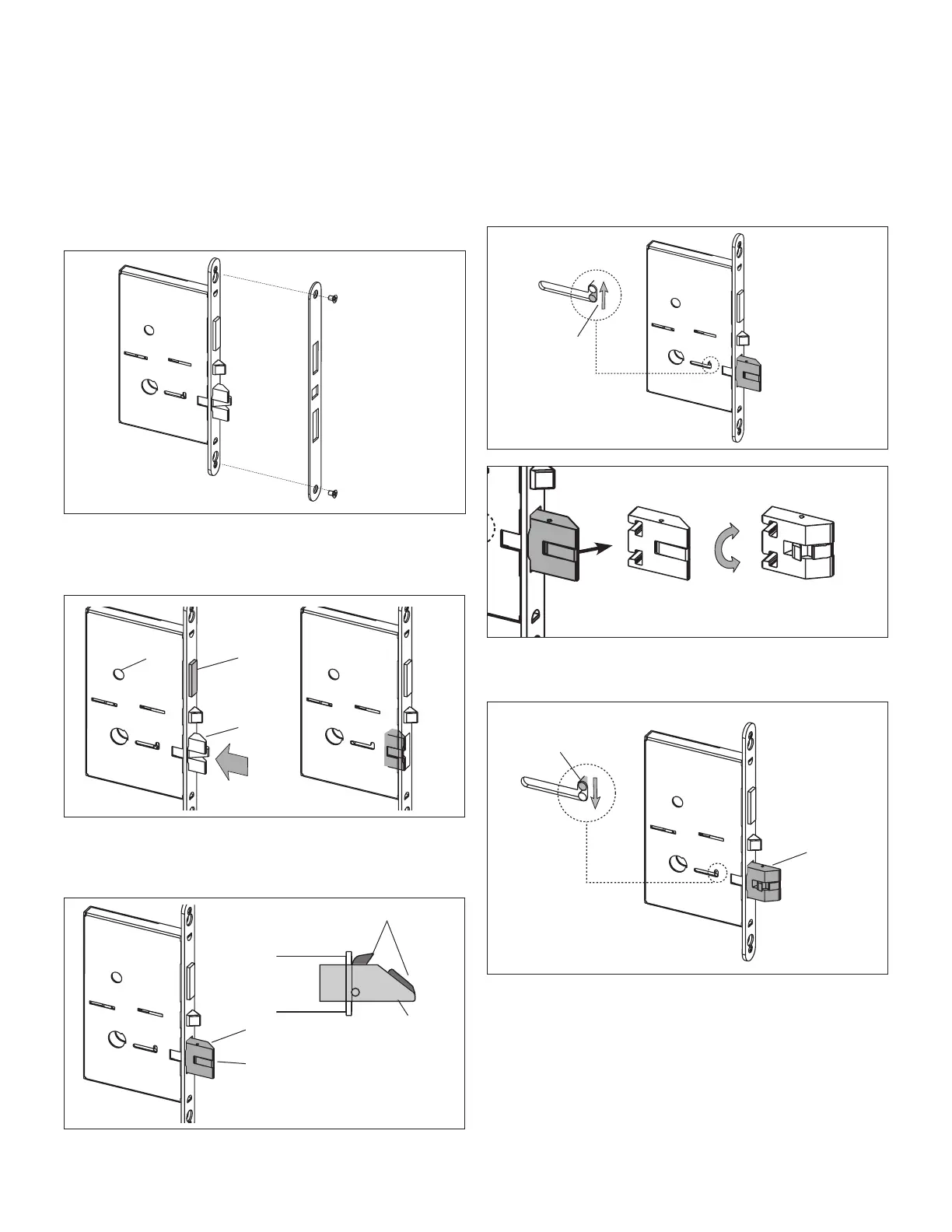
A.1.2 Reversing the Mortise Handing ESM
1. Remove the mortise faceplate, and place the mortise on a
flat surface for the following steps.
2. Retract deadbolt (D) as shown by turning the hub (H)
with a small screwdriver, then push in the latch bolt (L) to
the end of its stroke.
D
H
L
Release the latch bolt, and guide anti-friction latch (F)
against the flat side of the latch bolt so that it will slide out
of the mortise beyond its normal throw.
F
Mortise
Bottom view
L
F
L
3. Using a small screwdriver, slide up the locking pin (P). Pull
out the latch bolt (L) and rotate it 180°.
P
180°
4. Re-insert the rotated latch bolt (L) until it stops. Push
down pin (P) to lock the latch bolt in the mortise.
L
P
APPENDIX A Mortise Models



 To Next Page