EasyManua.ls Logo

Dormakaba DB25K - User Manual

Dormakaba DB25K
20 pages
Print Icon
To Next Page IconTo Next Page
Loading...
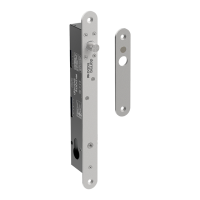
Solenoid Drop Bolt
with manual Key Override
DB25K
Operating Manual
EN
WN 60425 45532/16458 - 08/2022
Question and Answer IconNeed help?

Do you have a question about the Dormakaba DB25K and is the answer not in the manual?

Summary

Information about this document

1.1 Contents and purpose

Manual describes installation, connection, operation and maintenance of the lock DB25K.

1.2 Target group

Identifies installers and service technicians as the target audience for the manual.

1.3 Retain document

Instructs the operator to keep the document for future reference and accessibility.

Security

2.1 Intended use

Outlines the proper applications and suitability of the lock for various door types and environments.

2.2 Non-intended use

Lists applications and conditions where the lock is not suitable, such as escape routes or humid areas.

2.3 Responsibility of the operator

Details the operator's responsibilities for proper installation, maintenance, and use of the lock.

2.4 For qualified personnel only

Warns that assembly and connection must only be done by qualified persons due to potential danger.

Product description

3.1 View

Provides an illustrated view of the lock components with numbered parts for identification.

3.2 Accessories (to be ordered separately)

Lists optional accessories available for the lock, including part numbers.

3.3 Variants

Describes the two available lock variants: Fail-safe (currentless opening) and Fail-secure (closing without power).

3.4 Technical data

Presents detailed technical specifications including materials, mechanical properties, power supply, and electrical connections.

3.5 Dimensions

Displays detailed dimensional drawings of the lock and its associated accessories.

Operating modes and functions

4.1 Overview of functions

Introduces the lock's features and explains its operation modes, including permanent and short-term unlocking.

Function of the fail-safe variant (currentless opening)

Explains how the fail-safe variant operates, including relocking after door closure.

Function Variant Fail-secure (de-energized closing)

Details the operation of the fail-secure variant, including bolt operation after unlocking.

Mounting

5.1 Requirements for mounting

Details prerequisites for mounting, including product variant, installation type, and position.

Cable routing and conductor cross-section

Discusses cable routing considerations and provides a table for conductor cross-section selection based on cable length.

5.2 Example 1: Installing lock and strike plate in mortise openings

Provides a step-by-step guide with illustrations for installing the lock and strike plate in mortise openings.

5.3 Example 2: Install lock on frame and strike plate on glass door.

Offers a detailed guide with illustrations for mounting the lock on a frame and strike plate on a glass door.

Electrical connection

6.1 Select power supply

Advises on selecting an appropriate power supply based on the lock's maximum current consumption.

6.2 Connections

Details the terminal connections for the lock and explains the meaning and remarks for each terminal.

6.3 Three-wire connection (recommended)

Explains the recommended three-wire connection method for both fail-safe and fail-secure lock variants.

6.4 Two-wire connection

Describes the two-wire connection method, highlighting its limitations compared to the three-wire setup.

6.5 Connect signaling contacts for door position and bolt position.

Explains how to connect signaling contacts for monitoring door and bolt positions for different lock variants.

6.6 Configure lock

Details the use of DIP switches (S1, S2) for configuring the lock's relocking time.

Maintenance and Cleaning

Maintenance and cleaning

Details the recommended maintenance activities and checks for the lock to ensure proper functioning.

Disposal of the device

Summary

Information about this document

1.1 Contents and purpose

Manual describes installation, connection, operation and maintenance of the lock DB25K.

1.2 Target group

Identifies installers and service technicians as the target audience for the manual.

1.3 Retain document

Instructs the operator to keep the document for future reference and accessibility.

Security

2.1 Intended use

Outlines the proper applications and suitability of the lock for various door types and environments.

2.2 Non-intended use

Lists applications and conditions where the lock is not suitable, such as escape routes or humid areas.

2.3 Responsibility of the operator

Details the operator's responsibilities for proper installation, maintenance, and use of the lock.

2.4 For qualified personnel only

Warns that assembly and connection must only be done by qualified persons due to potential danger.

Product description

3.1 View

Provides an illustrated view of the lock components with numbered parts for identification.

3.2 Accessories (to be ordered separately)

Lists optional accessories available for the lock, including part numbers.

3.3 Variants

Describes the two available lock variants: Fail-safe (currentless opening) and Fail-secure (closing without power).

3.4 Technical data

Presents detailed technical specifications including materials, mechanical properties, power supply, and electrical connections.

3.5 Dimensions

Displays detailed dimensional drawings of the lock and its associated accessories.

Operating modes and functions

4.1 Overview of functions

Introduces the lock's features and explains its operation modes, including permanent and short-term unlocking.

Function of the fail-safe variant (currentless opening)

Explains how the fail-safe variant operates, including relocking after door closure.

Function Variant Fail-secure (de-energized closing)

Details the operation of the fail-secure variant, including bolt operation after unlocking.

Mounting

5.1 Requirements for mounting

Details prerequisites for mounting, including product variant, installation type, and position.

Cable routing and conductor cross-section

Discusses cable routing considerations and provides a table for conductor cross-section selection based on cable length.

5.2 Example 1: Installing lock and strike plate in mortise openings

Provides a step-by-step guide with illustrations for installing the lock and strike plate in mortise openings.

5.3 Example 2: Install lock on frame and strike plate on glass door.

Offers a detailed guide with illustrations for mounting the lock on a frame and strike plate on a glass door.

Electrical connection

6.1 Select power supply

Advises on selecting an appropriate power supply based on the lock's maximum current consumption.

6.2 Connections

Details the terminal connections for the lock and explains the meaning and remarks for each terminal.

6.3 Three-wire connection (recommended)

Explains the recommended three-wire connection method for both fail-safe and fail-secure lock variants.

6.4 Two-wire connection

Describes the two-wire connection method, highlighting its limitations compared to the three-wire setup.

6.5 Connect signaling contacts for door position and bolt position.

Explains how to connect signaling contacts for monitoring door and bolt positions for different lock variants.

6.6 Configure lock

Details the use of DIP switches (S1, S2) for configuring the lock's relocking time.

Maintenance and Cleaning

Maintenance and cleaning

Details the recommended maintenance activities and checks for the lock to ensure proper functioning.

Disposal of the device

Dormakaba DB25K Specifications

General IconGeneral
Access MethodPIN Code, RFID Card, Mechanical Key
MaterialZinc Alloy
Power Supply4 x AA Batteries
Emergency Power Supply9V Battery
FeaturesAuto-lock
Voltage6V
Operating Temperature-20°C to 60°C
Door Thickness35mm - 60mm

Related product manuals