7
WN 059666 45532 - 07/2023
ES 250 PRO/ES 250 PRO FST
ES 400 PRO/ES 400 PRO FST
Operating instructions
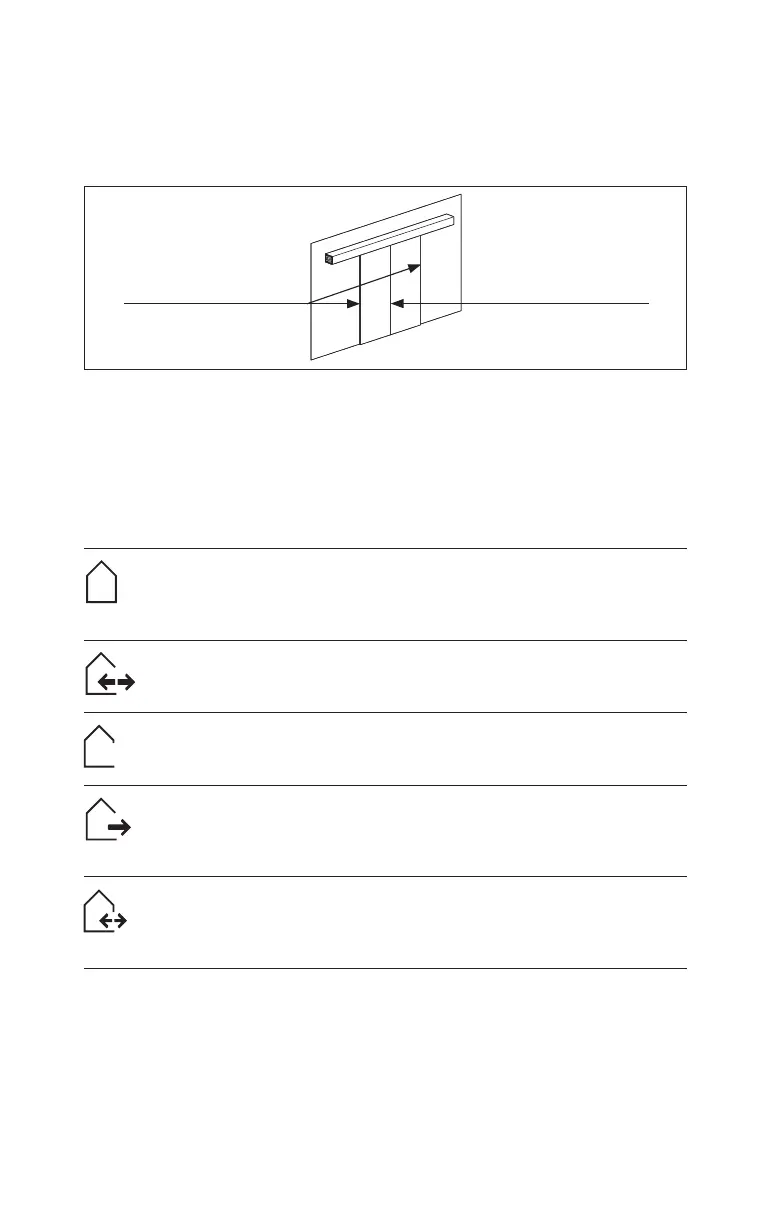
2.5 Danger points
Depending on the structural condition, door variant and protection option, residual
risks exist at the closing edges, e.g. due to slight crushing or force limited impacts.
Fig.1
Secondary closing edges
Main closing edge
3 Product description
3.1 Operating mode switch
The door unit is equipped with an operating mode switch. The following operating
modes can be set with the operating mode switch.
Off operating mode
The door cannot be opened automatically. Where units have a locking
device, the door is mechanically locked. The door can be opened in
conjunction with suitable activators via the night/bank function.
Automatic operating mode
The door opens automatically after an activator has been activated. The
door closes after the set hold-open time expires.
Permanently open operating mode
The door opens automatically and remains open while this function is
active.
Exit operating mode
The door opens automatically after an activator has been activated on the
inside. The activators on the outside are not active. The door closes after
the set hold-open time expires.
Partial open operating mode
The door opens automatically to the set partial opening width after an
activator has been activated. The door closes after the set hold-open time
expires.
3.2 Outside and inside detectors
The outside and inside detectors respond to movement. If a person or object enters
the detection area of the detectors, the door opens. When the hold-open time
expires, the door closes.













 To Next Page