06-2023 dormakaba Canada Inc. RAC5 MFC Installation Guide – PK3738 | 25
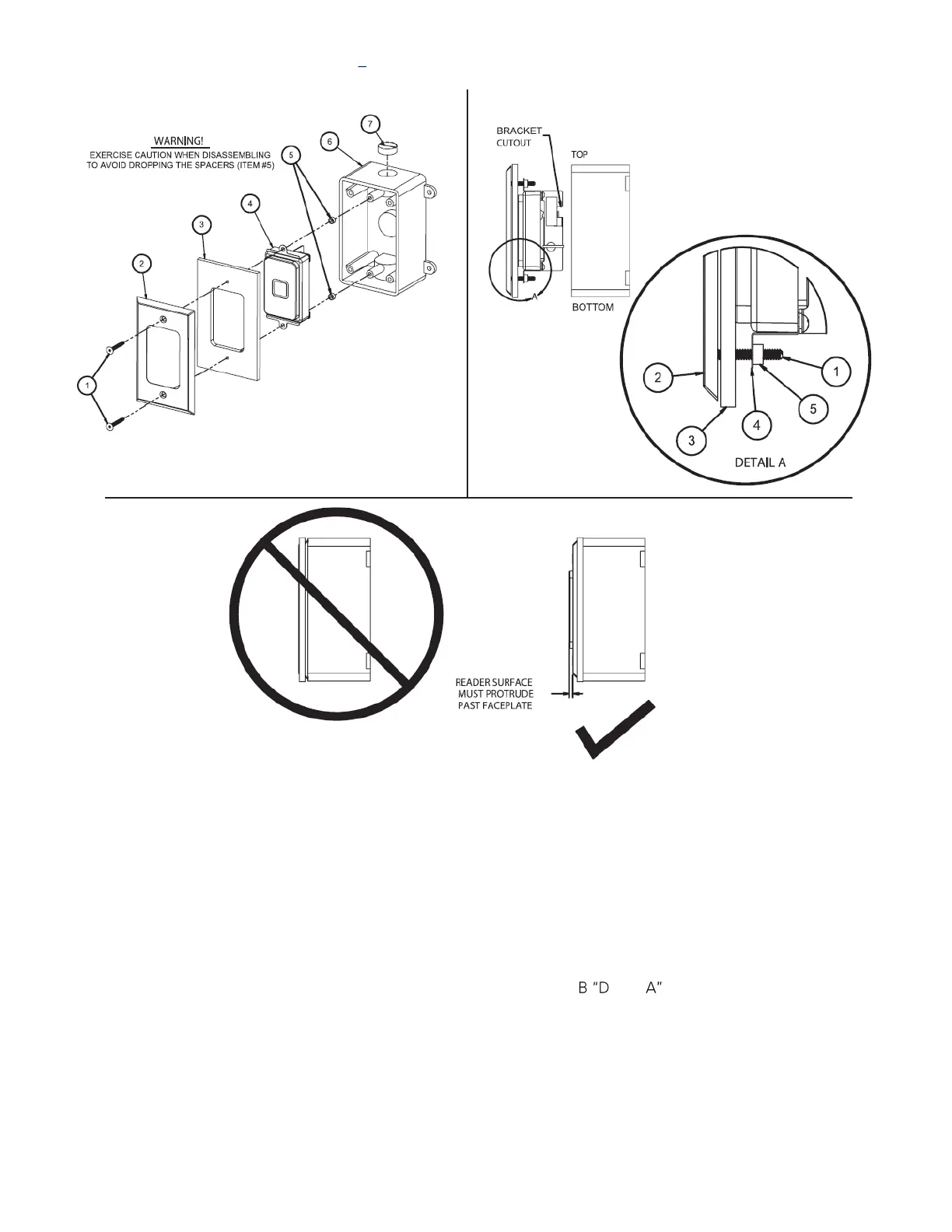
Figure 15 RFID Wall Reader Gang Box Installation
RFID Wall Reader Gang Box Instructions
1. Remove screws (item #1) to gain access to reader assembly (item #4)
2. Carefully remove reader assembly (item #4) (see warning above) remove protective film from reader
face
3. Install the gang box with proper screws, not provided
4. Connect cables for RAC5 as per Annex E and F
5. Reader assembly orientation to be as shown in Figure 15 B with bracket cutout at the top when installing
BLE.
6. Re-assemble items #1 through #5 in order as shown in Figure 15 etail , then assemble to gang box
(item #6) and tighten screws making sure the reader face protrudes past the faceplate as shown in
Figure 15 C


 To Next Page