06-2023 dormakaba Canada Inc. RAC5 MFC Installation Guide – PK3738 | 27
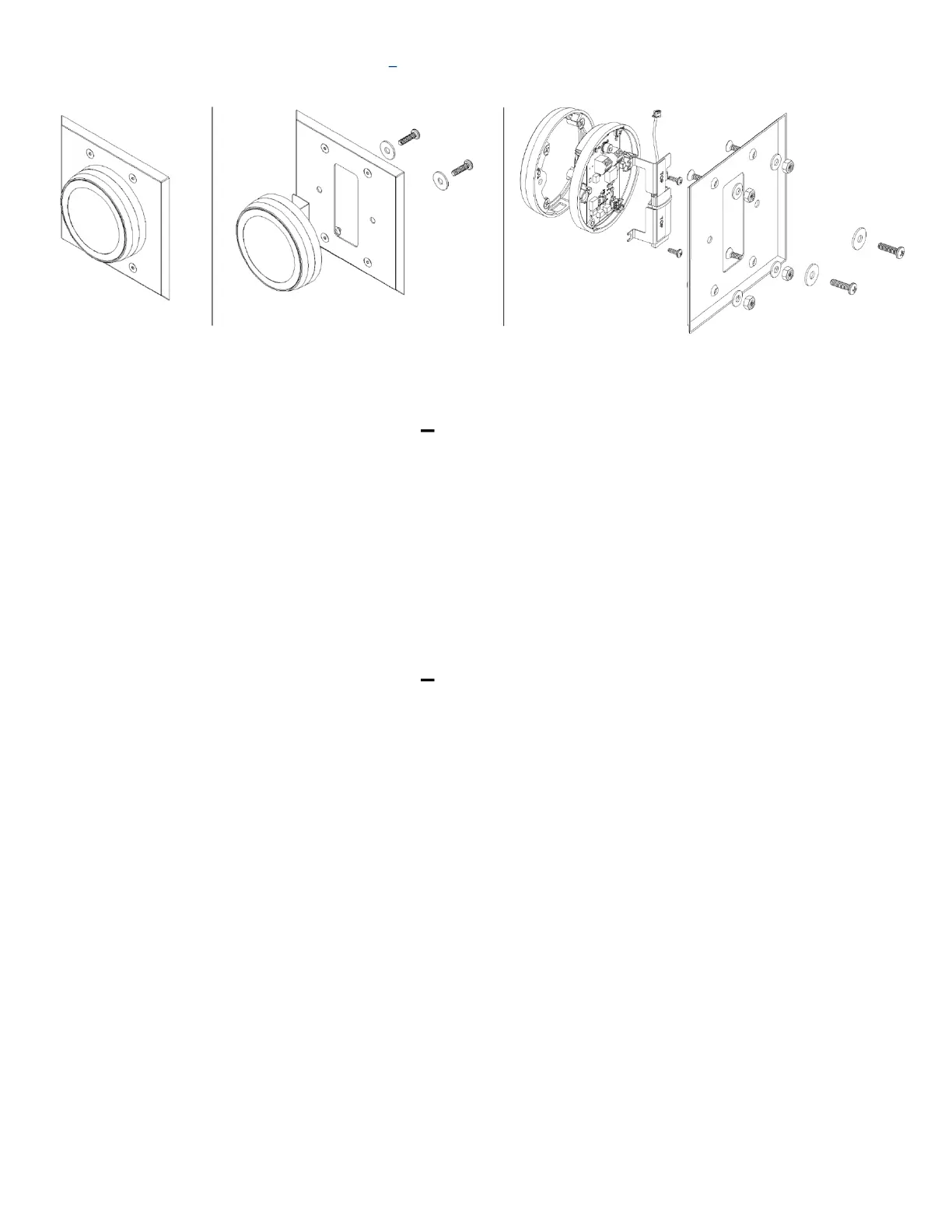
Figure 17 RFID Wall Reader Round Mount
RFID Wall Reader Instructions Round Mount (no Double Gang
Plate)
1. Remove 2 8-32 Pan Head screws and washers from assembly.
NOTE: At this point, reader electronics and reader housing can be separated.
2. Remove double gang plate and discard.
3. If applicable, remove BLE bracket to access wiring terminals by loosening 2 mounting screws.
4. Connect cables for RAC5 as per Annex E and F
5. If applicable, re-install BLE bracket.
6. Align reader assembly with elevator panel.
7. Assemble to panel using previously removed 8-32 pan head screws and washers.
RFID Wall Reader Instructions Round Mount (with Double Gang
Plate)
1. Remove washers from #8 screws on reader assembly. These will not be used in this configuration.
2. If applicable, remove BLE bracket to access wiring terminals by loosening 2 mounting screws.
3. Connect cables for RAC5 as per Annex E and F.
4. If applicable, re-install BLE bracket.
5. Align reader assembly with panel.
6. Assemble to panel using provided 6-32 hex screws, lock nuts, and washers. Ensure there is no washer
under 2 8-32 reader assembly screws when using double gang plate


 To Next Page