Installation -7
Version 1.36
02/2004
Install coffee pack
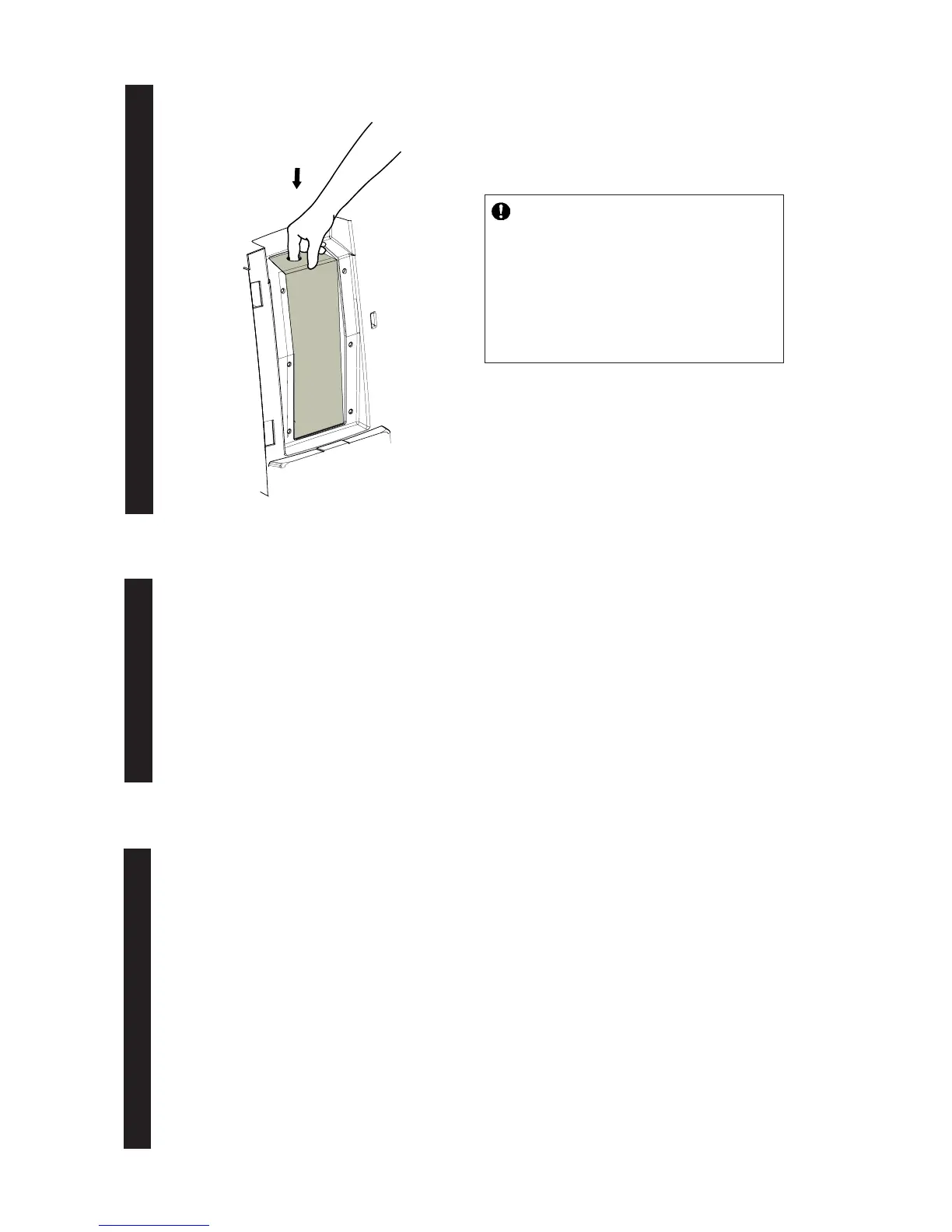
7. Install the 1,25 l/42.3 fl oz coffee pack. (chilled)
• Check the expiration date.
• Shake the coffee pack at least 10 times.
• Verify that the coffee is completely thawed /
properly chilled.
• Open pack and unfold dosing tube.
• Place the coffee pack in the cooling
compartment and close the door.
Rinse water system
8. Dispense a sufficient amount of coffee and hot water to rinse the water system.
It is recommended to pour no less than 8 cups of hot water and 8 cups or 1 pot of coffee.
This step eliminates the possibility of ‘off-taste’ and ensures the best water quality.
Program the machine
9. Calibrate the machine, set cup volumes and coffee strength. Programming can be done by
means of buttons or the service device. (See also chapter 4 for additional information)
1. Entering the programming mode
• Push the stop and power button simulteanously for 3 seconds.
The LED’s on the operation panel will flash 3 times to indicate that the programming mode has been entered.
During the programming mode the power on LED will blink continuously.
In case the machine has been over a long period (6 months or more) :
(a) for coffee it is recommended to dispense 2 times a double pot from the
machine after installation.
(b) for tea it is advisable to dispense once more 2 pots of hot water the next
morning.




 To Next Page