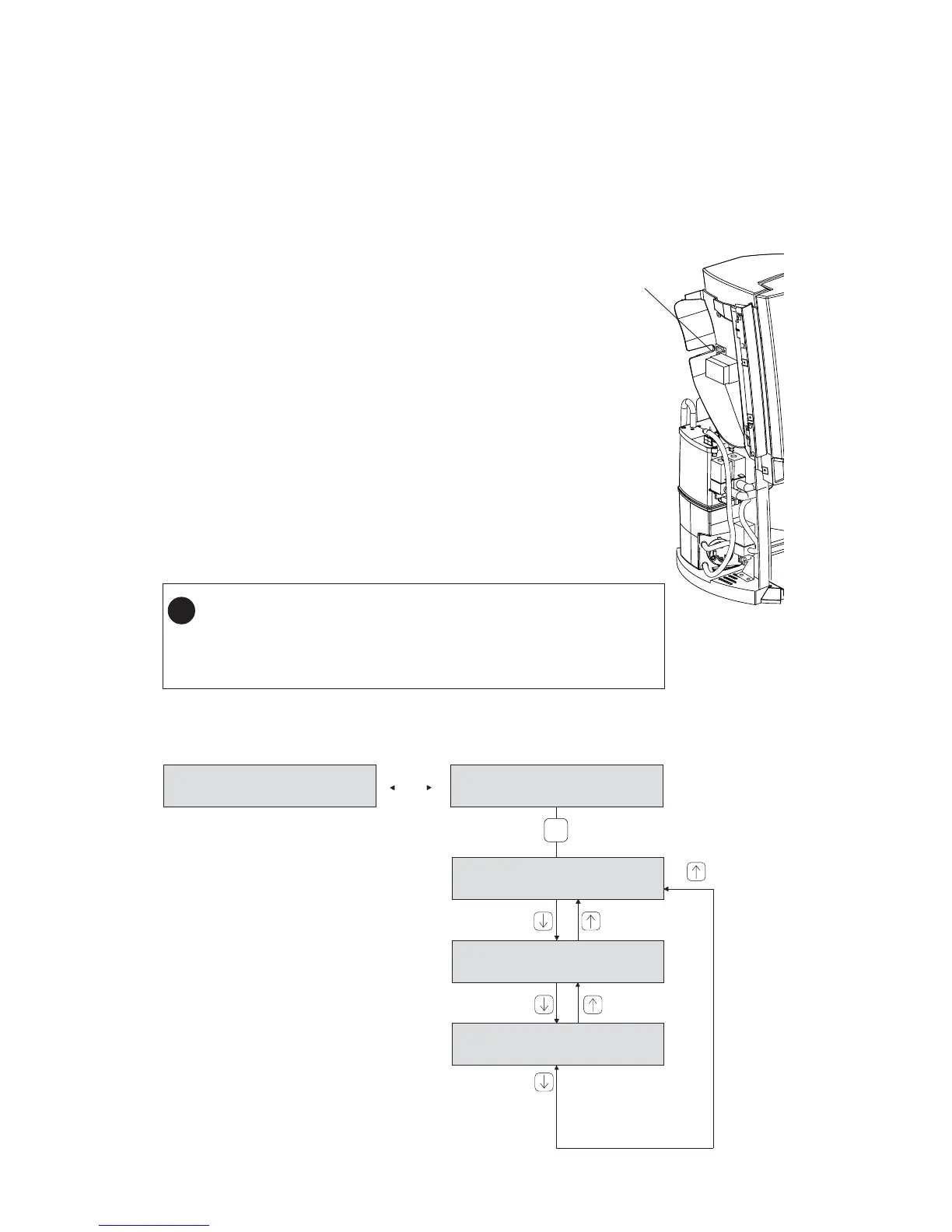
A. Programming mode structure
4. Programming mode
A variety of settings can be changed or viewed by means of (1) the standard DECS service device or by
means of (2) the operation panel buttons.
4.1 Programming by means of the service device.
Procedure
1. Switch the dispenser to stand-by.
2. Remove the left machine cover.
3. Plug the service device into the 9 pins D-connector.
(standard service device connector)
4. Switch the service device on.
5. Switch the machine on.
The programming mode is now enabled. Scroll through
the main programming menu with the up/down keys and
press [input] to enter a sub-menu to change any settings.
(remark: the time-out is 5 minutes)
6. Switch the dispenser to stand-byafter programming.
7. Disconnect the service device (switch it off) and
reinstall the machine cover.
8. Switch the machine on.
CONTENTA V. 2.XY
DD-MM-YEAR
INSTALLATION
READ COUNTERS
TESTING
BAD DOSING
It is possible that the last detected
error is displayed directly after the
service device is connected.
(See also chapter 3 page 1)
Any
key
or
9 pins D-connector
Should the machine become locked up during programming :
unplug the service device for about 30 seconds and retry.
However, if a microprocessor is exchanged (for upgrading, etc.) all
LED’s will light on when the machine is switched back on. During this
period the new microprocessor is initialised
!




 To Next Page