Functions (Cooling) - 1
Version 1.36
02/2004
5F. Cooling system
1. Disassembly
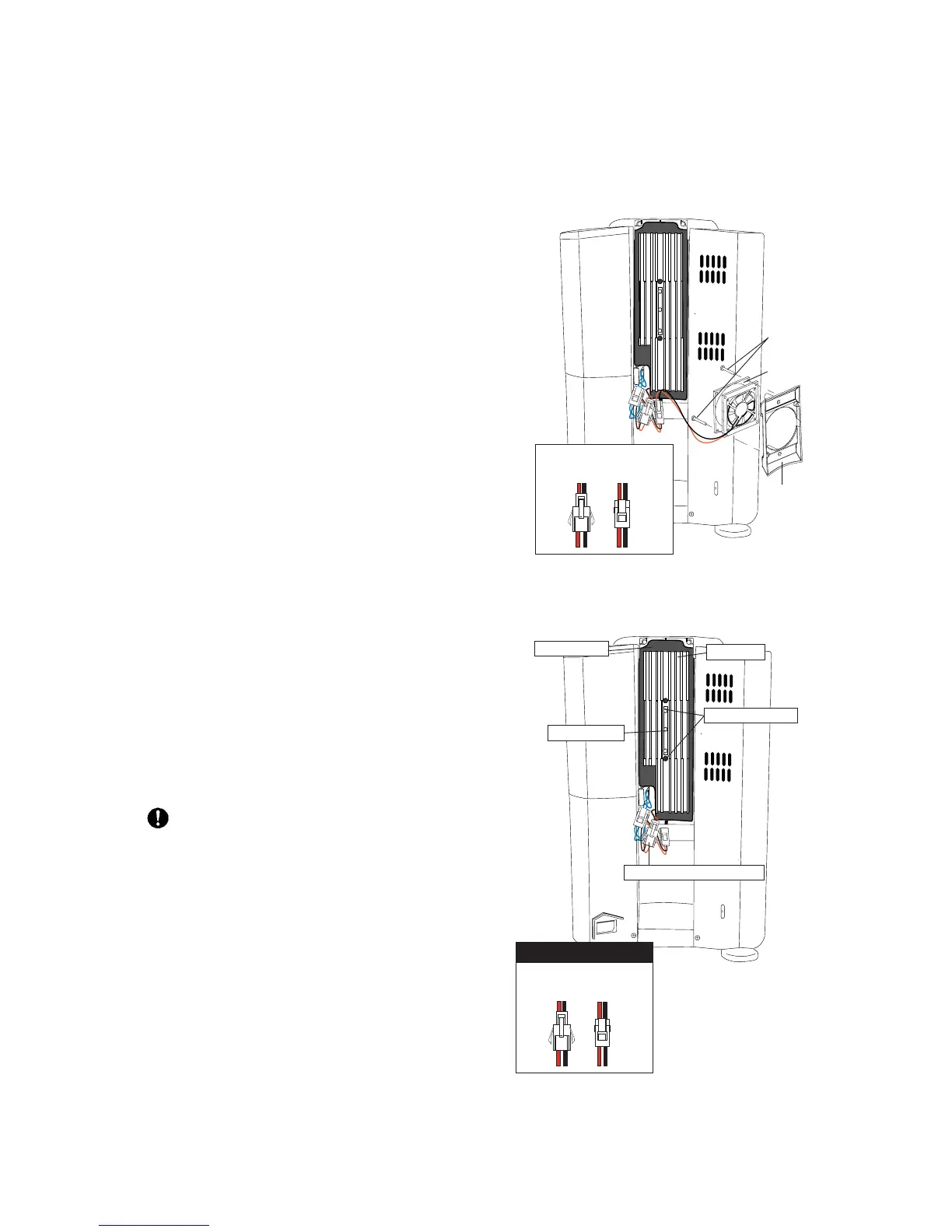
A. Fan replacement
B. Peltier element replacement
1. Unplug the power cord.
2. Remove the rear cover (2 screws).
3. Remove the fan (2 screws). See above.
4. Remove the heat sink and the Peltier element
retainer. (2 retaining screws)
Do not disturb the torque screw without
the proper tools! (Re)installation requires
utmost accuracy.
The Peltier element itself is situated behind the
plastic inner cover in which the heat sink is
installed.
5. Disconnect the wiring of the Peltier element.
(red/black - see the illustration)
1. Unplug the power cord.
2. Remove the rear cover (two screws).
3. The fan is mounted on the heat sink.
Remove the 2 screws of the fan bracket.
4. Take the fan out, remove the fan from its bracket
(2 screws) and disconnect the wiring of the fan.
(red/black wiring - see the illustration for
recognition of the connector)
5. Reassemble the machine in reverse order.
Peltier element
connector
Fan
connector
Bracket
Retaining
screws
Fan
Fan
connector
Peltier element
connector
Connector types
Retaining screw
Torque screw
Peltier element connector
Heat sink
Plastic cover





 To Next Page