Functions (Machine control) - 4
Version 1.36
02/2004
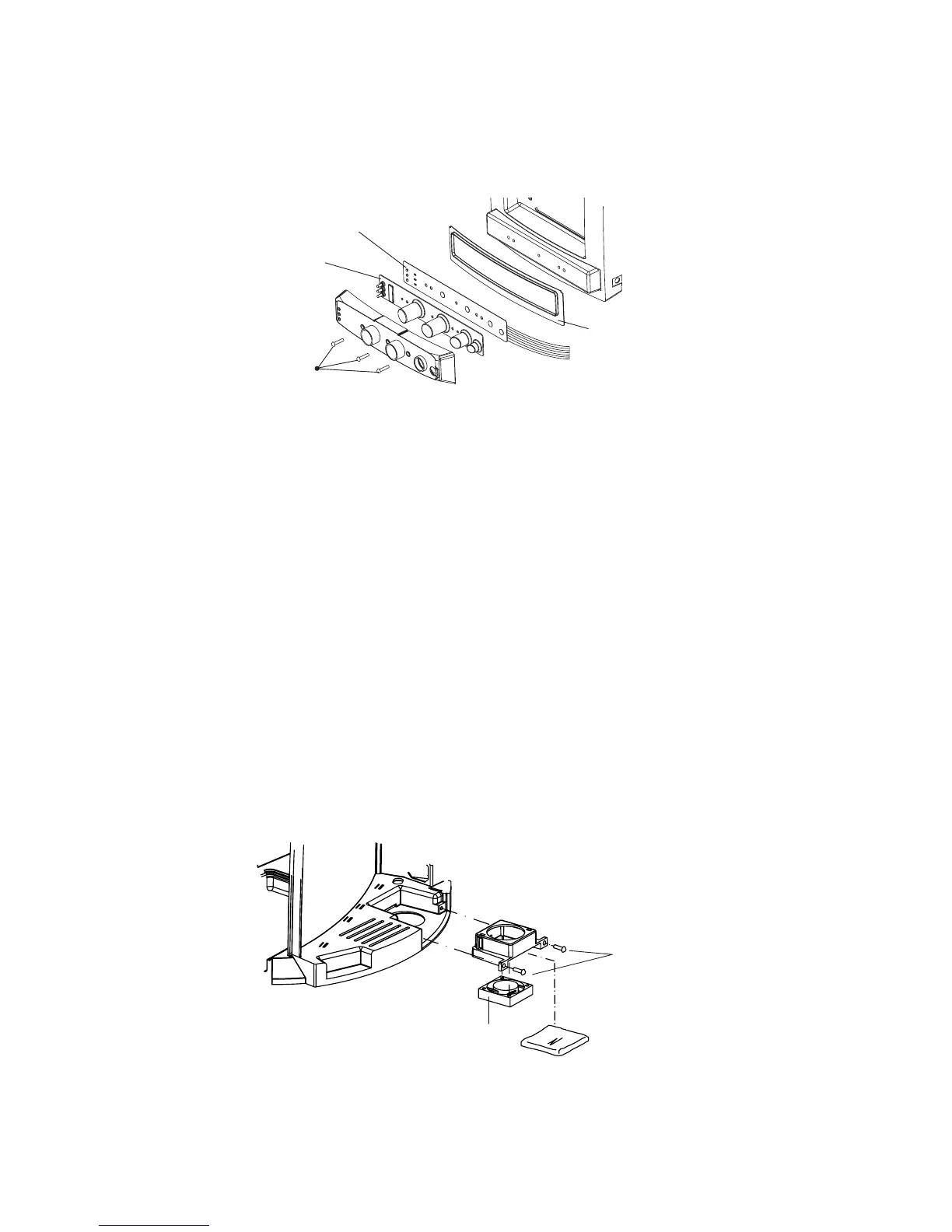
Operation unit
PCB
Button sheet
Seal
10. Remove the screws of the operation unit (3 screws) to separate the unit from the cooling
compartment. The button assembly and operation board can now be removed.
11. Reassemble the parts in reverse order.
D. Electronics fan replacement
In case a fixed water connection is installed start from step 1.
If no fixed water connection is installed, unplug the power cord and proceed with step 6.
1. Close the faucet and remove the external water supply hose. (water inside!)
Pour a cup of hot water.
2. Unplug the power cord.
3. Remove the tank lid.
4. Disconnect the silicon water hose as well as the wiring from the inlet valve.
5. Remove the retaining screw of the tank and lift the tank from the machine. Guide wiring and
hose upright trough the opening in the tank.
6. Remove the water tank and the right cover (1screw).
7. Remove the dust filter.
8. Loosen the retaining screws (2) of the fan.
10. Take the fan and disconnect the wiring from the Operating unit PCB. (CN3)
11. Reassemble the parts in reverse order.
Operation unit
retaining screws (3)
Dust filter
Cooling fan
Retaining screws





 To Next Page