EasyManua.ls Logo

Dräger 8000 NC - Page 15

Dräger 8000 NC
54 pages
Print Icon
To Next Page IconTo Next Page
To Previous Page IconTo Previous Page
Loading...
Checking
Readiness
for
Operation
Before
each
use
Checking
that
hand
ports
will
stay
closed
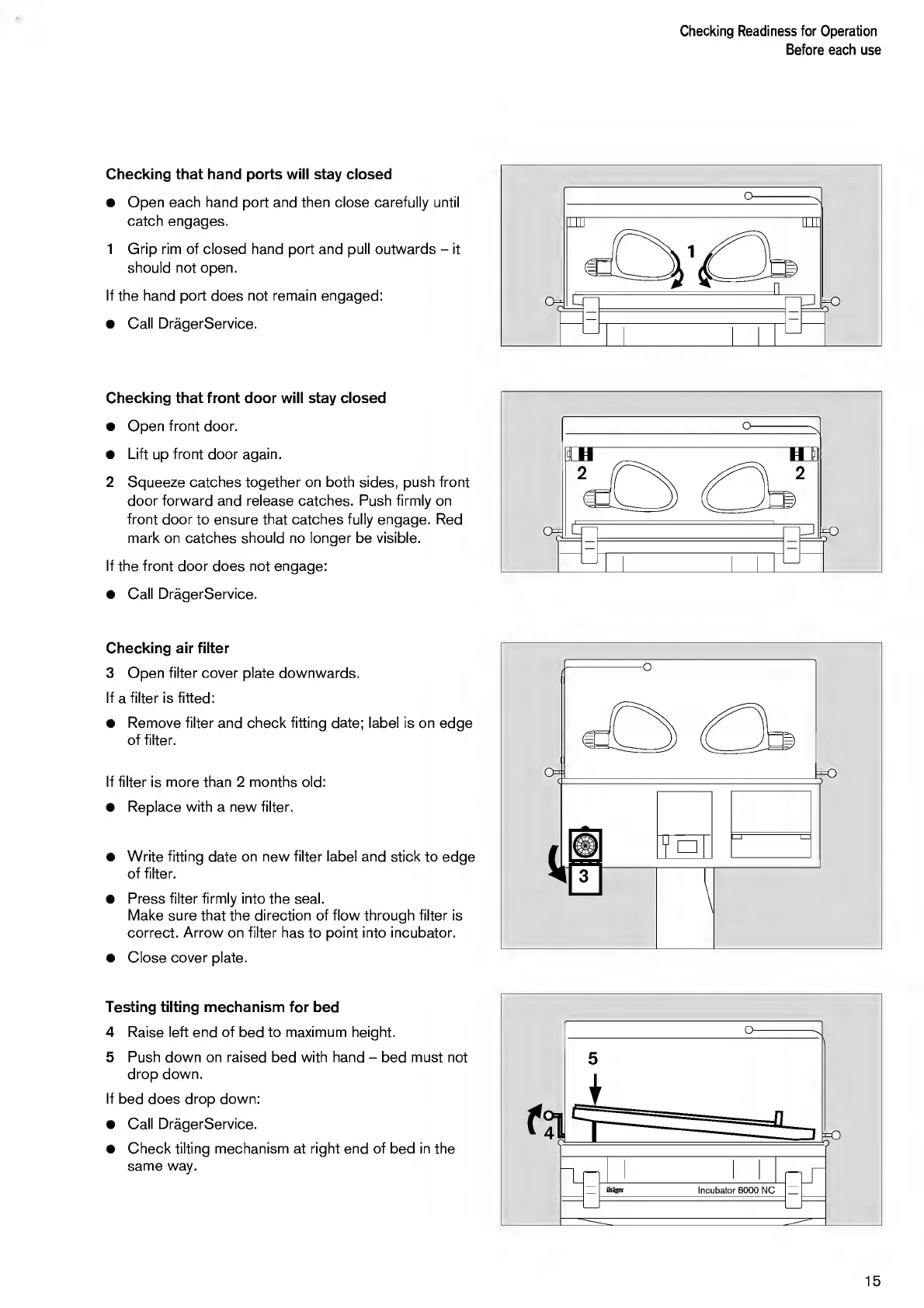
Open
each
hand
port
and
then
close
carefully
until
catch
engages.
1
G
r
ip
rim
of
closed
hand
port
and
pull
outwards
-
it
should
not
open.
If
the
hand
port
does
not
remain
engaged:
Call
DragerService.
Checking
that
front
door
will
stay
closed
Open
front
door.
Lift
up
front
door
again.
2
S
queeze
catches
together
on
both
sides,
push
front
door
forward
and
release
catches.
Push
firmly
on
front
door
to
ensure
that
catches
fully
engage.
Red
mark
on
catches
should
no
longer
be
visible.
If
the
front
door
does
not
engage:
Call
DragerService.
Checking
air
filter
3
O
pen
filter
cover
plate
downwards.
If
a
filter
is
fitted:
Remove
filter
and
check
fitting
date;
label
is
on
edge
of
filter.
If
filter
is
more
than
2
months
old:
Replace
with
a
new
filter.
Write
fitting
date
on
new
filter
label
and
stick
to
edqe
of
filter.
Press
filter
firmly
into
the
seal.
Make
sure
that
the
direction
of
flow
through
filter
is
correct.
Arrow
on
filter
has
to
point
into
incubator.
Close
cover
plate.
Testing
tilting
mechanism
for
bed
4
Raise
left
end
of
bed
to
maximum
height.
5
Push
down
on
raised
bed
with
hand
-
bed
must
not
drop
down.
If
bed
does
drop
down:
Call
DragerService.
Check
tilting
mechanism
at
right
end
of
bed
in
the
same
way.
15

Other manuals for Dräger 8000 NC

Related product manuals