EasyManua.ls Logo

Dräger 8000 NC - Page 16

Dräger 8000 NC
54 pages
Print Icon
To Next Page IconTo Next Page
To Previous Page IconTo Previous Page
Loading...
Checking
Readiness
for
Operation
Before
each
use
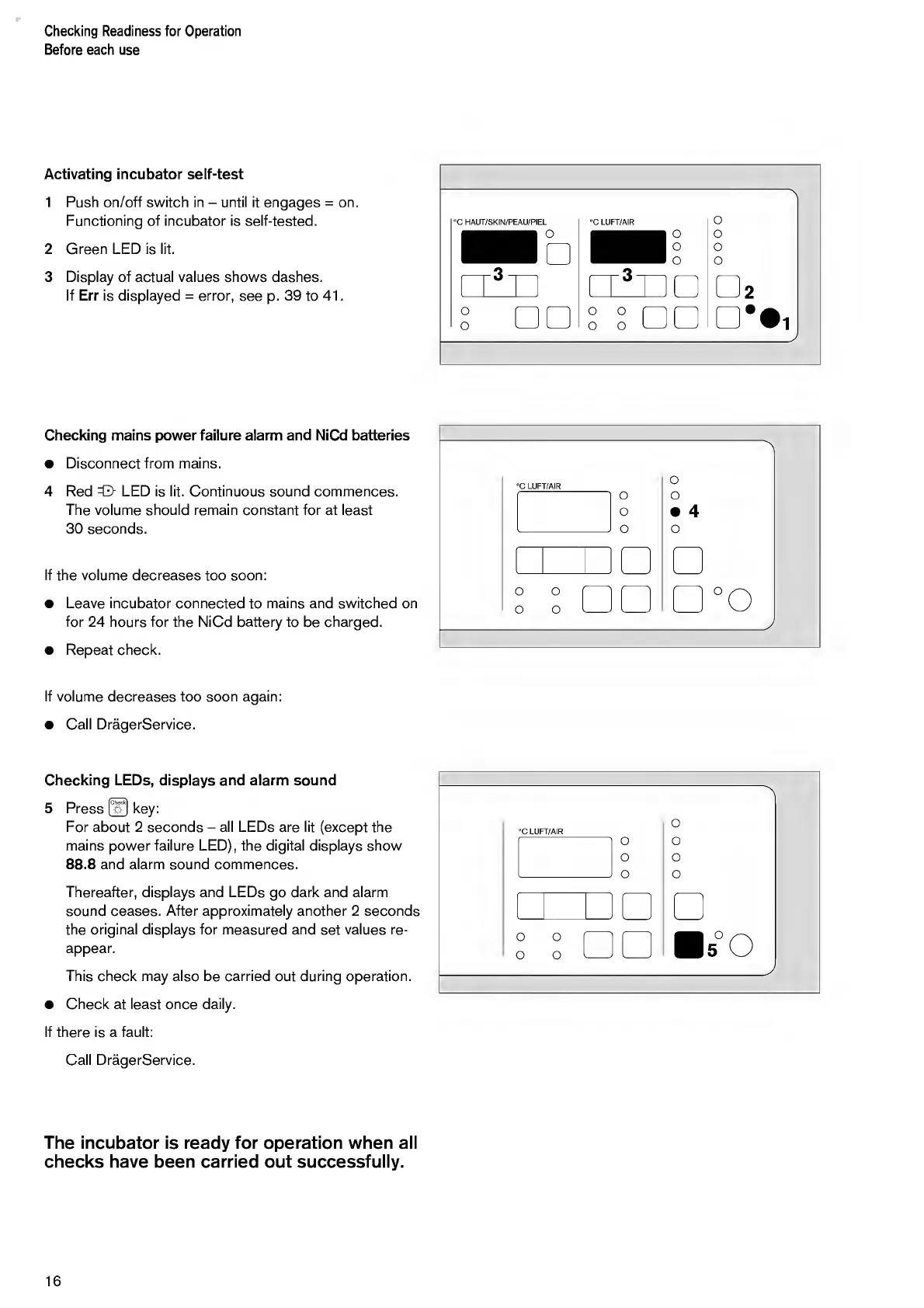
Activating
incubator
self-test
1
Push
on/off
switch
in
-
until
it
engages
=
on.
Functioning
of
incubator
is
self-tested.
2
Green
LED
is
lit.
3
Display
of
actual
values
shows
dashes.
If
Err
is
displayed
=
error,
see
p.
39
to
41.
"A
°C
LUFT/AIR
S
o
□□
o
o
o
o
2
1
Checking
mains
power
failure
alarm
and
NiCd
batteries
Disconnect
from
mains.
4
Red
=0-
LED
is
lit.
Continuous
sound
commences.
The
volume
should
remain
constant
for
at
least
30
seconds.
If
the
volume
decreases
too
soon:
Leave
incubator
connected
to
mains
and
switched
on
for
24
hours
for
the
NiCd
battery
to
be
charged.
Repeat
check.
°C
LUFT/AIR
0
0
0
A
O
O
4
0
\
-
OO''
0
0
--
O
i
PO
If
volume
decreases
too
soon
again:
Call
DragerService.
Checking
LEDs,
displays
and
alarm
sound
5
Press
@
key:
For
about
2
seconds
-
all
LEDs
are
lit
(except
the
mains
power
failure
LED),
the
digital
displays
show
88.8
and
alarm
sound
commences.
Thereafter,
displays
and
LEDs
go
dark
and
alarm
sound
ceases.
After
approximately
another
2
seconds
the
original
displays
for
measured
and
set
values
re¬
appear.
This
check
may
also
be
carried
out
during
operation.
Check
at
least
once
daily.
If
there
is
a
fault:
°C
LUFT/AIR
0
0
0
>
0
0
0
0
0
0
0
0
_-
s
°0
_
J
Call
DragerService.
The
incubator
is
ready
for
operation
when
all
checks
have
been
carried
out
successfully.
16

Other manuals for Dräger 8000 NC

Related product manuals