EasyManua.ls Logo

Dräger 8000 NC - Page 25

Dräger 8000 NC
54 pages
Print Icon
To Next Page IconTo Next Page
To Previous Page IconTo Previous Page
Loading...
Operation
Using
skin
temperature
control
When
the
temperature
falls
outside
the
30
°C
to
42
°C
measuring
range:
-
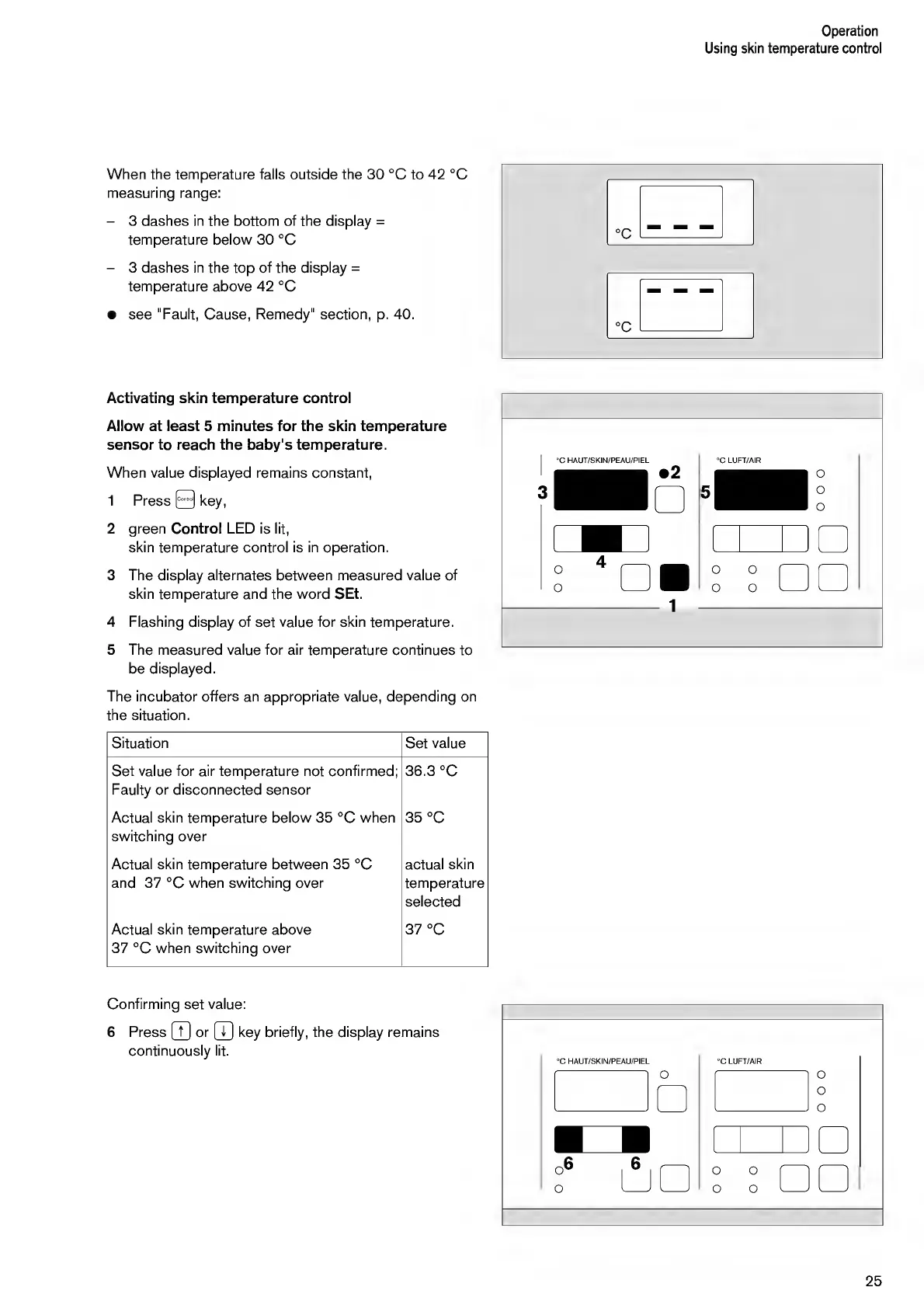
3
dashes
in
the
bottom
of
the
display
=
temperature
below
30
°C
-
3
dashes
in
the
top
of
the
display
=
temperature
above
42
°C
see
"Fault,
Cause,
Remedy"
section,
p.
40.
Activating
skin
temperature
control
Allow
at
least
5
minutes
for
the
skin
temperature
sensor
to
reach
the
baby's
temperature.
When
value
displayed
remains
constant,
1
Press
0
key,
2
green
Control
LED
is
lit,
skin
temperature
control
is
in
operation.
3
The
display
alternates
between
measured
value
of
skin
temperature
and
the
word
SEt.
4
Flashing
display
of
set
value
for
skin
temperature.
5
The
measured
value
for
air
temperature
continues
to
be
displayed.
1
The
incubator
offers
an
appropriate
value,
depending
on
the
situation.
Situation
Set
value
Set
value
for
air
temperature
not
confirmed;
Faulty
or
disconnected
sensor
co
a>
co
o
O
Actual
skin
temperature
below
35
°C
when
switching
over
35
°C
Actual
skin
temperature
between
35
°C
actual
skin
and
37
°C
when
switching
over
temperature
selected
Actual
skin
temperature
above
37
°C
when
switching
over
CO
^1
o
O
Confirming
set
value:
6
P
ress
(T]
or
[T]
key
briefly,
the
display
remains
continuously
lit.
25

Other manuals for Dräger 8000 NC

Related product manuals