Instruction Manual Dräger MSI EM200-E
5695022 13 of 29 Edition 2012-05-14
8. Data Processing
8.1 Store Data
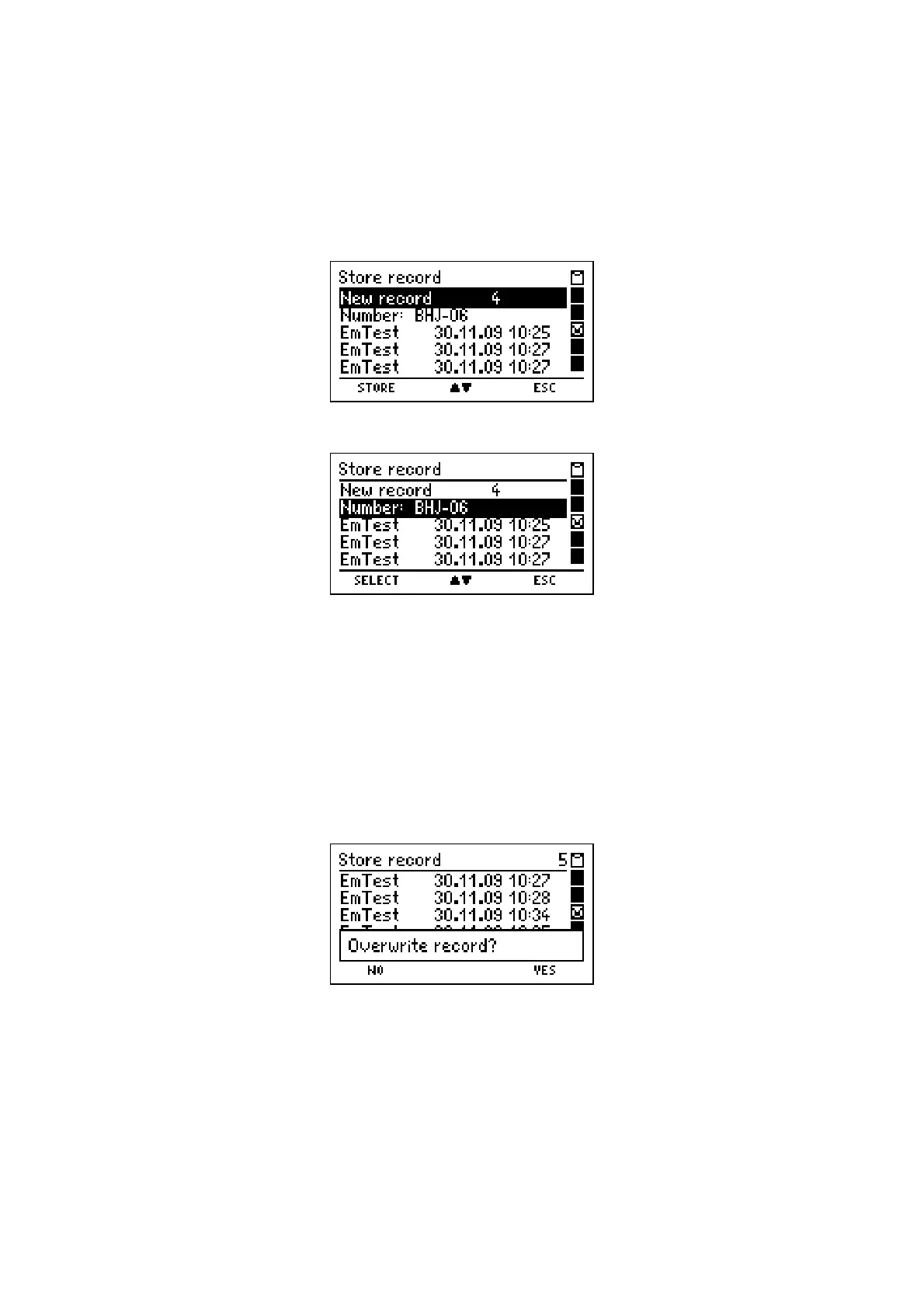
If "Store" has been selected, the display reads e.g.:
With pushing "▼" (
▲▼
)
you may mark "Number" (engine number), the display now reads:
With "F" (
SELECT
) you may call "Selection and Input of Engine Number" (see 10.). This
function makes it possible, to alter the displayed engine number, to select another existing
number or to create a new engine number. After this the former display screen is called.
With pushing "
▲
" or "
▼
" (
▲▼
)
you may mark the wanted data record (a new or an exist-
ing one). The records may be displayed with Date or engine number (see 8.6).
With "F" (
STORE
) you may store all values, together with date and time.
If an existing data record is selected, the display reads e.g.:
With pushing "H" (
YES
) the selected data record is overwritten.
With "F" (
NO
) you skip back to the former display screen.
After storing is complete or after pushing "H" (
ESC
) the MSI EM200-E returns to that dis-
play screen, from where this function has been called.



 To Next Page