Instruction Manual Dräger MSI EM200-E
Edition 2012-05-14 18 of 29 5695022
9. Info Function
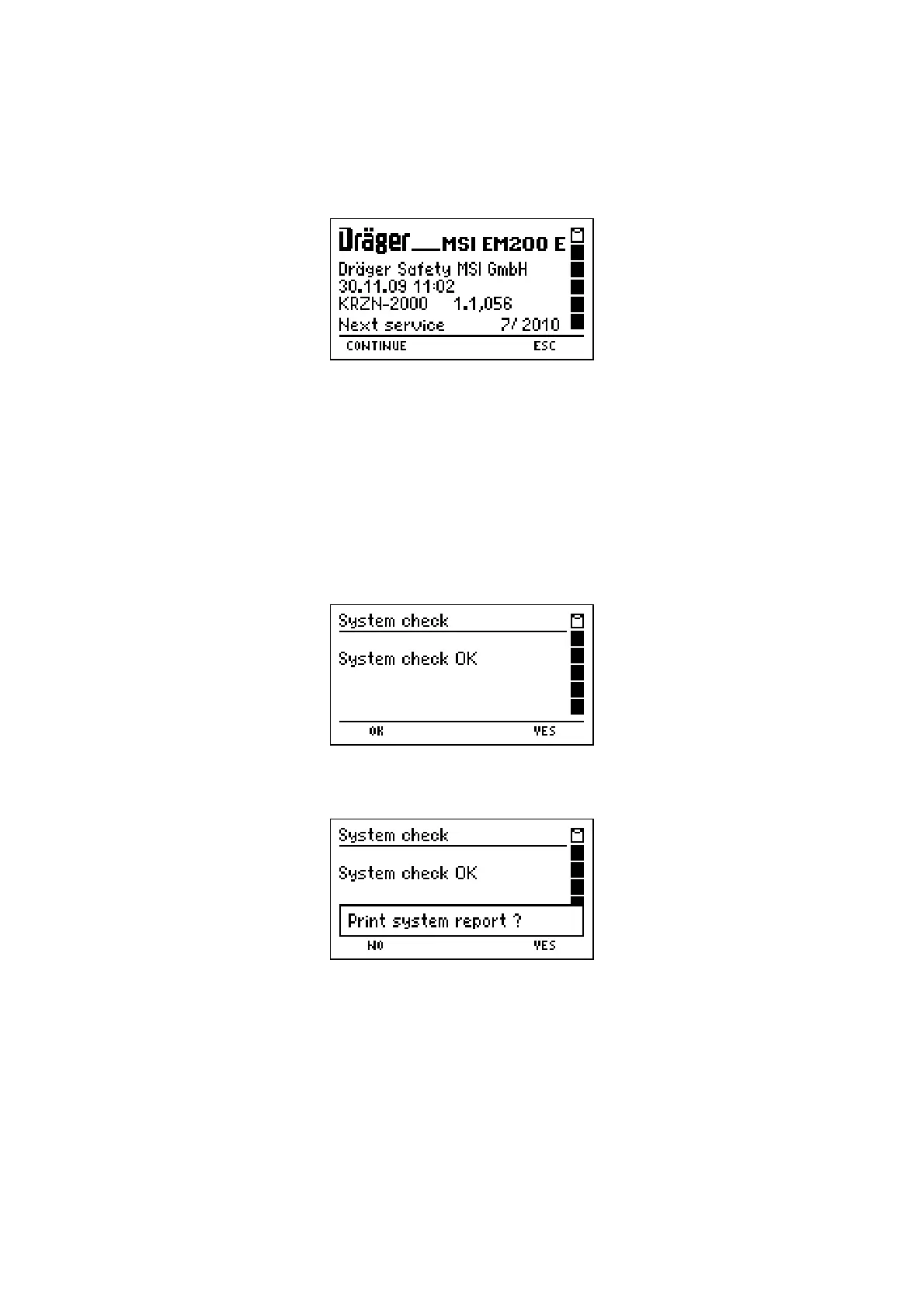
After selecting "Info" the display reads:
You are informed about the analyser (MSI EM200-E), the manufacturer (Dräger MSI
GmbH), the date and time when Info Function was called, the version of the firmware
(1.1,056), the date of next service (7/2010) and the serial number of the analyser (KRZN-
2000).
With "H" (
ESC
) you may cancel "Info Function" and call "Selection of Functions" (see 4.).
After pushing "F" (
CONTINUE
) you will be informed about all existing warnings and error
messages (see 12.). The display reads e.g.:
After pushing "F" (
CONTINUE
) the display reads e.g.:
With pushing "F" (
NO
) the first display screen of "Info Function" is called again.
With pushing "H" (
YES
) the MSI EM200-E sends a complete system report to the IR-
Printer, which contains all active warning and error messages together with all actual set-
tings of the instrument.
By means of this report, skilled service technician are able to find out easily, if malfunc-
tions of the MSI EM200-E exist.



 To Next Page