NOTE: Auto mode increases the RF power as-needed in order to maintain
a stable RC link and reduces it when not needed to maintain efficiency. It
does so very quickly – far quicker than the user could adjust it manually –
and in much finer increments. For this reason, Auto is the recommended
mode.
Low: sets the transmit power level when the switch, RC channel, or rotary pot is in
the lower third of the channel range
Mid: sets the transmit power level when the switch, RC channel, or rotary pot is in
the middle third of the channel range
High: sets the transmit power level when the switch, RC channel, or rotary pot is in
the upper third of the channel range
Power switch: Defines the switch, RC channel, or rotary pot that will be used to alter
the transmit power.
At the time of writing, there is no option to remove the assignment of a switch or RC
channel to the power setting, however, if the low, mid, and high settings are all set
to Auto (or an identical fixed value), the settings on this page will have no effect. In
addition, the assignment of a switch or channel here will not prevent it from being
assigned to other functions elsewhere.
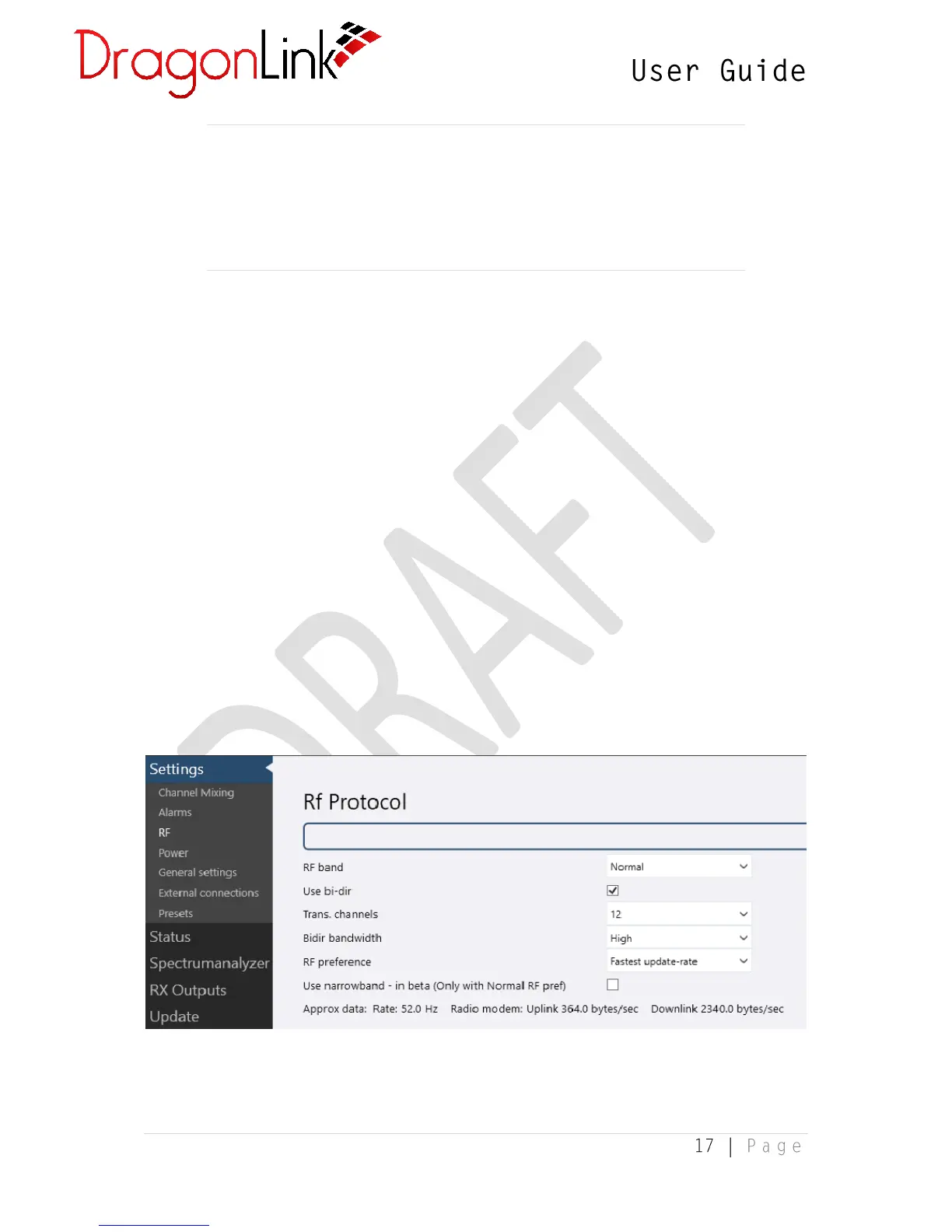
3.1.4 RF Settings
The RF settings page controls how the DragonLink transmitter talks to the receiver.
Changing these settings can affect the control range and telemetry range, as well as
the responsiveness of control over the model aircraft. For example, lowering the


 To Next Page