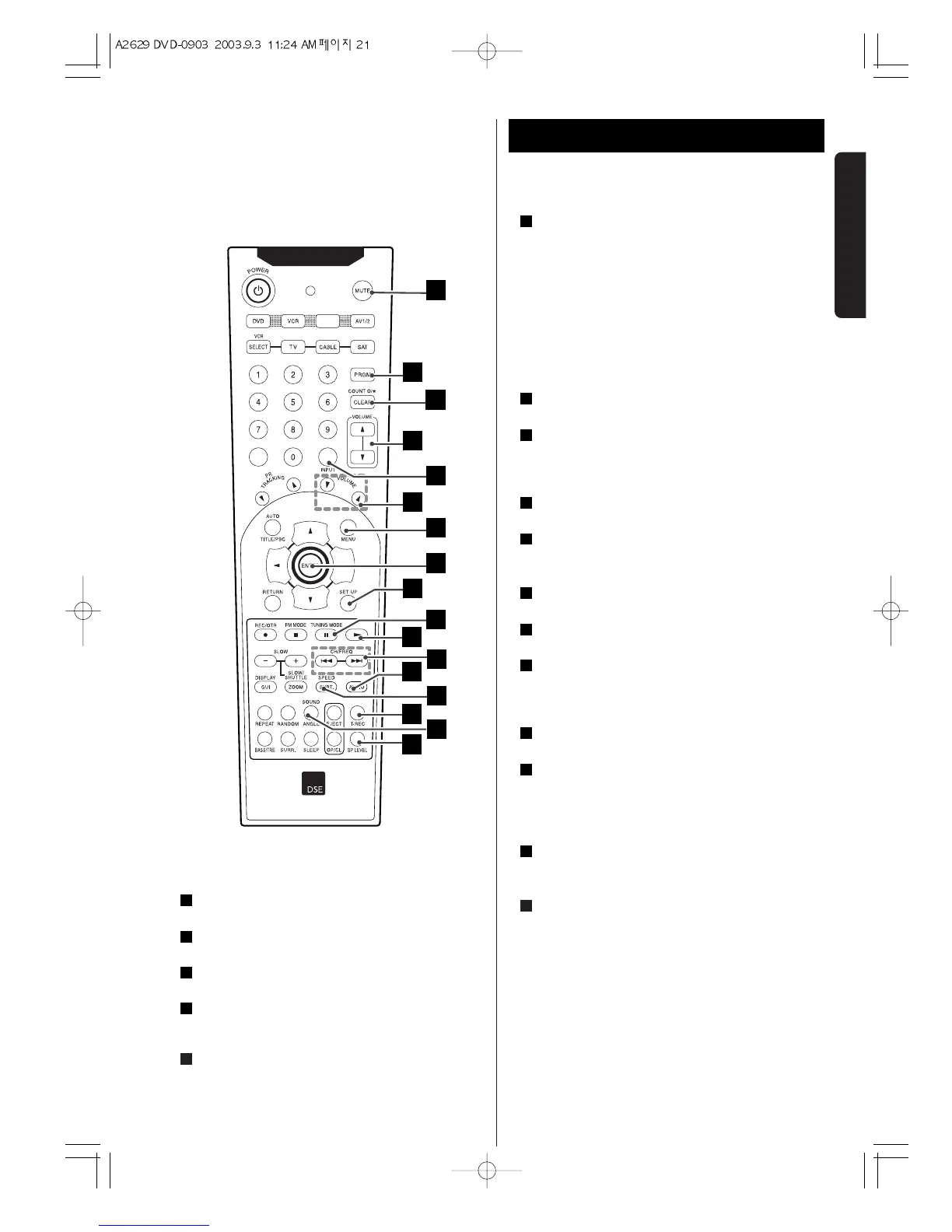
SP LEVEL .
Use this button to adjust the speaker level.
T-REC .
Sets the DVD/VCR ready to start recording at a preset time.
ANGLE / SOUND.
Selects a DVD camera angle if available.
AUDIO .
Selects different audio languages available in the DVD
disc.
SUBT./SPEED .
- Selects a subtitle language.
23
22
21
20
19
- Sets the tape speed for recording.
BACKWARD(
..
).
DVD : Search backward , go to beginning of current
chapter or track or go to previous chapter or track.
VCR : In the Stop mode, this button rapidly winds the
tape backwards. In the Play mode, this button activates
reverse search.
FORWARD(
//
).
DVD : Search forward , go to next chapter or track.
In the Stop mode, this button rapidly winds the tape
forward. In the Play mode, this button activates forward
search.
tt
(PLAY) .
Starts playback.
TUNING MODE(
JJ
).
- Switches from tuning to preset mode.
- Pause playback or recording temporarily / press
repeatedly for frame-by-frame playback.
SET UP ( DVD mode only).
Enter or exit the system setup menu.
ENTER .
- Acknowledges menu selection.
- Displays functions on the TV screen.
MENU .
Accesses the menu on a DVD disc.
TV VOLUME(
bb
/
55
) buttons.
Adjusts the volume level in TV mode.
TV/VCR , INPUT .
- Switches the picture signal source between the VCR
and cable/antenna system
- To select the VCR deck’s source
VOLUME(
55
/
bb
) buttons.
- To adjust the master volume.
CLEAR/COUNT 0/ * .
- Removes a track number on the program menu.
- Press to clear the linear time tape counter to 0:00:00.
Press when setting Timer Recording programs to clear
the selected program.
PRGM.
- In DVD/CD mode, to program disc tracks.
- In Tuner mode, to program preset radio stations.
MUTE .
Pressing this button immediately decreases the sound
level(The MUTE display in display panel)
To restore the sound, press this button again.
Note:
The red keys on the Remote control are used only in
the VCR mode.
To activate these keys, press the VCR key.
35
34
33
32
31
30
29
28
27
26
25
24


 To Next Page