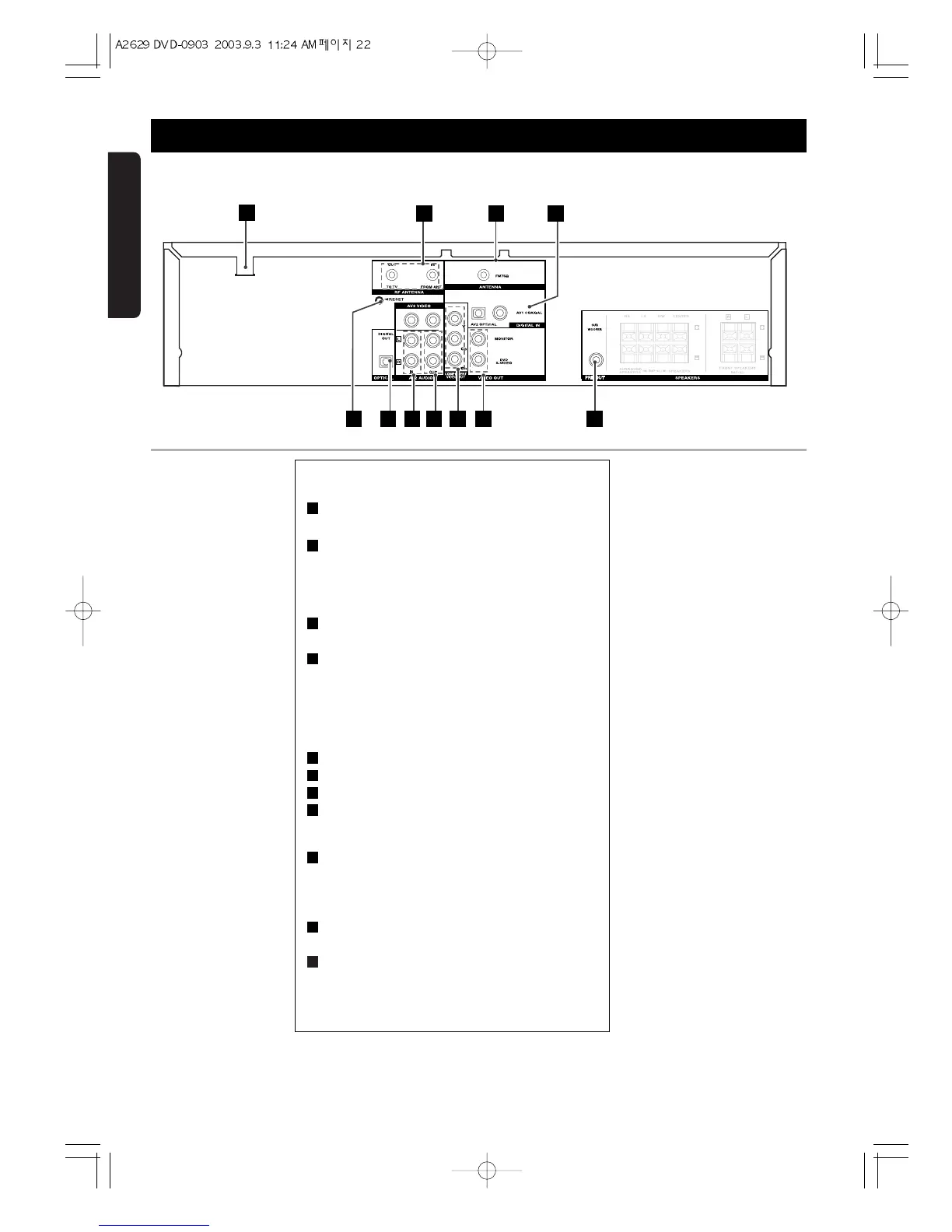
Rear Panel Jacks
AC POWER Cord.
Plug into the power source
RF ANTENNA
RF OUT (TO TV) : Connect to a TV with an RF
coaxial input.
RF IN (FROM ANT.) : Connect the UHF/VHF/CATV
antenna to this terminal.
FM ANTENNA CONNECTORS
Connect the FM antenna to this terminal.
DIGTAL AUDIO IN (OPTICAL)
Connect to the digital audio output of an external
digital device.
DIGTAL AUDIO IN (COAXIAL)
Connect to the digital audio output of an external
digital device.
OPTICAL DIGITAL OUT jack
AV2 AUDIO/VIDEO IN
AV2 AUDIO/VIDEO OUT
COMPONENT VIDEO OUT
Connect to the TV with Y, Cb, Cr inputs for DVD
viewing only.
S-VIDEO OUT
Connect to the S-VIDEO input of the TV.
COMPOSITE OUT
Connect to a TV a composite input.
SUB-WOOFER PRE OUT
Connect to a powered sub-woofer.
RESET
When wrong operation is incurred in DVD/VCR,
press this button.
Then AMP, VCR, FM parts will be initialised.
11
10
9
8
7
6
5
4
3
2
1


 To Next Page