15
DCA73W
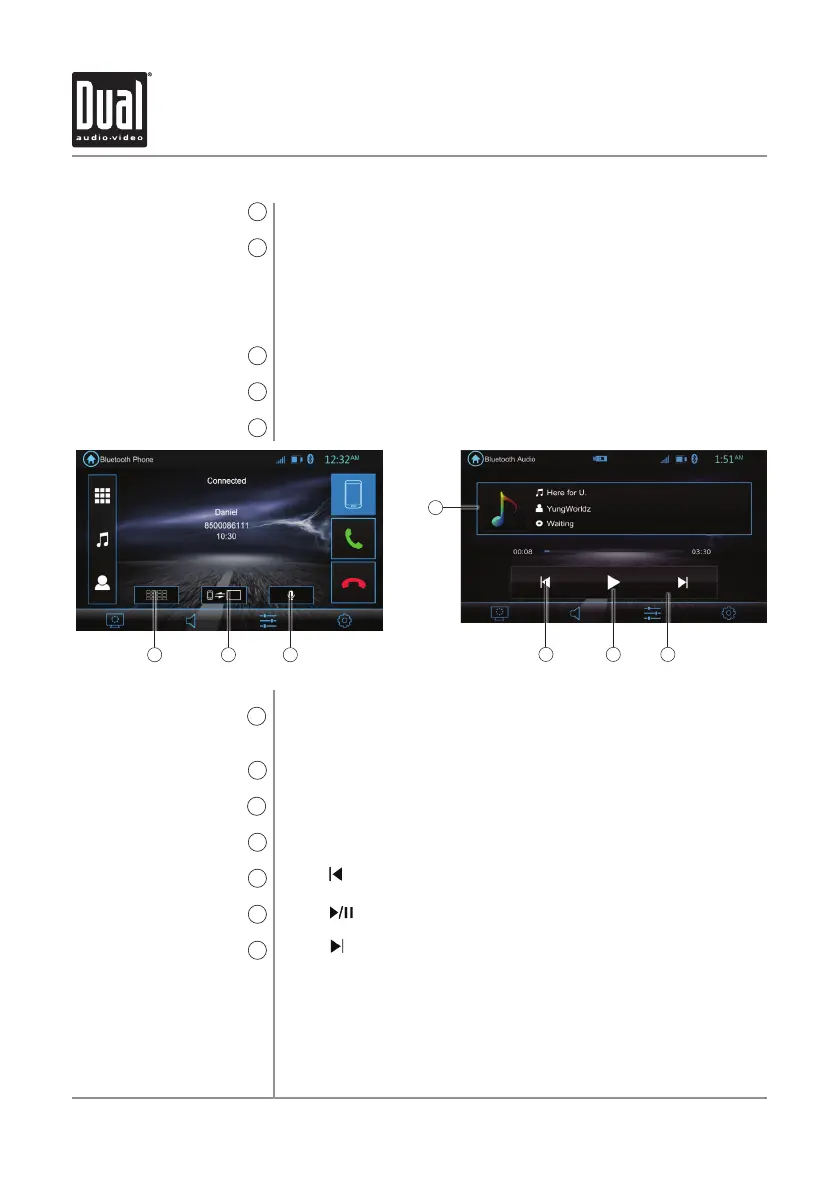
Bluetooth Operation
11 12 13
14
Phone keypad
11
Audio Transfer Button
12
Microphone
13
Bluetooth Music
14
Track Down
15
Play / Pause
16
Track Up
17
End Call
6
Devices
7
Calling Screen Mode
8
Last Number
9
Disconnect Bluetooth
10
Provides an alternate method of accessing the phone keypad
during a call.
Press to transfer audio between the unit and mobile phone.
Press to turn the Microphone voice On or Off.
Press to transfer audio between the unit and mobile phone.
Press icon to return to the beginning of the current track.
Press icon to pause or resume playback.
Touch icon to skip ahead to the next song.
Press to end a call in progress or reject an incoming call.
Press to show the pairing device list. To connect to a previously
connected device. press the current device name. Any previously
connected devices that are in rang will be listed by their device
name. Press the desired device name to disconnect from the
current device and connect to the new device.
Press to access the calling screen during a call.
Press to call the last number dialed.
Press to disconnect the current BT connection.
15 16 17


 To Next Page