7
XDM7615 OPERATION
General Operation - Setup Menu
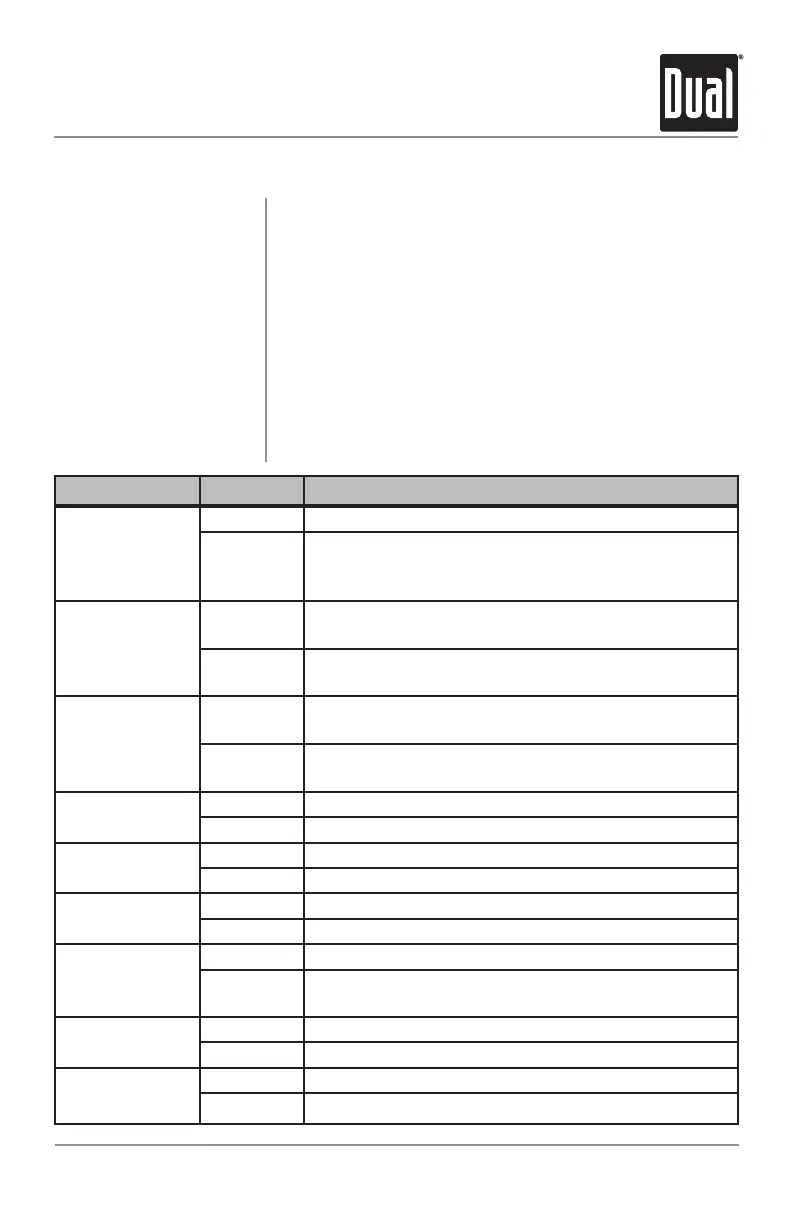
Menu Function Options Action
Loudness Curve
LOUDOFF Disablestheloudnessfunction.
LOUDON Enablestheloudnessfunction.Activatingthisfeature
willenhancethebassandtreblefrequencieswhen
listeningtomusicatlowvolumes.
Tuner Frequency
Spacing
FREQUSA ProgramstheunittoUSAtunerspacing.
(200kHzforFMand10kHzforAM)
FREQEUR ProgramstheunittoEuropeantunerspacing.
(50kHzforFMand9kHzforAM)
Clock Display
CLKOFF Programstheunittonotdisplaytheclockwhenthe
powerisoff.
CLKON Programstheunittodisplaytheclockwhenthepower
is off.
Auxiliary Mode
AUXON Enablesaccesstoauxiliarymode.
AUXOFF Disablesaccesstoauxiliarymode.
Beep
Confirmation
BEEPOFF Disablestheconfirmationbeep.
BEEPON Enablestheconfirmationbeep.
Local/Distance
Tuning
LOCOFF ActivatesDistancetuning.
LOCON ActivatesLocaltuningforstrongstationreceptiononly.
Subwoofer Mode
SB-WOFF DisablesthesubwooferRCAoutput.
SB-WON ActivatesthesubwooferRCAoutput.Subwoofercontrol
willbeavailableintheaudiomenu.
Power on
Message
MSGOFF Disablespoweronmessage.
MSGON Enablespoweronmessagetobedisplayed.
Demonstration
Mode
DEMOON Enablesthe"BTREADYANDIPODREADY"message.
DEMOOFF Disablesthedemonstrationmode.
Set the Clock
12/24-hour Clock
Setup Menu
Withtheuniton,pressandholdDISPuntiltheclockbegins
toflash,thenrelease.PressTUNE
nn
toadjustthehours
and TUNE
ll
toadjusttheminutes.PressDISP momen-
tarilytosavetheselectedtime.
Theclockwilldisplay12-hourAM/PMtimeinUSA
frequencyspacingmode(PM10
:
00).InEuropeanfrequency
spacingmode,theclockwilldisplay24-hourtime(22:00).
PressandholdSETUPformorethan3secondstoaccess
thesetupmenu.PressSETUPmomentarilytoselect
betweenthemenufunctionsandrotatetherotary encoder
left/righttoadjustoractivatethedesiredfunction.



 To Next Page
 Loading...