3
XDMA6540 INSTALLATION
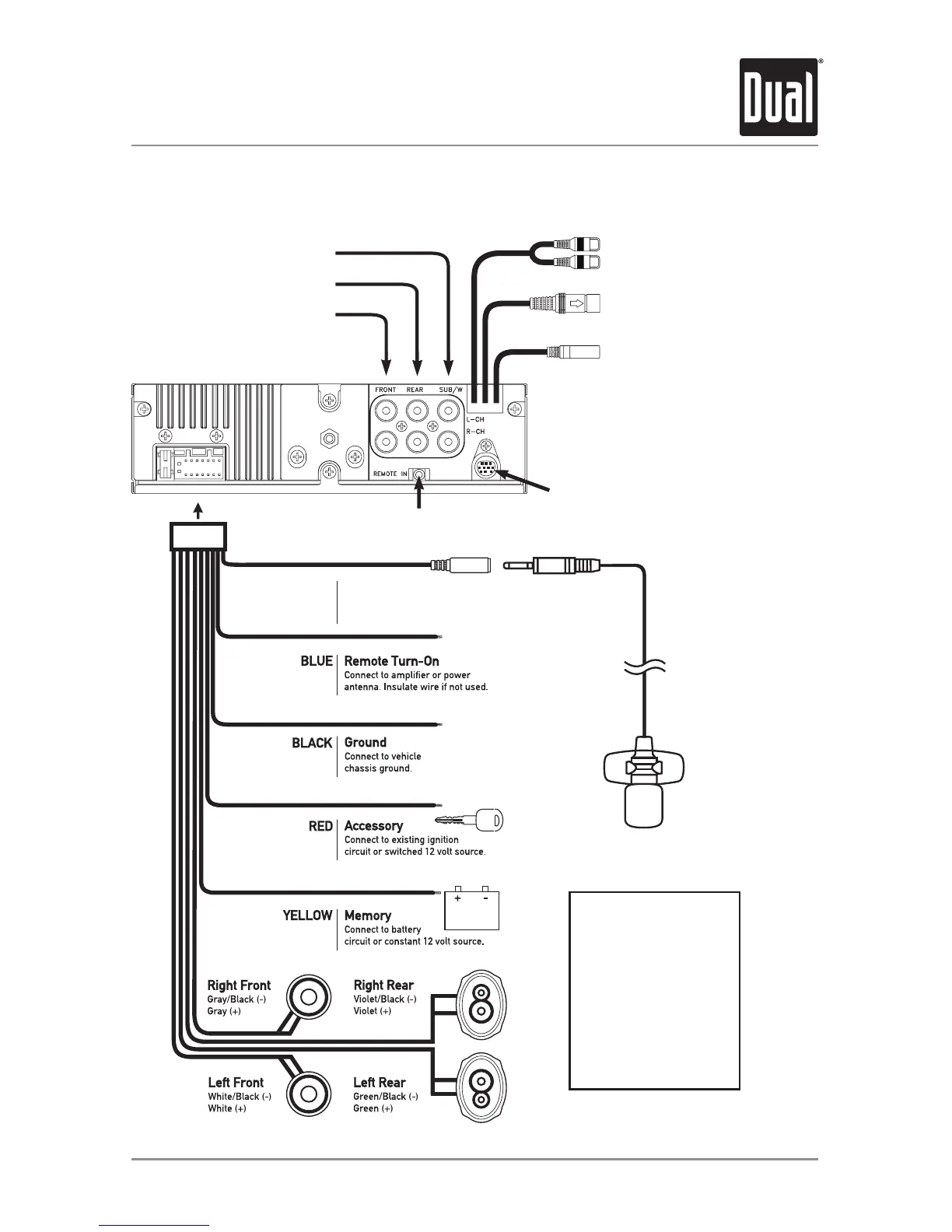
SiriusXM Vehicle Tuner Connection
(tuner sold separately)
Steering Wheel Interface Input
(PAC SWI-PS sold separately)
REAR
External Amplifer Connections
FRONT
SUB
BLACK
Bluetooth Microphone
(must be connected for Bluetooth functionality)
Bluetooth Microphone Input
Connect the included
Bluetooth microphone.
YELLOW - Rear RCA Input
Connect a portable device
BLACK - Antenna Input
Connect the vehicle antenna
BLUE - 10-pin Female Mini-DIN
HDM90 HD Radio™ Tuner Connection (sold separately)
Wiring Diagram
FUSE
Whenreplacingthefuse,
makesurenewfuseisthe
correcttypeandamperage.
Usinganincorrectfusecould
damagetheradio.
TheXDMA6540usesone
10ampATMfuselocated
besidethewiringconnector.



 To Next Page