Parameter setting/displaying
Warning
Operate on instrument panel only when the
motorcycle is stopped. Do not operate on instrument
panel while you are riding the motorcycle under no
circumstances.
Once check routine is over, instrument panel on tank
will always display the Odometer (TOT) on the left-
hand side and the Average Consumption on the right-
hand side as "main" indication (unless Menu 2 has
been disabled).
"Main" displaying includes the following information:
- Set Riding Mode;
- Gear indication (GEAR);
- Menu 1: Odometer (TOT);
- Menu 2: Average Fuel Consumption (CONS.
AVG).
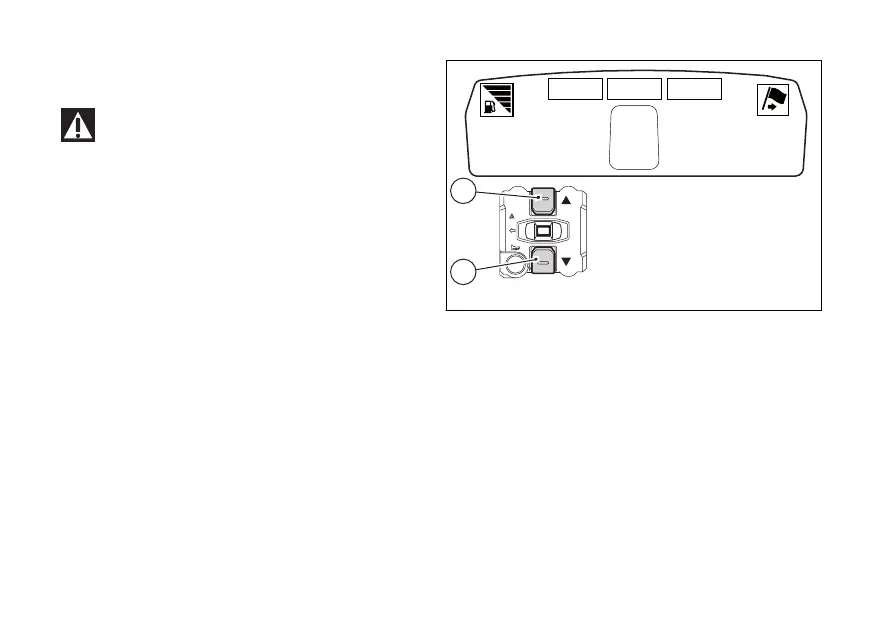
By pressing button (1, Fig. 6) it is possible to toggle to
the following functions of menu 1:
- TRIP1: Trip meter 1;
- TRIP2: Trip meter 2;
- RANGE - Indication of estimated distance that
can be run.
By pressing button (2, Fig. 6) it is possible to toggle to
the following functions of menu 2:
- CONS. - Instantaneous fuel consumption;
- SPEED AVG - Average speed;
- TRIP TIME - Trip time;
- AIR - Air temperature.
10355 16.3
3
TOT
CONS.AVG
KM/L
162 HIGH
GEAR
SPORT 03 DTC
1
2
Fig. 6
28










 To Next Page