E
18
Clock setting function
Hold down button (A, fig. 5.1) for 2 seconds, the wording
AM begins to flash. If button (B) is pressed, PM begins to
flash; press button (B) to go back to previous step. Press
button (A) to confirm and start setting hours that shall
begin to flash.
Use button (B) to set hours. If button (B) is pressed for
more than 5 seconds, fast scroll is activated. Press button
(A) to confirm and start setting minutes. Use button (B) to
set minutes. If button (B) is pressed for more than 5
seconds, fast scroll is activated. Press button (A) to
confirm and exit clock setting mode and go back to normal
operation.
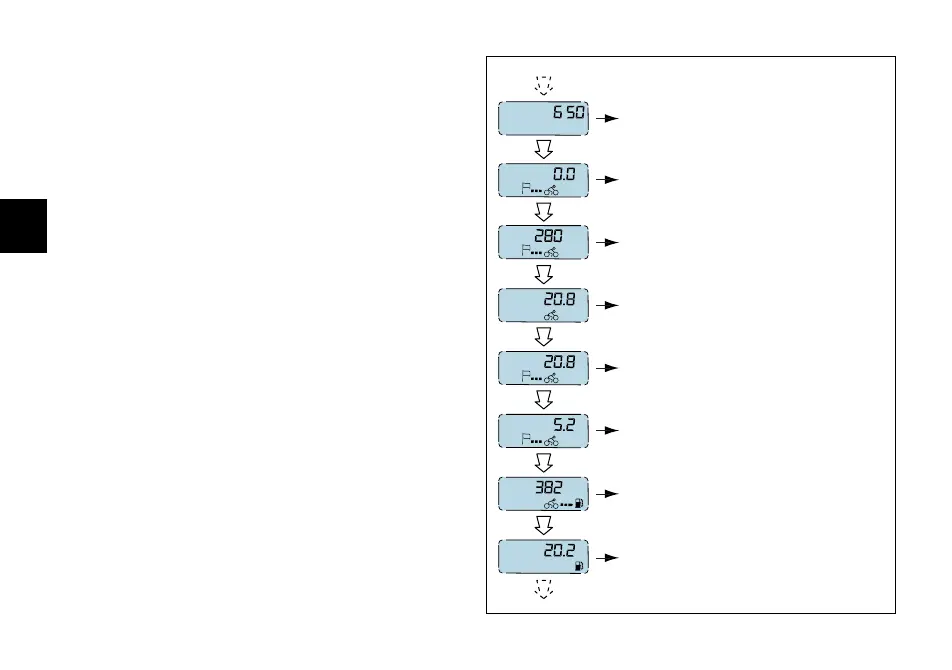
How to scroll through auxiliary display functions
(fig. 9)
Press button (B, fig. 5.1) with the key on ON to scroll down
the following functions, in sequence:
- Odometer
-TRIP meter
- Average speed
- Instant fuel consumption
- Average consumption
- Fuel used
-Range
-Digital fuel level indication
km
miles
km
km/h
km/L
mpgal
km/L
L
gal
km
miles
L
miles
mph
mpgal
gal
ODOMETER
TRIP METER
AVERAGE SPEED
INSTANT FUEL CONSUMPTION
AVERAGE CONSUMPTION
FUEL USED
RANGE
DIGITAL FUEL LEVEL INDICATION
fig. 9









 To Next Page