18
Owner's Manual for
DUKE RCO Speed Oven
7. STATS SCREENS
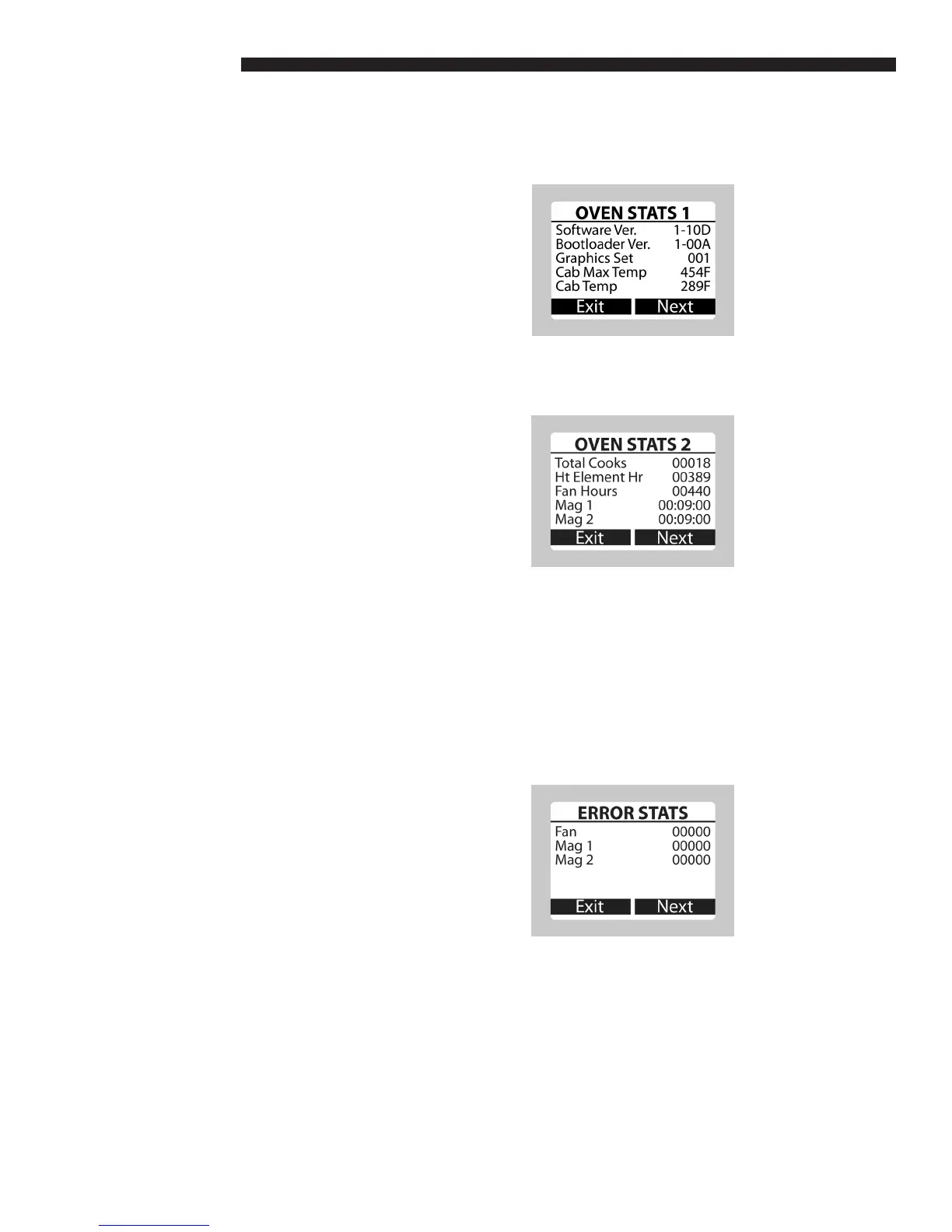
a. Oven Stats 1
• The Oven Stats screens are entered from
the Support screen by pressing the RIGHT
key (Stats).
• Software Ver. - Software Version Number
• Bootloader Ver. - Bootloader Version
Number
• Graphics Set - Graphics Set Number
• Cab Max Temp – The maximum
temperature the control board has reached.
• Cab Temp – The current temperature of the
control board.
b. Oven Stats 2
• Press the RIGHT key (Next) in Oven Stats 1
to toggle to Oven Stats 2.
• Total Cooks – The number of recipes that
have been cooked.
• Ht Elem hr – The cumulative time, in hours,
that the heating elements have been on.
• Fan hr – The cumulative time, in hours, that
the fans have been on.
• Mag1 – The cumulative time that Magnetron
1 has been on.
• Mag2 – The cumulative time that Magnetron
2 has been on.
c. Error Stats
• Press the RIGHT key (Next) in Oven Stats 2
to toggle to Error Stats.
• The Error Stats screen shows the count of
errors for each item on the screen.
OPERATING INSTRUCTIONS



 To Next Page