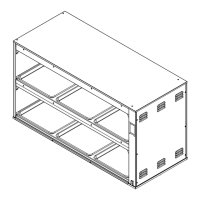
The Duke ReadyFlex™ Hot Holding Cabinet (RFDU) is a sophisticated culinary appliance designed to maintain food products at optimal serving temperatures for extended periods, ensuring both quality and consistency. It leverages innovative top and bottom heat technology, refined since Duke's introduction of product holding units in 1999, to achieve an ideal holding curve for a broad variety of food items.
Function Description:
The RFDU is a hot holding cabinet capable of accommodating up to six full-size sheet pans. Its primary function is to hold prepared food at precise temperatures, extending its freshness and readiness for service. The unit features independent top and bottom heat zones that are programmable, allowing for customized recipes and holding configurations. This flexibility enables operators to adapt the unit for different menu items and dayparts, from breakfast to lunch to dinner, without compromising food quality.
The device is equipped with a user-friendly touchscreen interface that is visual, intuitive, and colorful, making in-store control and programming straightforward. Users can easily select from stored library recipes or program new ones on the fly. Daypart switching is simple and can be pre-programmed for operational efficiency.
Connectivity is a key feature of the ReadyFlex™ Technology. The RFDU includes built-in Wi-Fi, Ethernet, USB, and Mesh networking capabilities, as well as Bluetooth connectivity to enable interaction with third-party cloud and on-premise solutions. This allows for remote management, recipe updates, and data exchange, enhancing operational flexibility and control.
Important Technical Specifications:
The manual details two models: RFDU-22 and RFDU-23, with slight variations in width.
- Dimensions (Body Only):
- Height: 34.0 inches (86.4 cm) for both models.
- Depth: 26.5 inches (67.3 cm) for both models.
- Width: RFDU-22 is 42.9 inches (108.9 cm), while RFDU-23 is 62.0 inches (157.5 cm).
- Electrical Specification (Top and Bottom Heat):
- 208/240 V, 60Hz, 3~:
- Amps: 15.5/17.3 for both RFDU-22 and RFDU-23.
- 400V, 50/60Hz, 3N~:
- Amps: 10 for RFDU-22, 11 for RFDU-23.
- Wiring: Units are field-wired. Refer to page 7 of the manual for installation details.
- Temperature Range: The allowable range of well temperatures that can be programmed on the RFDU is 140°F-280°F (60°C-137.8°C).
- IRDC Period: The Infrared Duty Cycle (IRDC) Period, which is the total period time of the IR in seconds, can be programmed from 0 to 360 seconds. For example, with an IRDC Period of 180 seconds and an IRDC Percent (recipe) of 65%, the IR will be on for 120 seconds and off for 60 seconds, repeating.
Usage Features:
- Boot Screen: Upon power-on, a boot screen displays the Duke Logo and firmware version.
- Runtime Screen: After booting, the runtime screen loads, displaying information for each shelf, including recipe name, top IR duty cycle, bottom heat setpoint, and current temperature. A preheating icon indicates when a well is heating to temperature, clearing once the recipe temperature is reached.
- Daypart Menu: Users can select different menus (dayparts) such as Breakfast, Lunch, or Dinner, allowing for pre-programmed recipe changes throughout the day.
- Settings Menu: Accessed via a cog icon, this menu offers various configurations:
- Menu Selection: Choose the number of available menus (1 to 3).
- Temp Mode: Switch between Fahrenheit and Celsius display.
- PHU Configurator: Modify recipe mapping for each well and menu. When a well is pressed, a list of available recipes appears for selection.
- RFDU Recipe Editor: View, add, or edit local recipes stored on the unit. Recipe fields (Name, IRDC%, Bottom Temp, Lid Status) can be modified. IRDC% is adjustable in 5% increments (0-100), and Bottom Temp in 5°F increments (140°F-280°F).
- Language: Reserved for future use to change the display language.
- Help: Displays a QR code linking to the online manual.
- About: Provides unit details like serial number, API key, firmware version, and MAC addresses for Wi-Fi and Ethernet.
- Tools Menu: Offers further configurations:
- Network: Configure network connections (Wi-Fi or Ethernet). Supports both DHCP and static IP addresses. Users can select available Wi-Fi SSIDs and enter passwords via an on-screen keyboard.
- PHU Volume: Enable or disable sound on the RFDU.
- Temperature Display: Enable or disable the temperature display on the runtime screen.
- Admin: (PIN protected) Access to Manager Menu.
- Manager Menu: (PIN protected with default PIN "8429") Provides access to advanced functions:
- Access Menu: Lock or unlock configuration options like Recipe Config, Menu, Temp Mode, Network, and PHU Config to prevent unauthorized changes.
- Temp Offset: Adjust the temperature offset per zone (shelf). Displays actual bottom heatsink temperatures and current offset values. Offset range is -20°F to 20°F, adjustable in 1°F increments.
- IRDC Period: Program the total period time of the IR in seconds (0-360 seconds).
- UI Mode: (Not detailed in provided text, but listed as an option).
- Fault Indicators: The unit displays unique icons on the well screen if faults occur (e.g., Bottom Heater High/Low Temperature Fault, CAN Error Fault).
- Sous Chef Technology Programming: Recipes and well programming can be updated locally or via Duke's cloud solution, the Sous Chef Cloud. Users can create an account on souscheftech.com, add units using their serial number and API key, and manage configurations remotely. The cloud interface allows for programming grids, color-coded by zone, and supports different menus (Breakfast, Lunch, Dinner, All Day) for each well. Recipes can be added, edited, or deleted in real-time.
- USB Programming: For units not connected to the cloud, recipes and programming settings can be modified via the RFDU Offline Configurator menu option on the Sous Chef Cloud. This generates an "RCP" file that can be copied to a USB flash drive and then uploaded to the RFDU unit.
Maintenance Features:
- Daily Cleaning:
- Safety First: Turn off, unplug, and allow the unit to cool for 30 minutes before cleaning. Do not use caustic cleaners, acids, ammonia products, abrasive cleaners, or abrasive cloths, as these can damage stainless steel and plastic surfaces. Do not use high-pressure water wash or water jets/hoses, as water can damage electrical components.
- Pans: Remove all holding pans, wash, rinse, and sanitize them in a 3-compartment sink, then air dry.
- Surfaces: Clean upper glass surfaces and lower heat sink surfaces with a cleaning towel or non-scratch scrub pad sprayed with soapy solution or KAY™ Degreaser. Avoid spraying cleaning solution directly onto the cabinet.
- Accumulation: For heavier accumulation, a Cleaning Brush Tool can be used with degreaser.
- Sanitizing: Wipe all compartments with a sanitizer-soaked towel (wrung out to be damp, not dripping). Wipe top compartments first, then lower.
- Stainless Steel: To prevent discoloration or rust, clean stainless steel surfaces with alkaline-based or non-chloride cleaners. Always rub with the grain of the steel. Stainless steel cleaners can restore and preserve the protective layer. Address small pits and cracks by thorough cleaning and applying stainless steel cleaners.
- Glass: Inspect glass daily for chips, cracks, or breaking. Discard all food and notify manager if any damage is found. Do not use equipment with damaged glass.
- Temperature Check Procedure:
- Equipment: Use a calibrated digital temperature meter with a thermocouple surface temperature probe.
- Preparation: Ensure no pans are in wells. Pre-heat the warmer for 30 minutes before taking readings. The cavity must be clean and empty. Avoid air drafts.
- Procedure: Take readings from the front side of the unit. Position the probe halfway back on the heat sink and centered left to right on the bottom of the first shelf.
- Calibration: The correct calibration temperature is the average of several readings over 20 minutes after pre-heating. The average temperature should be no greater than ± 10°F (± 6°C) from the set point.
- Adjustment: If the calibration temperature deviates by more than +/- 10°F (6°C) from the set point, adjust the temperature offset via the Tools menu. The offset value should be the difference between the calibration temperature and the set point.
- Repeat: Repeat the procedure for all heat sinks.

 Need help?
 General

 To Next Page