11
RFDU Operator’s Manual
RFDU OPERATING INSTRUCTIONS Continued
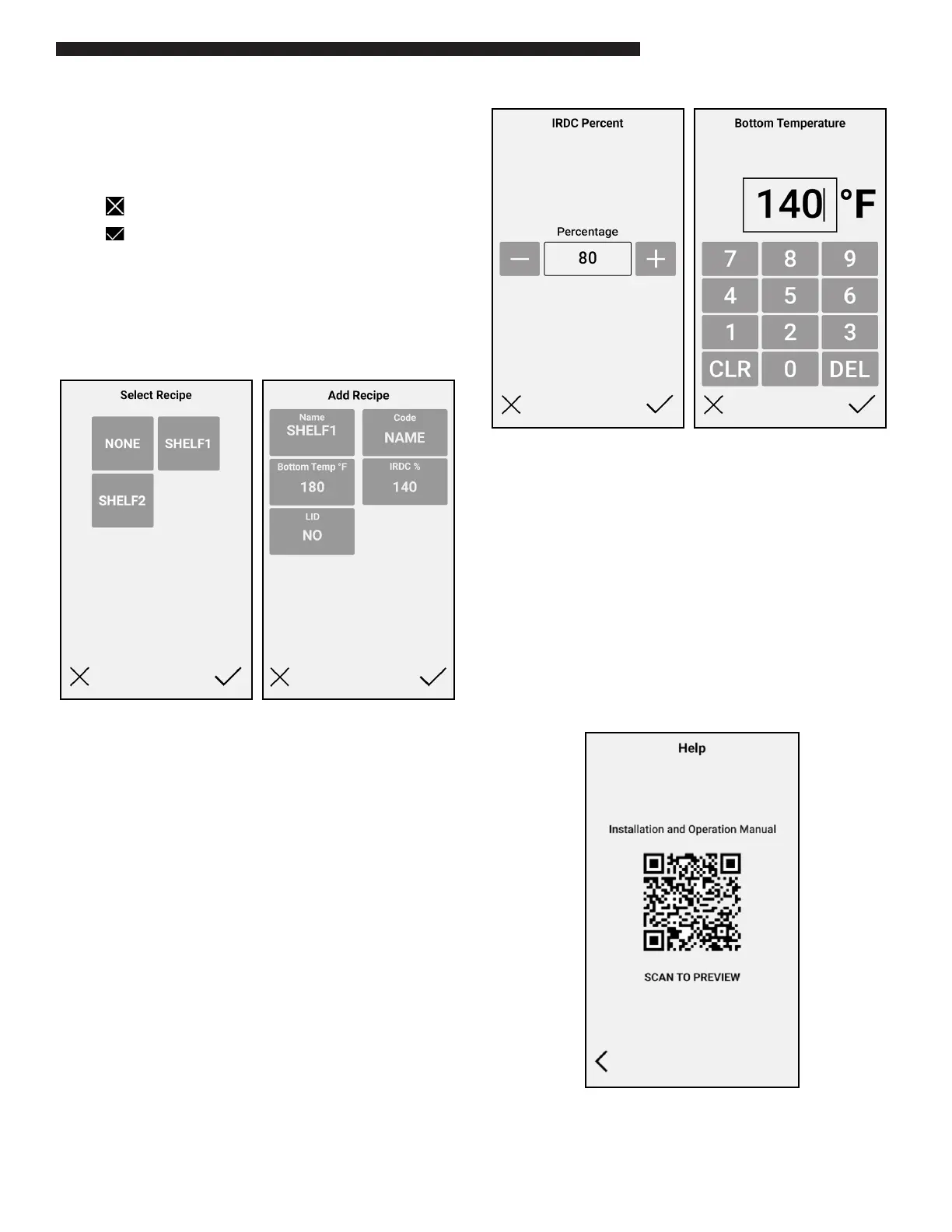
Use the left and right navigation buttons to scroll
through the available recipes for this RFDU. To
assign a new recipe to the well, simply select the
desired recipe.
Select to exit without making a change.
Select to save and update the RFDU
Conguration.
“Language” Setting. This is reserved for future use
and will allow RFDU users to change the language
display on all screens.
Language
RFDU Recipe Editor
Selecting the “Recipe Cong” option will display
the list of local recipes currently stored on the unit.
These are sorted alphabetically
Key information on each recipe is displayed on this
screen view. This includes the Recipe Name, IR Duty
Cycle (IRDC) %, the Bottom Temperature, and Lid
Status.
NOTE: Code is only for units with Timer Bars
Page navigation buttons can be used on each
screen to navigate through each set of recipes.
The “+” icon can be used to add a new local recipe.
Selecting on an existing recipe will load the recipe
in edit mode.
Each of the 4 recipe elds can be modied here.
IRDC% can be adjusted in 5% increments from 0
to100
Bottom Temp can be adjusted in 5F increments
from 140F to 280F
When selecting Help option the Help screen will
load with a QR code. When scanned this will link to
this manual hosted on the cloud.
Help


 To Next Page