RFDU Operator’s Manual
8
RFDU OPERATING INSTRUCTIONS
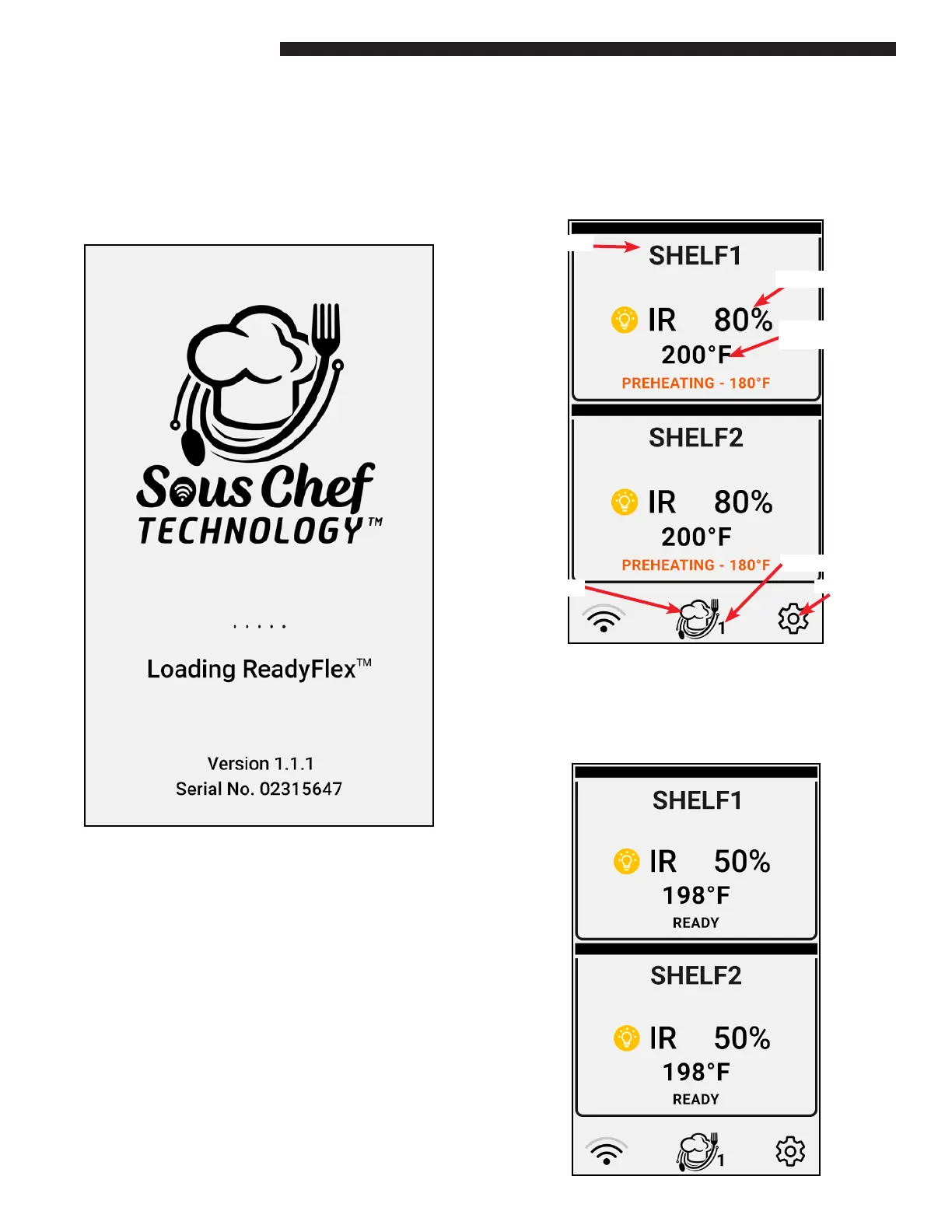
When the ReadyFlex™ Display Unit is turned on the
boot screen will appear rst for 2 or 3 seconds. This
will display the Duke Logo along with the rmware
version number of the RFDU.
RUNTIME SCREEN
After the RFDU has loaded the runtime screen will
load. Dierent types of information are found on
the runtime screen. Details below.
When the unit rst boots each well will contain a
preheating icon. This indicates the well is heating
to temperature. When the recipe temperature is
reached the preheat icon will clear and the well will
be ready for use.
OVERVIEW
Recipe Name
Current Recipe
Top IR Duty Cycle
Bottom Heat
Setpoint
Menu Selector
Setting Icon


 To Next Page