RFDU Operator’s Manual
16
RFDU OPERATING INSTRUCTIONS Continued
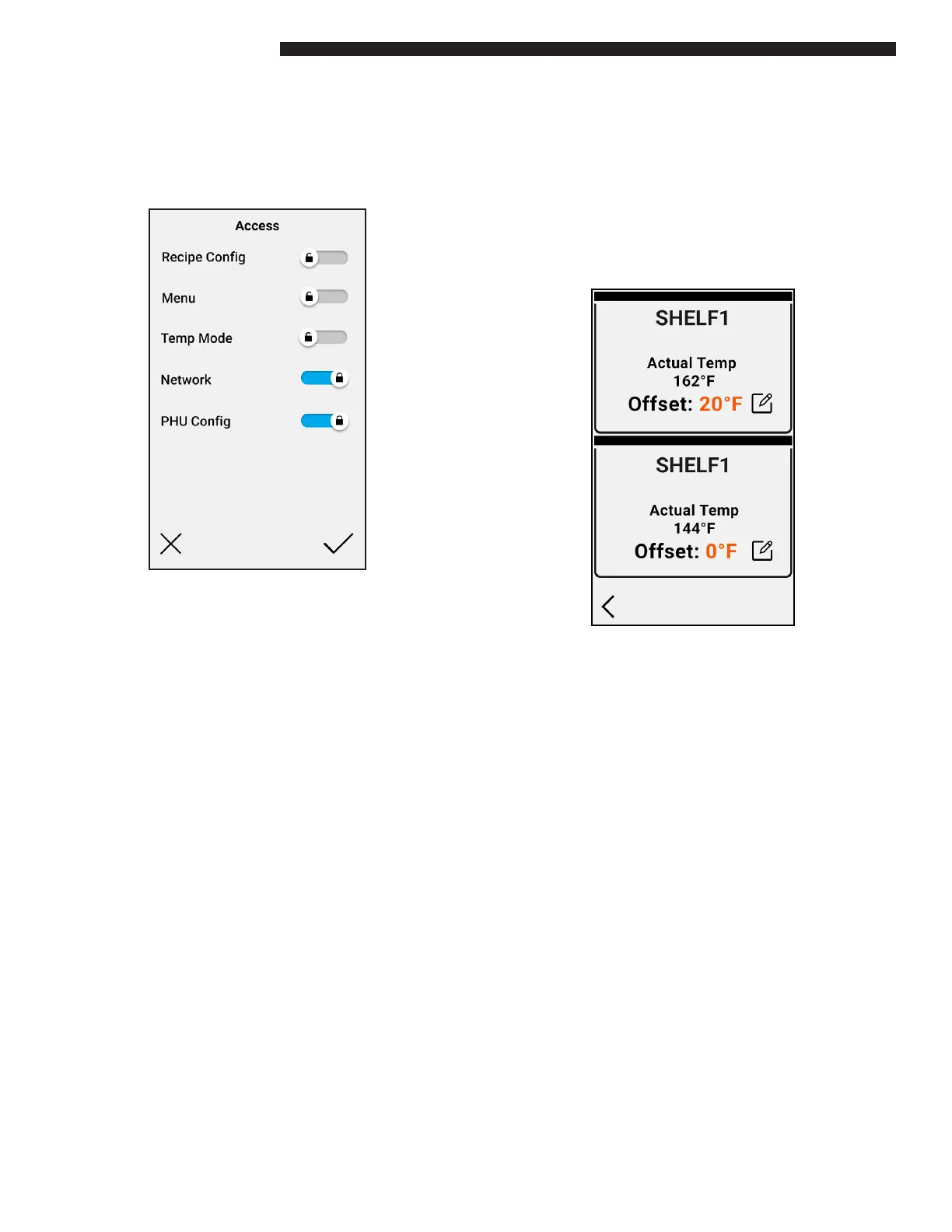
Access Menu
The ACCESS menu allows a number of conguration
options to be “locked” or unable to be changed. When
selected the following screen will appear.
Each of the Recipe Cong, Menu, Temp Mode
(C/F), Network and PHU Cong can be locked or
unlocked.
For example, if “Recipe Cong” is locked when the
Recipe Cong option described previously is loaded
it will be in “VIEW MODE” only. Modications such
as editing existing recipe settings, delete a recipe or
adding a new recipe will not be available.
Temp Oset
The Temperature Oset function will allow the
temperature oset to be adjusted per ZONE on the
selected RFDU.
After selecting the “TEMP OFFSET” function the
following screen will appear.
The screen displays the well or shelf conguration,
SHELF 1 and SHELF 2 actual bottom heatsink
temperatures and the current temperature oset
values. Each well or shelf can be individually
selected for editing.


 To Next Page