RFDU Operator’s Manual
20
RFDU OPERATING INSTRUCTIONS Continued
For the user’s Account an “oine recipe set” will
always be available to the user. This information
will be saved and be readily available if a USB le is
required to be created.
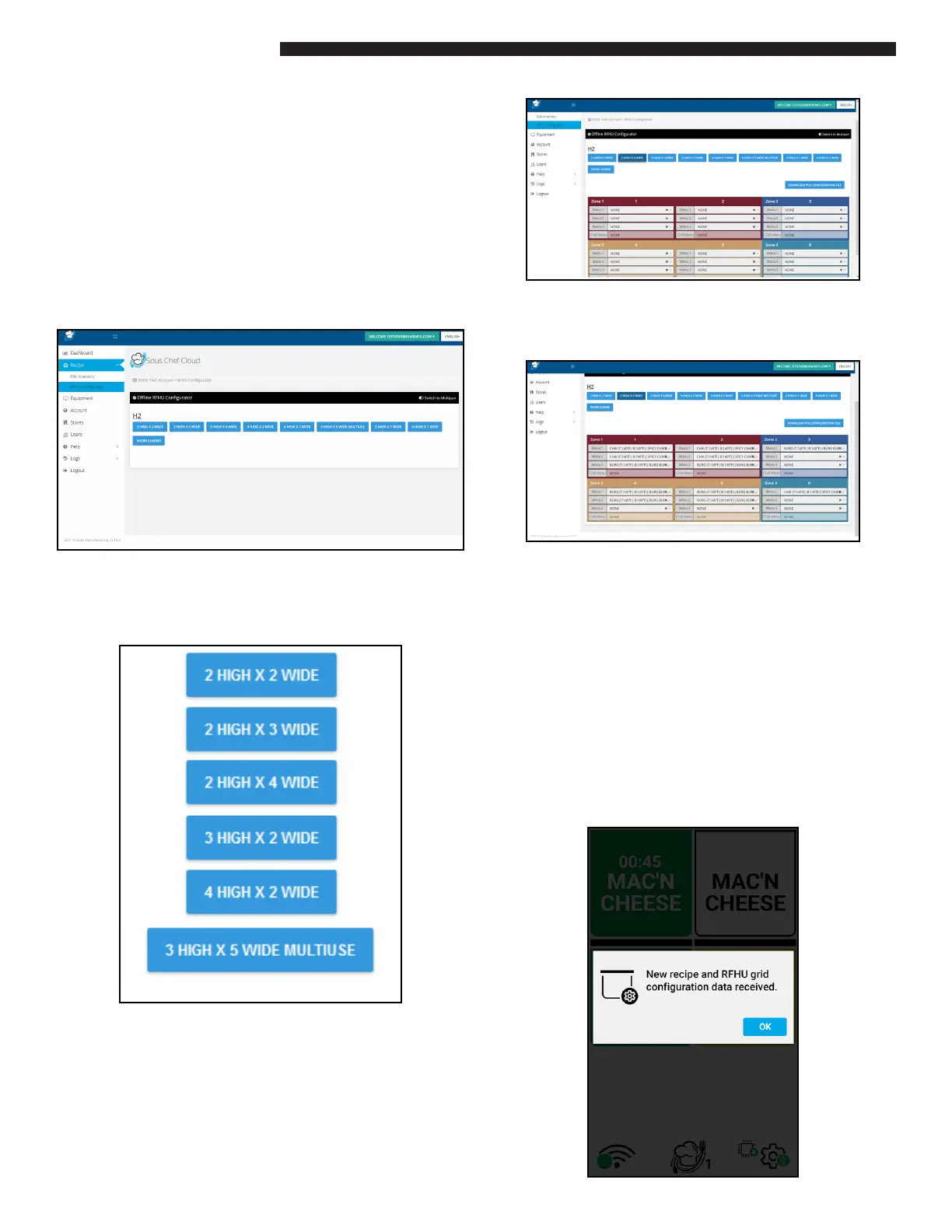
The RFDU Congurator is available for well
programming.
As the unit is not connected the RFDU congura-
tion, for example 2x2, 2x4 will not be automatically
detected.
Instead a list of available congurations will be
available for programming.
These include:
When a selected PHU conguration is selected the
appropriate programming grid will appear. For
example a 2x4 will appear as:
This can then be programmed in the same way as
the online RFDU. For example:
When nished select “DOWNLOAD PHU
CONFIGURATION FILE” option. This will create a
RFDU “RCP” le which contains both the recipe list
and well mapping settings.
This le can then be copied to the “root” directory of
a USB ash drive.
Plug this same USB drive into the USB port on an
RFDU and if the conguration is correct both the
recipe list and well programming will be uploaded
on the unit itself. A conrmation message will ap-
pear on the RFDU display when a new recipe set has
been successfully loaded.


 To Next Page