54
Chapter3AdvancedOperation
Copyright © 2019 Duplo Corporation All Rights Reserved
8
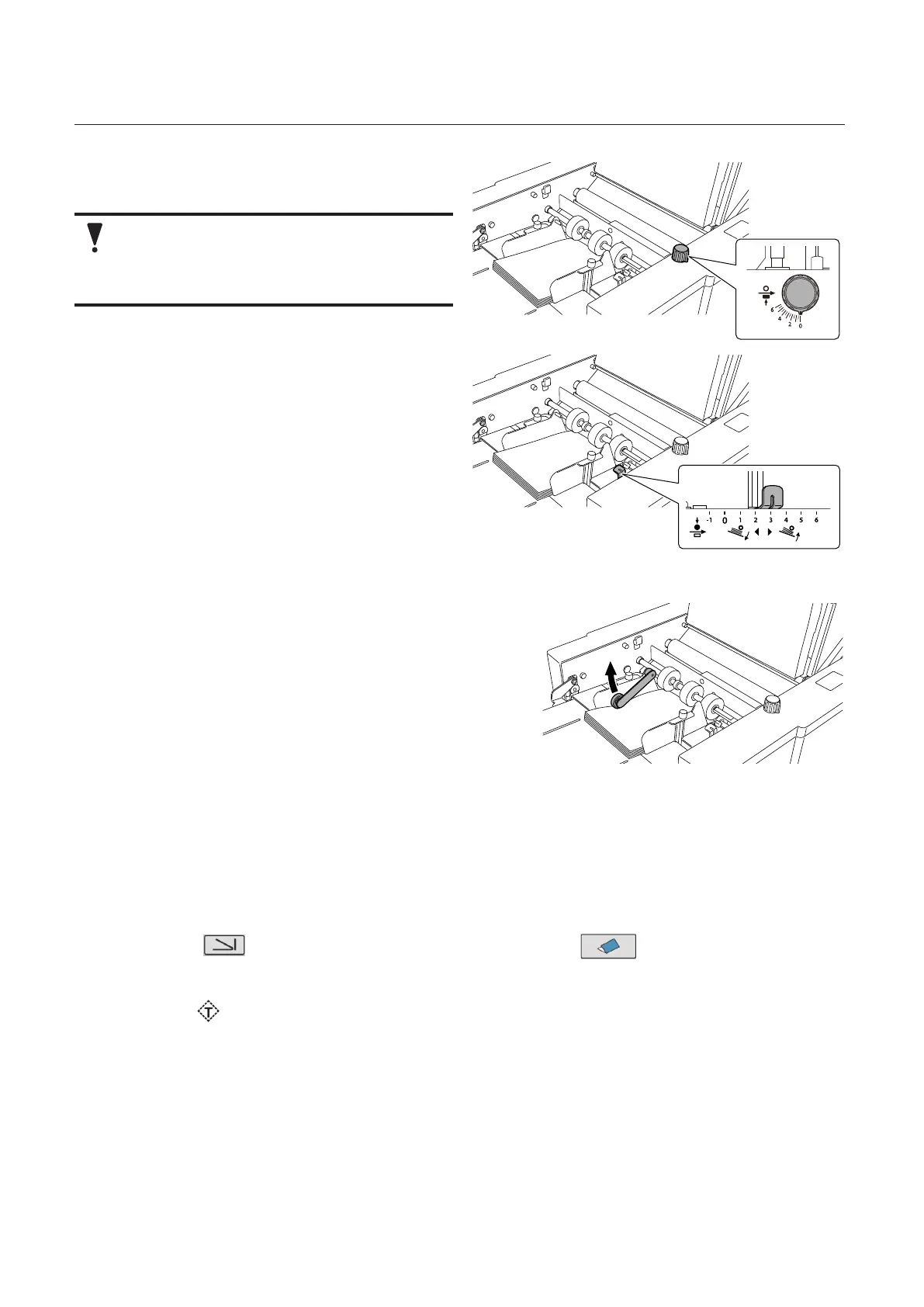
Set the separating pressure adjustment
dial to [0].
Set the paper separating pressure as low
as possible. Setting it high will cause the
single-folded paper to open during paper
feed, resulting in paper feed error.
9
Set the feeding pressure adjustment
lever to [3].
Set the paper feed pressure within the range
ofscale[3]to[5].
10
Take out the cross fold lever.
11
Attach the cross fold lever to the paper
feed guide on the left side.
• Attachthecrossfoldleversothatthe
weight roller on the leading edge of the
cross fold lever will be on the folding line.
• Raisethecrossfoldleverinthedirectionof
an arrow when stacking paper in addition.
12
Close the top cover.
4-1-3. Operation procedures
1
Turn on the power.
2
Touch the key on the [Ready] screen —> Touch the key.
Returntothe[Ready]screen.
3
Press the key to execute test folding.
4
Check the finishing.



 To Next Page