62
Chapter3AdvancedOperation
Copyright © 2019 Duplo Corporation All Rights Reserved
[7]
[1]
[2]
[3]
[7]
[10]
[7]
[10]
[6]
[6]
[5]
[4]
[12]
[8]
[11]
[9]
[11]
[6]
[12]
No. Name Function Default
value
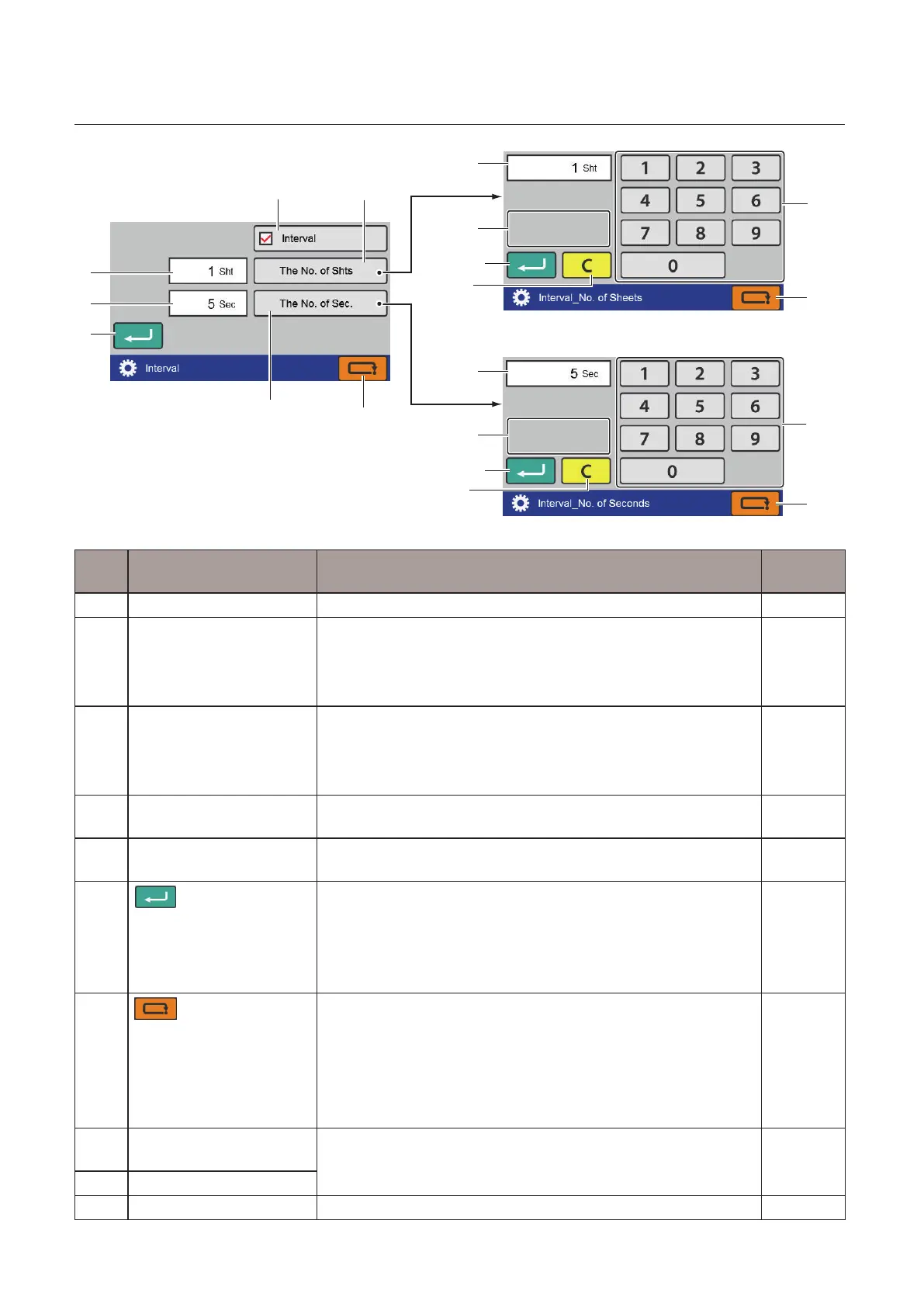
[1] Interval Setson/ooftheintervalfunction. –
[2] No.ofSheet The[Interval_No.ofSheets]screenisdisplayed.
Whentheintervalsettingisturnedo,thekeyisgrayedoutand
cannot be operated.
Settingrange:1to999(sheets)
1
[3] TheNo.ofSec. The[Interval_No.ofSeconds]screenisdisplayed.
Whentheintervalsettingisturnedo,thekeyisgrayedoutand
cannot be operated.
Settingrange:3to30(seconds)
5
[4] Interval_No.ofSheets
setting value
Displays the currently set interval sheets number. –
[5] Interval_No.ofSeconds
setting value
Displays the currently set interval time. –
[6]
(Return)key
[Interval]screen
Savestheon/osettingoftheintervalandreturnstothe
[FunctionSettings]screen.
[Interval_No.ofSheets]screen/[Interval_No.ofSeconds]screen
Savestheinputvalueandreturnstothe[Interval]screen.
–
[7]
(Cancel)key
[Interval]screen
Returnstothe[FunctionSettings]screenwithoutsavingthe
input content.
[Interval_No.ofSheets]screen/[Interval_No.ofSeconds]screen
Returnstothe[Interval]screenwithoutsavingtheinputvalue.
Pressandholdtoreturntothe[Ready]screen.
–
[8] Interval sheet number
input value
Displays the input value. –
[9] Interval time input value
[10] Numerickeypad Inputs the value. –



 To Next Page