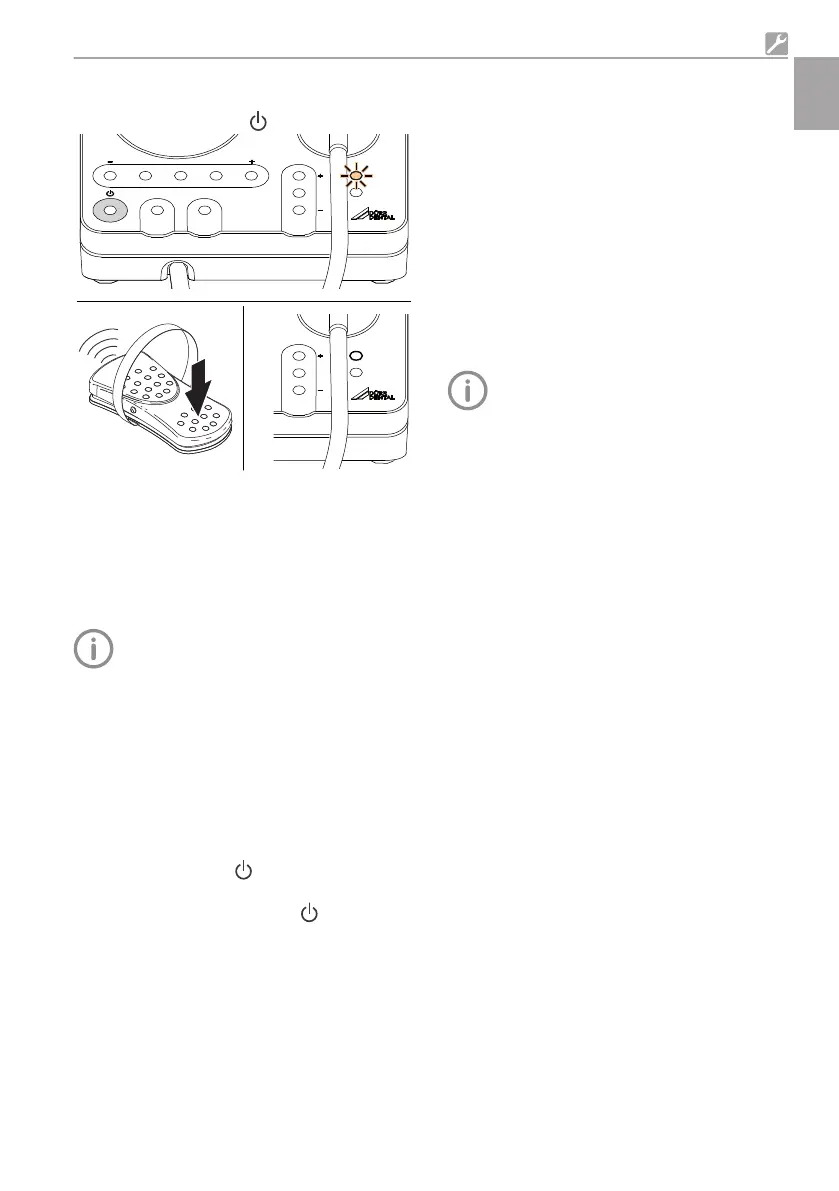
Performing pairing between the flexible foot
switch and the device:
❯
Switch on the device .
3 s
1.
2.
LIQUID
PEDAL
FUNCTION
CLEANRINSE
POWER
LIQUID
PEDAL
FUNCTION
❯
LED PEDAL flashes in orange.
❯
Press the flexible foot switch for around 3
seconds until the orange PEDAL LED goes
out.
Result:
After successful pairing the unit is immediately
ready for operation.
If nothing happens when the
flexible foot
switch is operated, it is possible that the
foot switch being used is paired with a
different device. In this case cancel the
pairing and repeat the process.
Cancelling a pairing
Requirements:
ü
No foot switch cable must be connected to
the device or to the flexible foot switch.
ü
The orange PEDAL LED is not on or is not
flashing.
❯
Switch off the device
.
❯
Touch the LIQUID operating panel, keep touch-
ing it and switch on the device .
Result:
When the orange PEDAL LED flashes, this shows
that the current pairing has now been cancelled.
8 Commissioning
8.1 Function check
To finish the initial start-up process, all of the
connections must be checked to make sure they
are securely seated and leak-tight.
Check for correct operation:
– Operating panel
– Flexible foot switch
– Visual and acoustic signals
8.2 Handover record
❯
Carry out and document the instruction and
handover for the unit.
A sample handover report is included in
the attachment.
Assembly
9000-615-32/02 2012V003 17
EN





 To Next Page