CLEAN
The cleaning process lasts around 10 minutes.
During this step Vector cleaner cleaning fluid is
pumped through the lines, whereby these are is
cleaned of any deposits.
Cleaning can be started whenever required.
Once the process is started it runs automatically
until the program is finished.
We recommend that cleaning is performed every
4 weeks.
After an operating time of approx. 30 hours the
blue LED on the operating panel lights up to
show that cleaning needs to be performed.
The blue LED goes out when the cleaning proc-
ess is completely finished.
If the cleaning process is not properly completed,
the blue LED will light up every time the unit is
switched on.
PEDAL (flexible foot switch)
Operating the flexible foot switch will activate the
handpiece.
If the orange LED lights up, the battery power
must be checked, "15.4 Inserting or changing
the battery in the flexible foot switch".
If the orange LED flashes then no flexible foot
switch is connected or paired.
FUNCTION
If the orange LED lights up, the contact pressure
of the instrument is too high or the handpiece
needs to be checked.
10.3 Preparing the device for treat-
ment
Switch on the unit.
WARNING
Risk of cross contamination
❯
All parts must be reprocessed before
every treatment.
❯
If there has been no treatment for more
than 24 hours then the complete fluid
system must be disinfected.
❯
Switch on the unit.
Result:
Blue LED is on – unit is ready for operation.
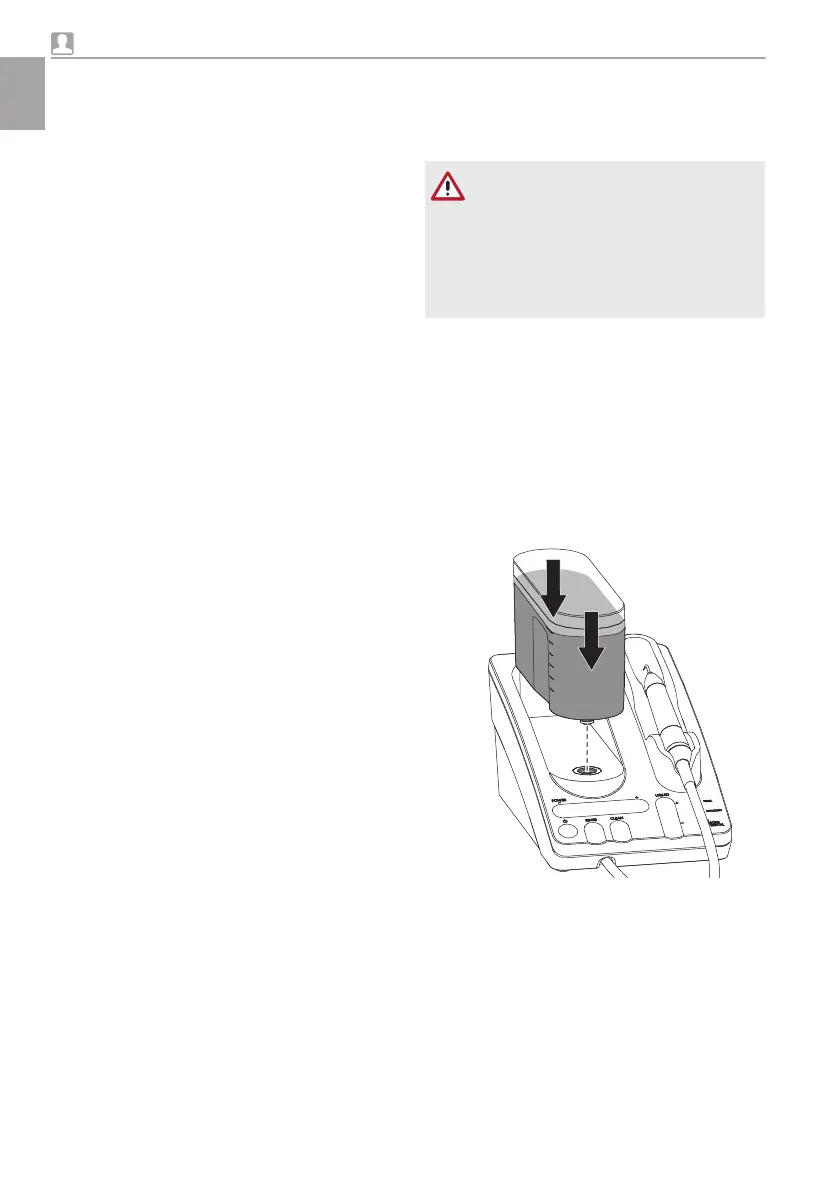
Inserting the fluid container
❯
Check whether the fluid container is full. If nec-
essary top up the fluid container to the upper
marking with lukewarm water (approx. 30 °C).
❯
Insert the fluid container vertically in the correct
position into the unit and press downwards
until you feel it lock into position.
Usage
24 9000-615-32/02 2012V003
EN





 To Next Page