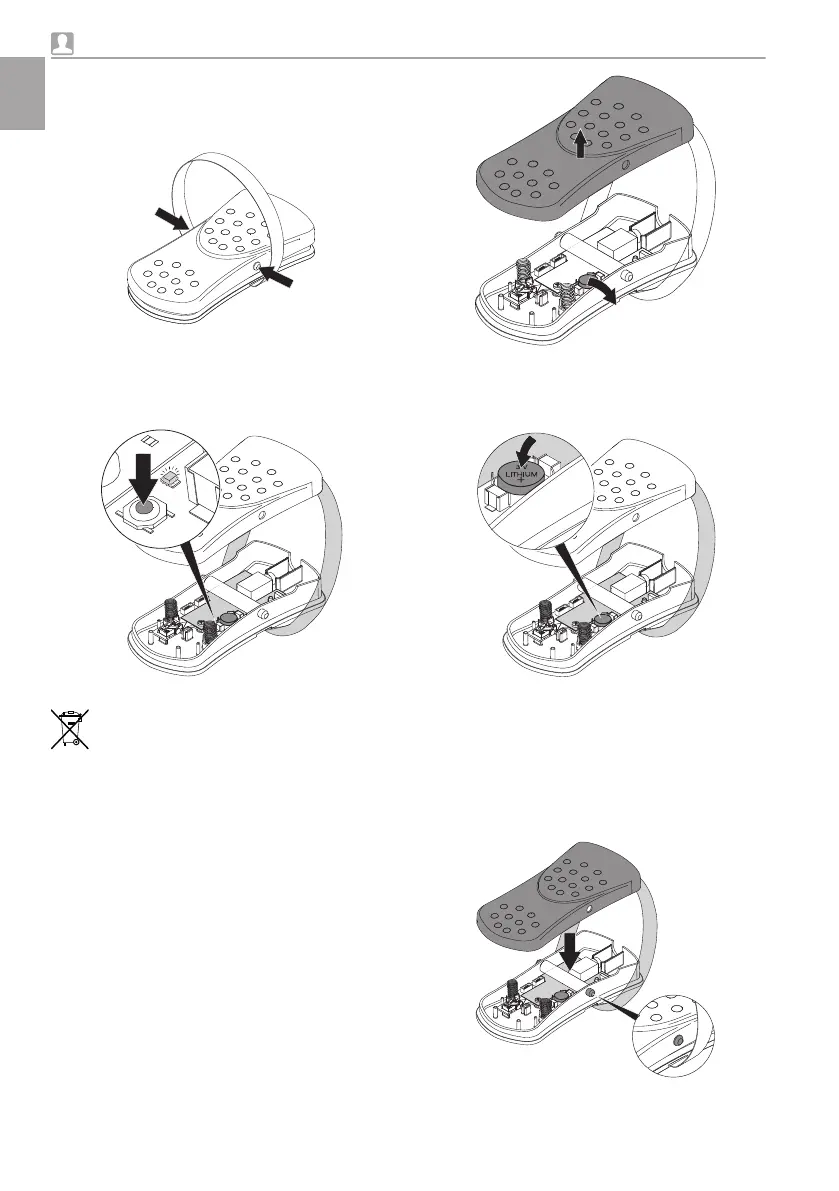
Opening the cover:
❯
Press both pins on the flexible foot switch
together at the same time and lift the cover
off.
Checking the battery:
❯
Press the button to the left of the battery.
Green LED lights up: battery power is OK.
Green LED does not light up: change the
battery.
Taking out the battery:
The old battery must be properly dis-
posed of in accordance with applicable
national and regional guidelines for envi-
ronmentally friendly disposal. Do not
throw batteries away with domestic
waste.
❯
Take out the battery from the holder and dis-
pose of it in an environmentally friendly way.
Inserting the battery:
❯
Insert the battery in the holder. Make sure
that the battery is inserted with the correct
polarity.
Closing the cover:
❯
Make sure that the two pedal return springs
are present and correctly positioned. If they
are not, the function of the unit may be
impaired.
❯
Fit the cover in such a way that the two pins
on the side of the flexible foot switch snap
into the holes in the cover.
Usage
46 9000-615-32/02 2012V003
EN





 To Next Page