44 45
ELECTRONICS
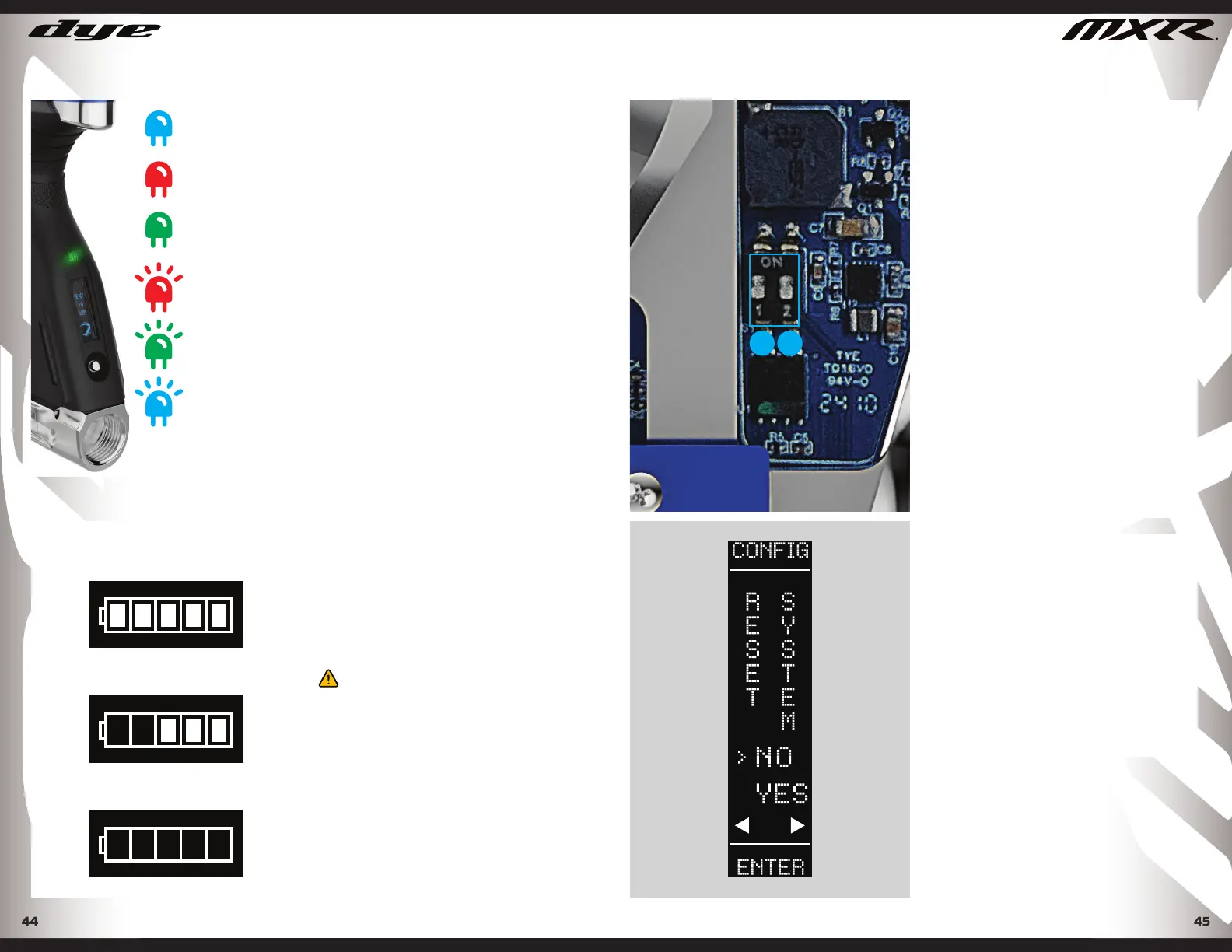
SOLID BLUE:
Boot Sequence
SOLID RED:
Breach is Clear
SOLID GREEN:
Ball in Breech
BLINKING RED:
Eyes Off
Eye Failure
BLINKING BLUE:
Low Battery
LED LIGHT COLOR INDEX
The LED light provides feedback for
the anti-chop eye system.
To get the best performance out of
your MXR it is recommended that
you use a motorized loader system.
Preferably the Rotor R2 Loader.
Blue: Boot sequence
Red: Breech is clear, no ball (eyes on)
Green: Ball in breech, ready to fi re
(eyes on)
Blinking Red: Eyes are off
Blinking Green: Eye failure
Blinking Blue: Low Battery
LED COLOR INDEX
100% Battery
60% Battery
0% Battery
BATTERY LEVEL INDICATOR
LOW BATTERY
When the battery level drops below
30% the LED light will fl ash Blue.
When the low battery alert fl ashes,
the battery should be replaced as
soon as possible to prevent improper
function.
WARNING!
A LOW BATTERY WILL NOT BE ABLE TO
POWER BOTH THE ACE EYE AND THE
TRIGGER SWITCH, CAUSING ACE EYE
FAILURE. IF THE BATTERY IS LOW, IT MAY
NOT BE ABLE TO POWER THE SOLENOID
CORRECTLY. THIS WILL AFFECT THE
MXR’S VELOCITY, CAUSING IT TO BECOME
INCONSISTENT AND/OR LOW.
DYEPAINTBALL.COM
DIP SWITCH SETTINGS
To change the dip switch settings, open the
right side of the grip. Once the grip is open,
locate the dip switches on the main board.
DIP SWITCH 1 - TOURNAMENT LOCK - View
the system check screen to see if the lock
is engaged. The padlock icon will display
as locked or unlocked. To engage the
tournament lock: slide #1 switch into the ON
position. To unlock: slide switch #1 into the
OFF position.
When the tournament lock is engaged,
settings that could affect the gun’s
performance will not be able to be adjusted
until the tournament lock is turned off.
DIP SWITCH 2 - RECHARGEABLE BATTERY
PROTECTION MODE - For players wishing
to use rechargeable batteries, the MOS
system provides voltage protection
to prevent damage to the batteries
by depleting them beyond a minimum
threshold. To activate the rechargeable
battery protection mode: slide switch #2
into the ON position. For non-rechargeable,
standard batteries: slide switch #2 into the
OFF position.
SWITCH SETTINGS
2
1
TOURNAMENT LOCK
To view the if the tournament lock is
engaged or not, tap the joystick once to
the left. This will prompt System Check
screen #1 to be displayed. On this screen
you will see the Tournament Lock padlock
Icon either locked or unlocked.
ELECTRONICS
DYEPAINTBALL.COM


 To Next Page