26 27
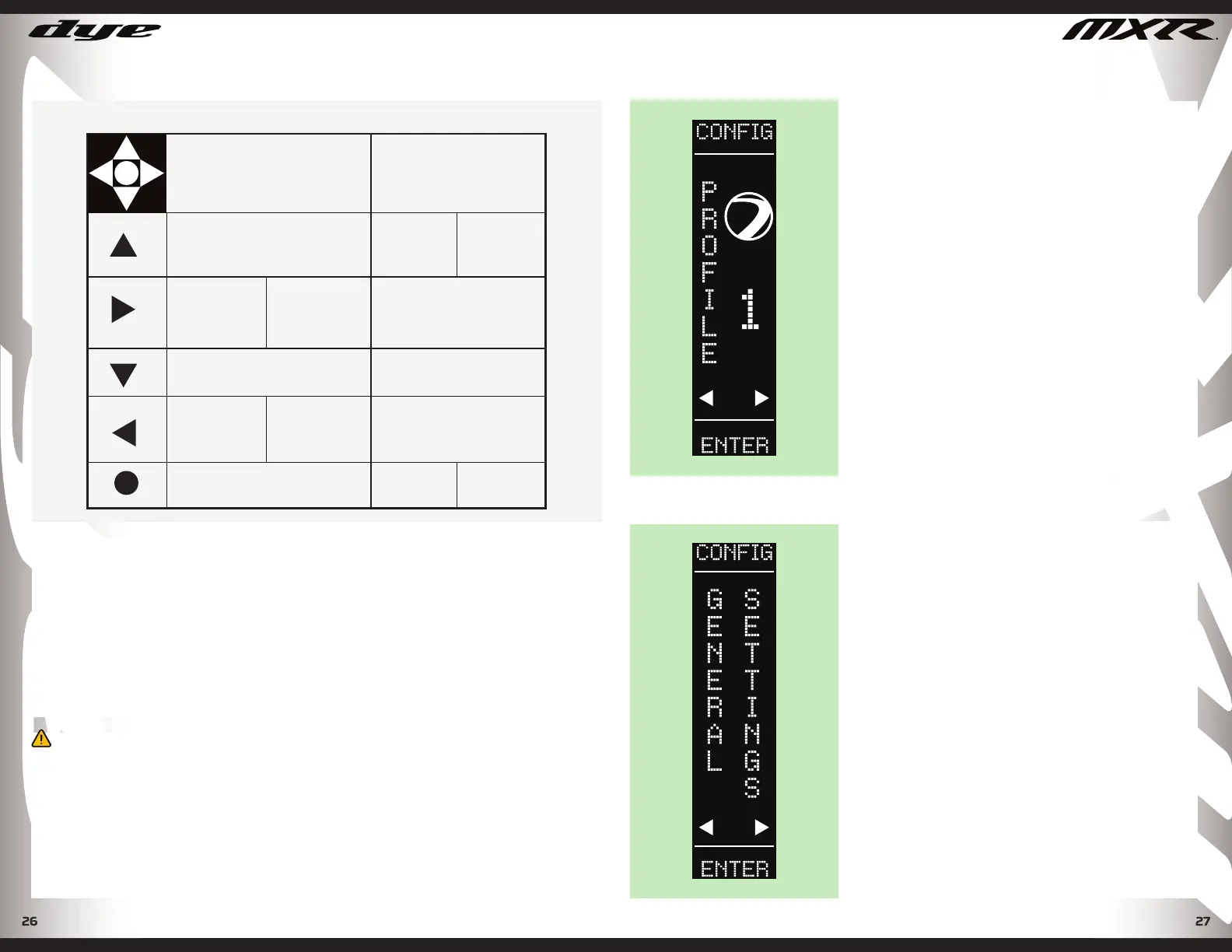
5-WAY JOYSTICK CONTROL INDEX
PLAY MODE
SETTINGS
ADJUSTMENT MENUS
1
3
4
ENTER CONFIGURATION
MODE (HOLD 2 SEC)
VALUE UP
(TAP)
GAME TIMER
START/STOP
(TAP)
GAME TIMER
RESET
(HOLD 2 SEC)
SCROLL RIGHT
THROUGH MENU
(TAP)
EYES ON/OFF
(HOLD 2 SEC)
VALUE DOWN
(TAP)
SYSTEMS CHECK
(TAP)
SHOT COUNT
RESET
(HOLD 2 SEC)
SCROLL LEFT
THROUGH MENU
(TAP)
POWER ON - HOLD 1 SEC.
OFF - HOLD 1 SEC.
SELECT
(TAP)
SAVE VALUE
(TAP)
EXIT
(HOLD 2 SEC)
5
5
1
3
4 2
2
MOS - METHOD OPERATING SYSTEM
The MXR is powered by DYE’s Method Operating System. The MOS gives
the operator unrestricted access to precision tuning, and unsurpassed
performance. The 5-way Joystick control and high contrast OLED display
screen provide an intuitive user interface. The optimized MOS programming
logic ensures lightning fast response time, long battery life, precision
tuning, and dual player profi les to store your exact playing specifi cations.
Communication between frame and body is facilitated through the Freewire
connector pins. Press fi t pins ensure a positive connection between
performance driving hardware and the MCU. DYE Freewire connector pins
eliminate awkward wire routing, and dramatically improving serviceability.
METHOD OS (MOS)
WARNING!
• THE MXR IS NOT WATER RESISTANT. EXCESS MOISTURE WILL CAUSE DAMAGE TO
ELECTRONIC PARTS.
• KEEP THE BOARD AND ALL ELECTRICAL COMPONENTS CLEAN OF DIRT, PAINT, AND
MOISTURE.
• TO CLEAN THE BOARD, USE CANNED AIR. IF A MORE AGGRESSIVE CLEANING METHOD
IS NEEDED, LIGHTLY SCRUB THE COMPONENTS WITH A SOFT, DRY BRUSH. HEAVY
SCRUBBING WILL DAMAGE THE BOARD.
DYEPAINTBALL.COM
METHOD OS (MOS)
MENU SELECTIONS
PROFILE SELECTION
To enter into Profi le programming toggle and
hold the joystick Up for 2 seconds. This will
take you to the Profi le Selection menu. Scroll
left or right to move through menu options.
Press the center of the joystick to select.
There are 2 fully adjustable profi les and 1
locked Factory default profi le.
Once you have selected your desired profi le,
toggle the joystick up and hold the joystick in
this position to return to Play Mode screen, or
press the CENTER of the joystick to enter into
the Settings Adjustment menu.
PROFILE SETTINGS
Profi le settings will affect the MXR’s shooting
performance. These settings are not
adjustable when the tournament lock is on.
GENERAL SETTINGS
Data is collected and reviewable through the
general settings menu. You can analyze data,
display controls, and system parameters.. Scroll
LEFT OR RIGHT to display menu options. Press
the CENTER of the joystick to select the displayed
menu option. Once selected, the setting’s values
can be adjusted using the joystick. Once the
desired value or setting has been entered, press
the CENTER of the joystick to save the value, and
continue scrolling through menu options.
NOTE: To exit scroll until the “exit” screen appears
and then press the CENTER of the joystick.
NOTE: At any point you can also toggle and hold the
joystick UP to exit to the profi le selection screen.
DYEPAINTBALL.COM


 To Next Page
 Loading...