Maintenance, 10h
ICC1200C-1EN3.pdf2012-05-16
Scrapers
Check - Adjustment
1
2
3
4
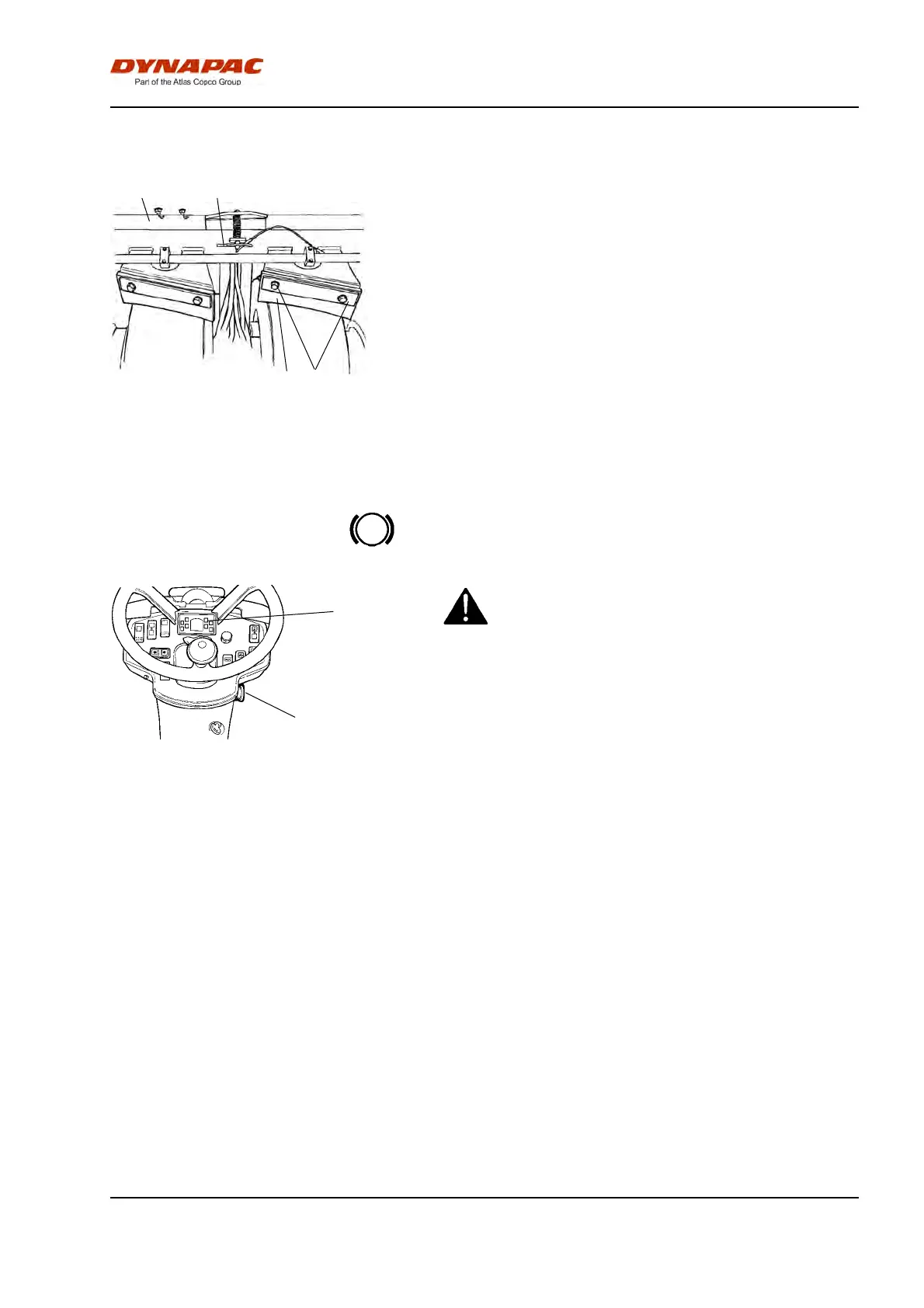
Fig. Wheel scrapers
1. Scraper
2. Scraper blade
3. Lock pin
4. Adjusting screw
Make sure that the scraper (1) is flush with the tire
when compacting asphalt.
The scrapers must hang clear of the tires during
transport. Lift up the scraper beam (2) by moving up
the cotter (3) to the uppermost hole.
The angle of the scraper to the tire can be adjusted by
releasing the screws (4) to adjust the scraper, and
then tightening the screws.
Brakes - Check
Figure. Instrument panel
3. Emergency stop
25. Parking brake lamp
3
25
Check operation of the brakes as follows:Check operation of the brakes as follows:
Run the roller very slowly forward. Hold the steering
wheel firmly and brace yourself for a sudden stop.
Press in the emergency stop button (3). The roller will
stop abruptly and the engine will switch off.
After testing the brakes, set the forward/reverse lever
in neutral.
Pull out the emergency stop button (3). Start the
engine.
The roller is now ready for operation.
Refer also to the section in the manual on operation.
73



 To Next Page