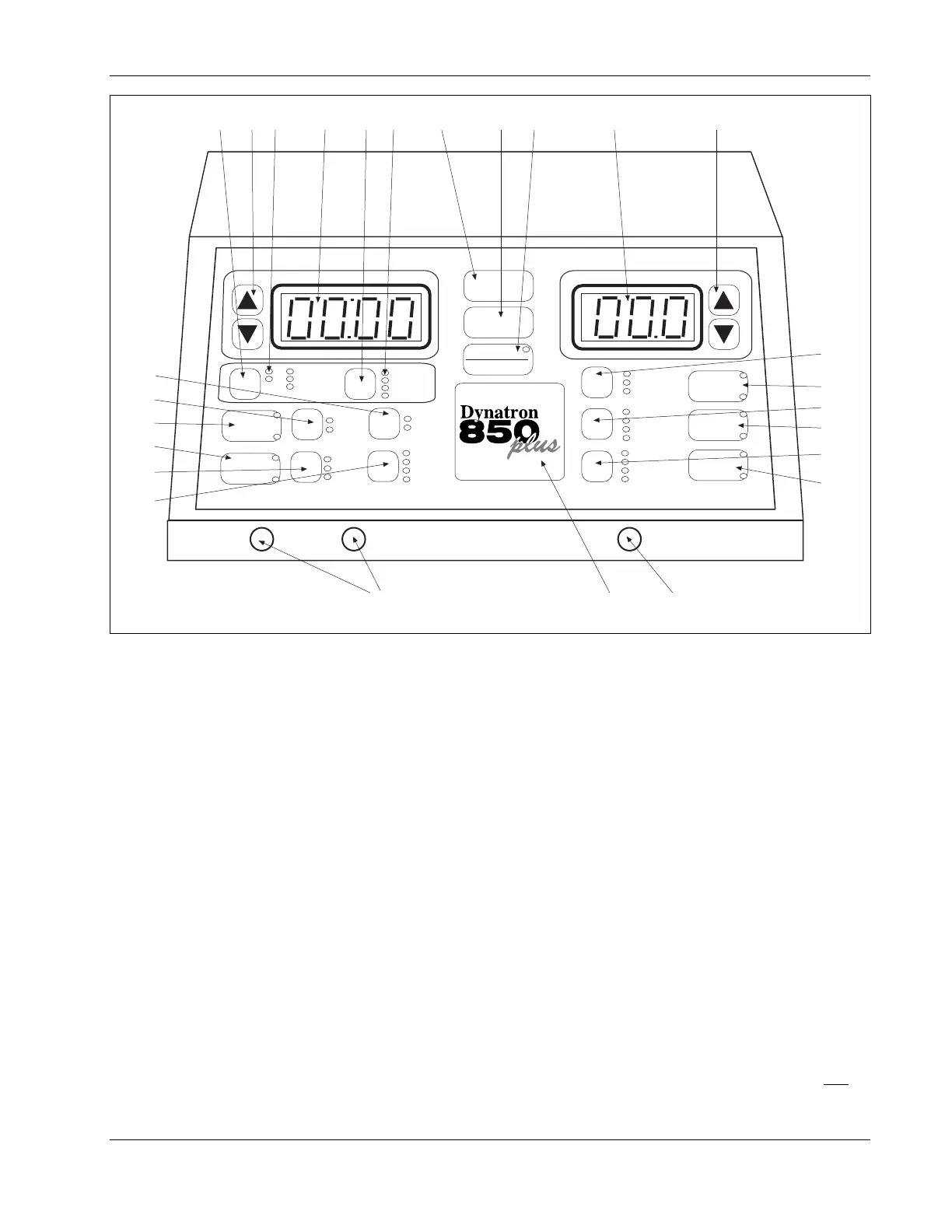
Dynatron® 850plus & 550plus
Installation & Features
7
POWER-INTENSITY
TIME
START
STOP
HI VOLT
+
-
PREMOD
IFC
BIPHASIC
CO-CONT
NORMAL
RECIP
.5 RAMP
1.0 RAMP
1.5 RAMP
2.0 RAMP
HIGH
LOW
TARGET
SWEEP
CH 1 CH 2
MICRO
+
-
RUSSIAN
COMBO
SOUND
1 MHz
2 MHz
3 MHz
10/10
10/30
10/50
CONT
10%
20%
50%
CONT
HV
TARGET
PAUSE
WIDTH
RATE
FREQ
TIME
SOUND
MICRO
HV
2
1
FUNCTION
64
758
9
123 10 11
14
13
12
16
17
18
21
19
22
20
23
24
261525
CH
Dynatron 850plus Control Panel
Dynatron 850plus and Dynatron 550plus Physical Features
Before operating the Dynatron 850plus or Dynatron 550plus, acquaint yourself with the
control panel by reviewing the illustrations and descriptions on this and the following pages.
The numbered features in the diagrams correspond to the numbered descriptions. Before
administering treatment to a patient, read the sections later in this manual that provide
specific instructions for performing treatments, discussions of each modality, definitions of
the available options, along with contraindications, warnings, and precautions for all
modalities.
Note that some options use “toggle” keys for making selections. More specific instructions
for using toggle keys are provided later in this section.
General Selections:
1. START: Pressing this key starts the treatment timer, and treatment proceeds as set up.
2. STOP: Pressing this key during a treatment IMMEDIATELY stops the output and sets
the treatment time to zero for all modalities. Treatments may also be stopped by pressing
the button on the patient REMOTE STOP cable. You can also stop a treatment for one
treatment only by pressing and holding the Function








 To Next Page