11
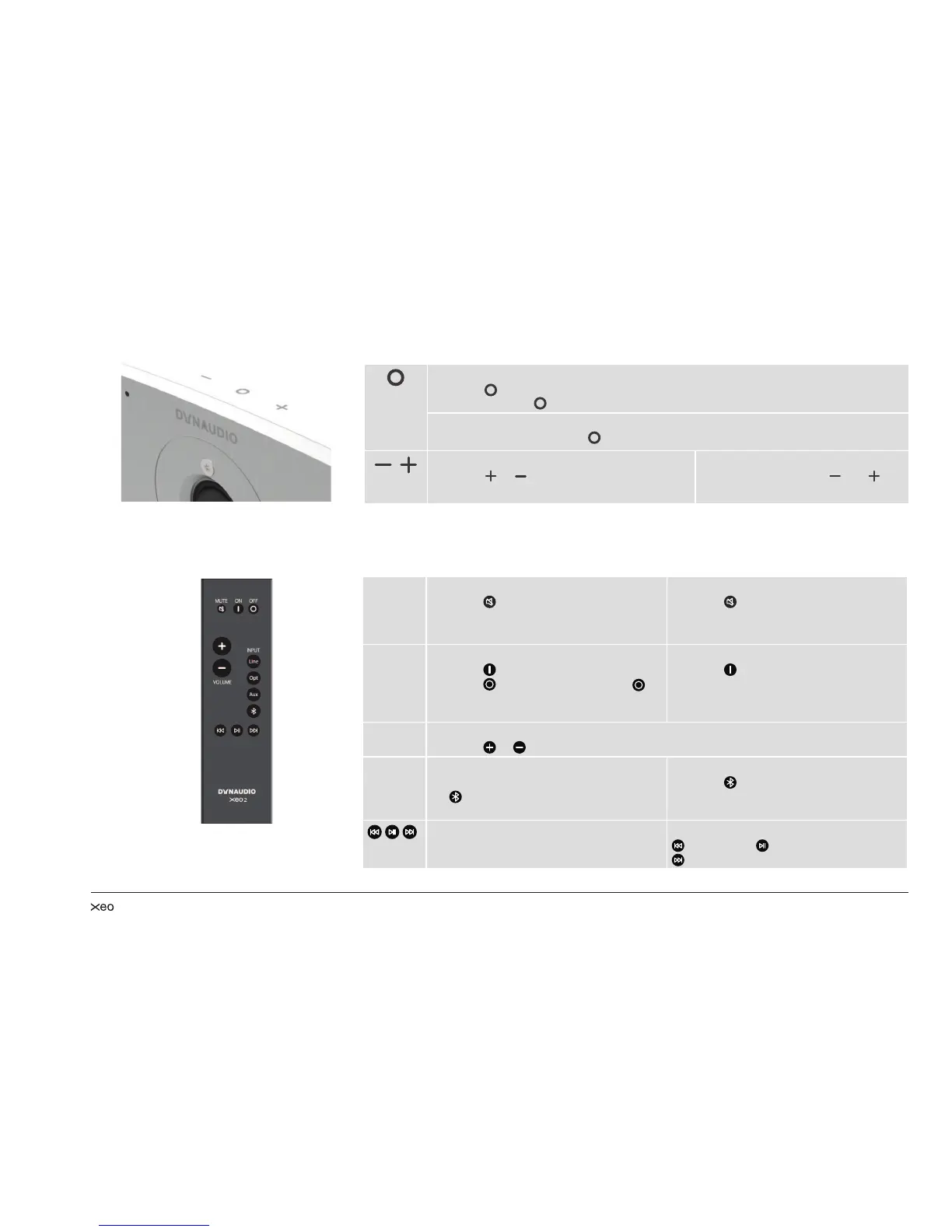
Buttons on top of the cabinet
Speaker on/off
► Press
to switch on the speakers. The Xeo 2 will scan the inputs for a signal.
► Press and hold to switch off the speakers.
Input selection
► When switched on, press
to jump to another input.
Volume control
► Press
or to raise or lower the volume
level. Press and hold for faster adjustment.
Bluetooth pairing
► Press and hold both and to
start pairing (see page 13).
Remote control
Commands will always apply to both of the speakers.
MUTE Muting the speakers
► Press
to mute or unmute the
speakers.
Fixing the volume
► Press for at least 2 seconds to set
a high volume for the speakers (see
page 16).
ON/OFF Speaker on/off
► Press
to switch on the speakers.
► Press for standby mode. Press for
at least 5 seconds to put the speakers
in sleep mode.
Reset
► Press for at least 5 seconds to reset
the speakers to the factory settings.
VOLUME Volume control
► Press
or to raise or lower the volume level.
INPUT Signal source
► Press to select a signal source.
selects a Bluetooth device or
Hub/Connect.
Bluetooth pairing
► Press for at least 5 seconds to enter
pairing mode.
Controls
► Press to control most Bluetooth 4.1
compliant devices:
= backward, = play or pause,
= forward



 To Next Page