EN
DYON LIVE
10
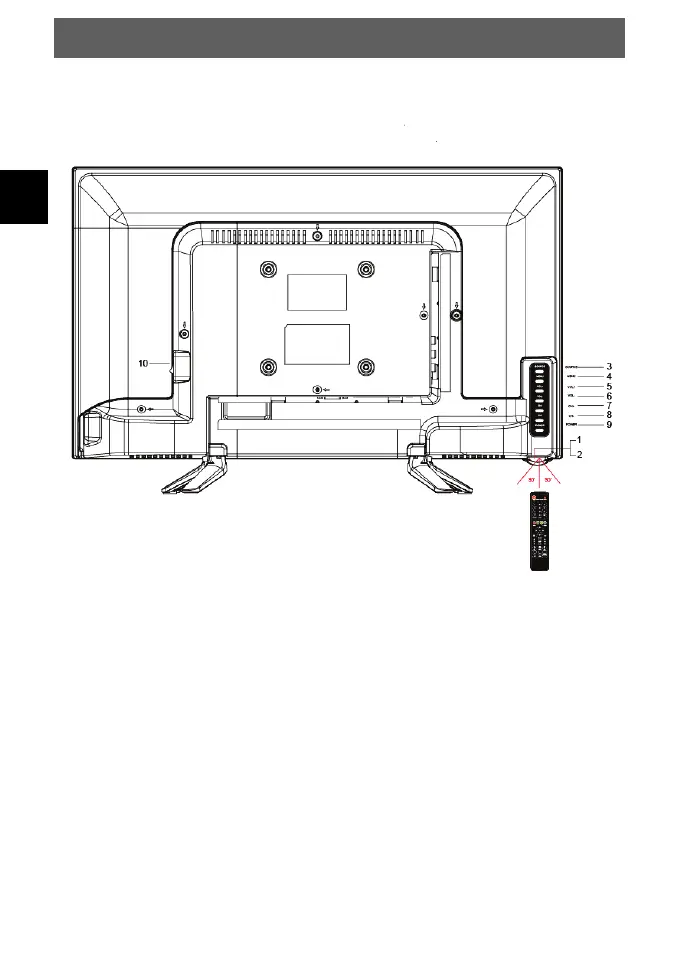
4 Front and Rear Panel Illustration
4.1 Keyboard
1. Status indicator Green = Power on
Red = Standby
2. Sensor Remote control sensor
3. SOURCE Display the input source menu you selected
4. MENU
Display main menu
5. VOL+ Increase sound level
Move to the left in menu
6. VOL- Decrease sound level
Move to the right in menu
7. CH+ In TV mode channel up
Move up in menu
8. CH- In TV mode channel down
Move down in menu
9. POWER Switch from or to Standby



 To Next Page