EN
DYON LIVE
26
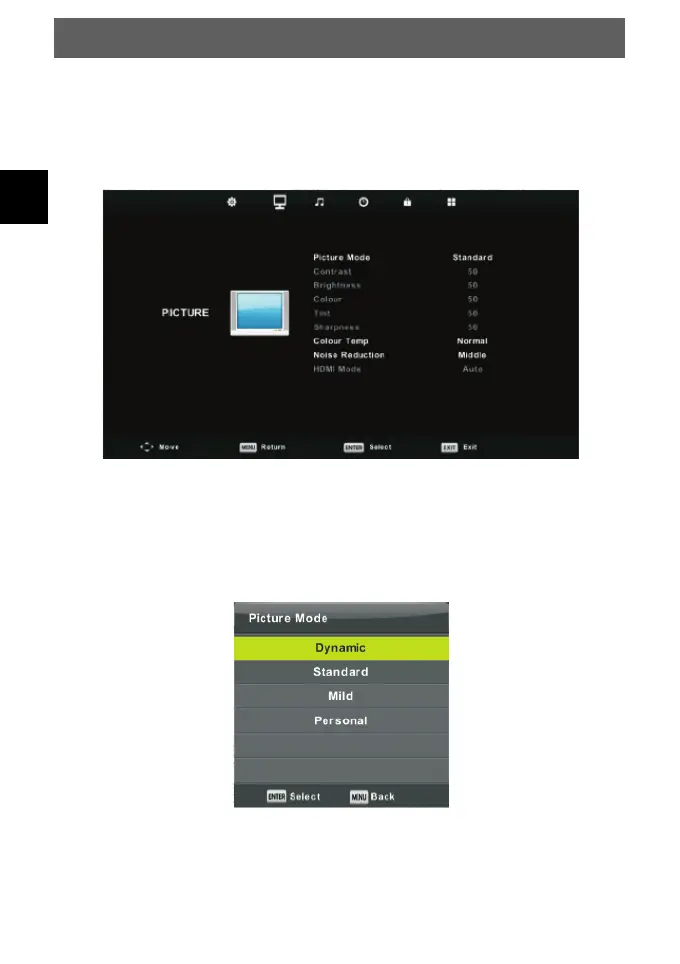
6.1.2 PICTURE MENU
The second item of the MENU is PICTURE MENU. You can adjust picture effect here,
such as contrast, brightness, etc.
Press MENU botton to display the main menu.
Press ◄/► button to select PICTURE in the main menu.
Picture Mode
Press ▼/▲ button to select Picture Mode, then press OK button to enter sub-menu.
You can change the value of contrast, brightness, colour, sharpness and tint when the
picture is in Personal mode.
TIPS: You can press PMODE button to change the Picture Mode directly.
Contrast/ Brightness/ Colour/ Tint/ Sharpness
Press ▼/▲ button to select option, then press ◄/► button to adjust.



 To Next Page