EN
DYON LIVE
42
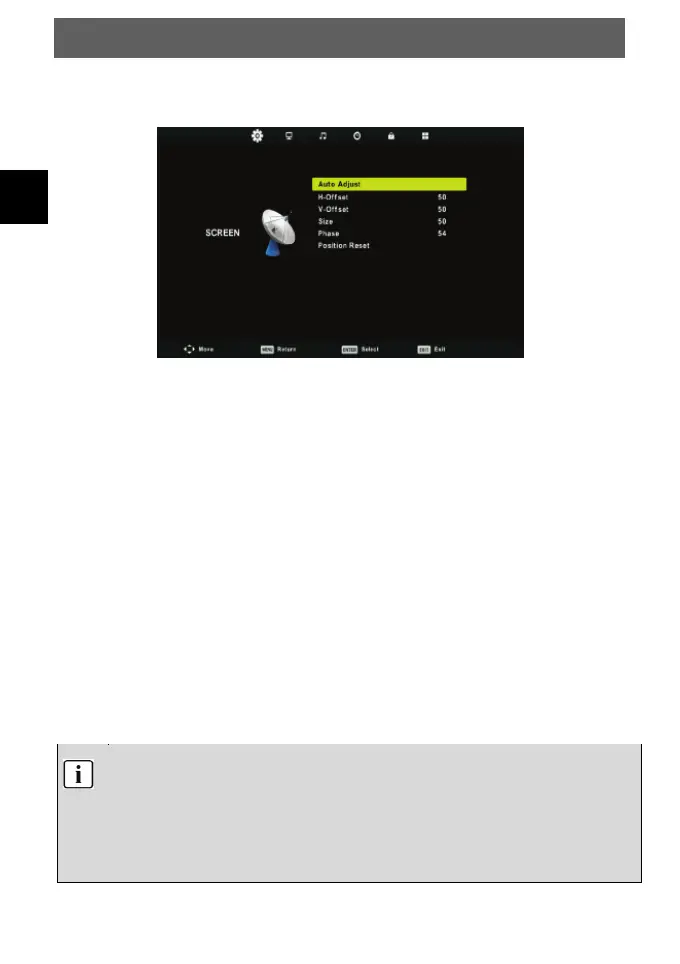
6.1.7 Screen Menu
Press MENU button to display the main menu.
Press ◄/► button to select SCREEN in the main menu.
1. Press ▼/▲ button to select the option that you want to adjust in the SCREEN menu.
2. Press Enter button to adjust.
3. After finishing your adjustment, Press Enter button to save and return to the previous
menu.
Auto Adjust
Press Enter button to start adjusting H-Offset/V-Offset/Size/Phase automatically.
H-Offset
Adjust the horizontal position of the picture.
Press ▼/▲ button to select H-Offset, then press Enter button to enter sub-menu.
V-Offset
Adjust the horizontal position of the picture.
Press ▼/▲ button to select V-Offset, then press Enter button to enter sub-menu.
Size
Adjust the display size.
Press ▼/▲ button to select Size, then press Enter button to enter sub-menu.
Phase
Adjust the horizontal interfering lines.
Press ▼/▲ button to select Phase, then press Enter button to enter sub-menu.
Position Reset
Press ▼/▲ button to select Position Reset, then press Enter button to enter.
1. Noise Reduction in PICTURE option is invalid.
2. AD Swith in SOUND option is invalid.
3. TIME menu and description are the same as that for Air mode.
4. Block Program and Parental Guidance in LOCK option is invalid.
5. Audio Languages, Subtitle Language, Hearing Impaired and PVR File System in
SETUP option is invalid.
6. PC mode has no CHANNEL menu.



 To Next Page