EN
DYON LIVE
13
4.3 CI/CI+ Slot
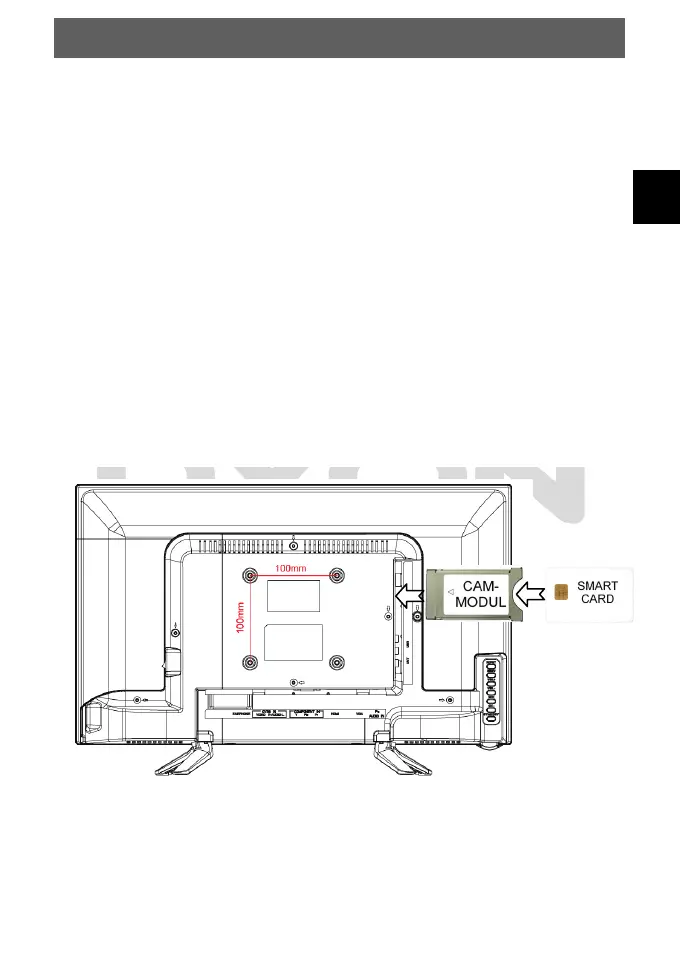
This device is equipped with a CI+ slot for use with cam modules and smart cards which
allow for the viewing of encrypted Pay-TV channels.
The corresponding modules may be purchased from the Pay-TV provider or specialized
dealer.
Installation
1. Disconnect the TV set from power.
2. Before inserting the module into the device, insure that the smart card has been
properly installed into the module (). Pay close attention to the direction when
inserting.
The printing on the module and the chip of the smart card must be on top.
3. Insert the Module with inserted smart card with the printing of the module facing
backwards ().
Insert the module carefully into the slot of the device until a little resistance is felt.
Using a little pressure, carefully press the module into the slot until it sits firmly.
4. Reconnect the power source.
Remove the module
1. Disconnect the TV set from power.
2. To take the module out carefully.



 To Next Page