EN
DYON LIVE
41
Blue Screen
Press ▼/▲ button to select Blue Screen, then press Enter button to select On or Off.
First Time Installation
Press ▼/▲ button to select First time installation, then press Enter button to enter.
Reset
Press ▼/▲ button to select Reset, then press Enter button to enter sub-menu.
Software Update (USB)
Press ▼/▲ button to select Software Update (USB), plug your USB device in the USB slot,
then press Enter button to update the right software.
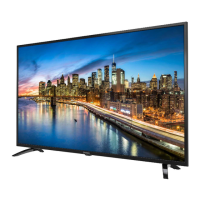
HDMI CEC
Press ▼/▲ button to select HDMI CEC, then press Enter button to enter sub-menu.
HDMI CEC Press ◄/► button to turn the HDMI CEC On or Off.
HDMI ARC Press ◄/► button to turn the HDMI ARC On or Off.
Auto Standby Press ◄/► button to turn the Auto Standby On or Off.
Device List Press Enter button to open the main menu of device.



 To Next Page