EN
DYON LIVE
21
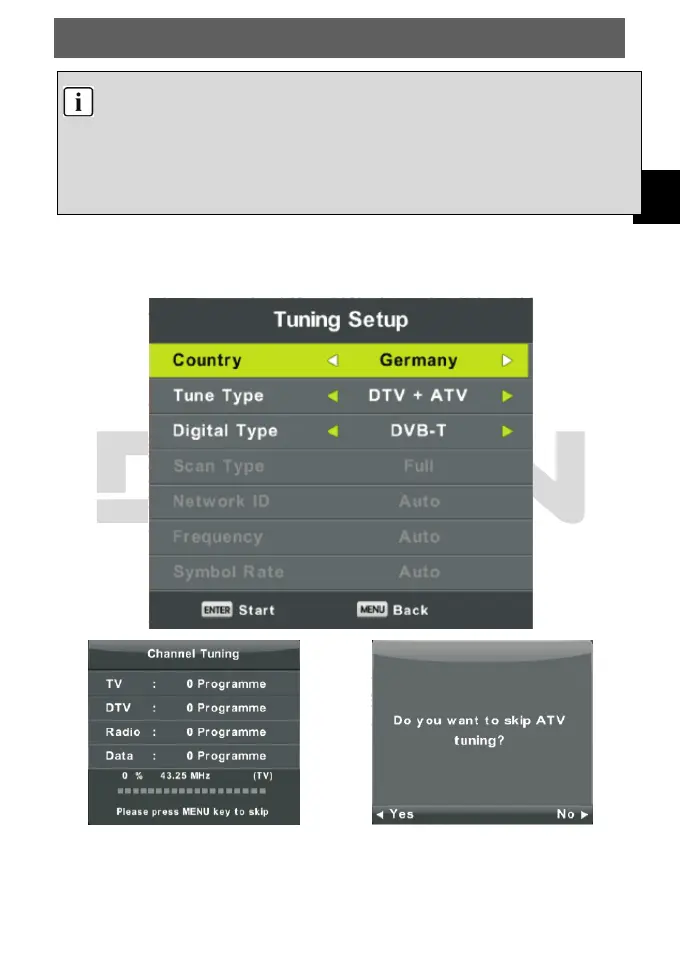
All the channels including ATV, DTV and DTV Radio can be tuning by one time, if
the Tune Type is DTV+ATV .
All the stored channels will be deleted and overwritten after auto tuning .
After auto tuning , the channel will skip to the first DTV channel.
If there is no reception for more than 15 min, the TV will automatically
switch to standby mode.
Auto Tuning
Press ▲/▼ button to select Auto Tuning, then press Enter/► button to the enter.



 To Next Page