conguring the machine 15
Presets
To maintain channel settings for your dierent instruments, they
can be saved as presets once they are congured. Presets are
based on a per channel basis, not as a whole machine congura-
tion.
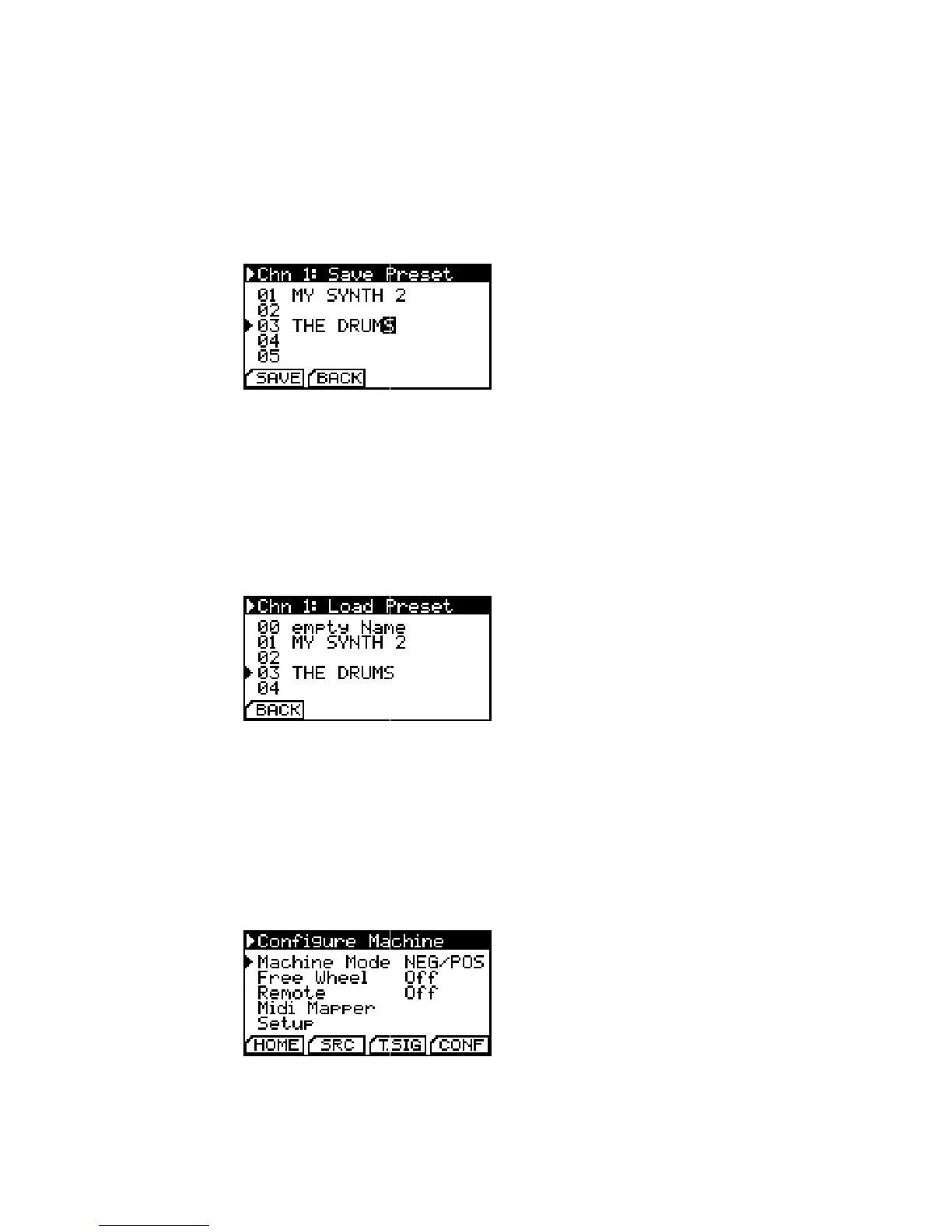
Save Presets. Numbers and characters
are accessible in an innite loop.
Simply select the virtual SAVE button on the Channel Setup
page, choose a preset number and name them. 30 preset cells are
available.
Presets are loaded by selecting the LOAD button. Choose the
preset you need and click the encoder to load it. Presets containing
LFO settings can only be loaded on Channel 1.
Load Presets. ’empty Name’ loads a
factory default preset.
Advanced Settings
By hitting the virtual CONF button on the homescreen, you can
congure some advanced settings which aect the multiclock’s
general behaviour.
Advanced Settings.
With Machine Mode you can choose between NEG/POS and POS. Please note: the Offset Parameter is
saved seperatly in the channel presets
for both machine modes!


 To Next Page