Using MIDI In
MIDI Mapper
Due to the fact that the multiclock features more than one MIDI Out,
there is a MIDI Mapper to route incoming messages on the MIDI In
conveniently to the outputs.
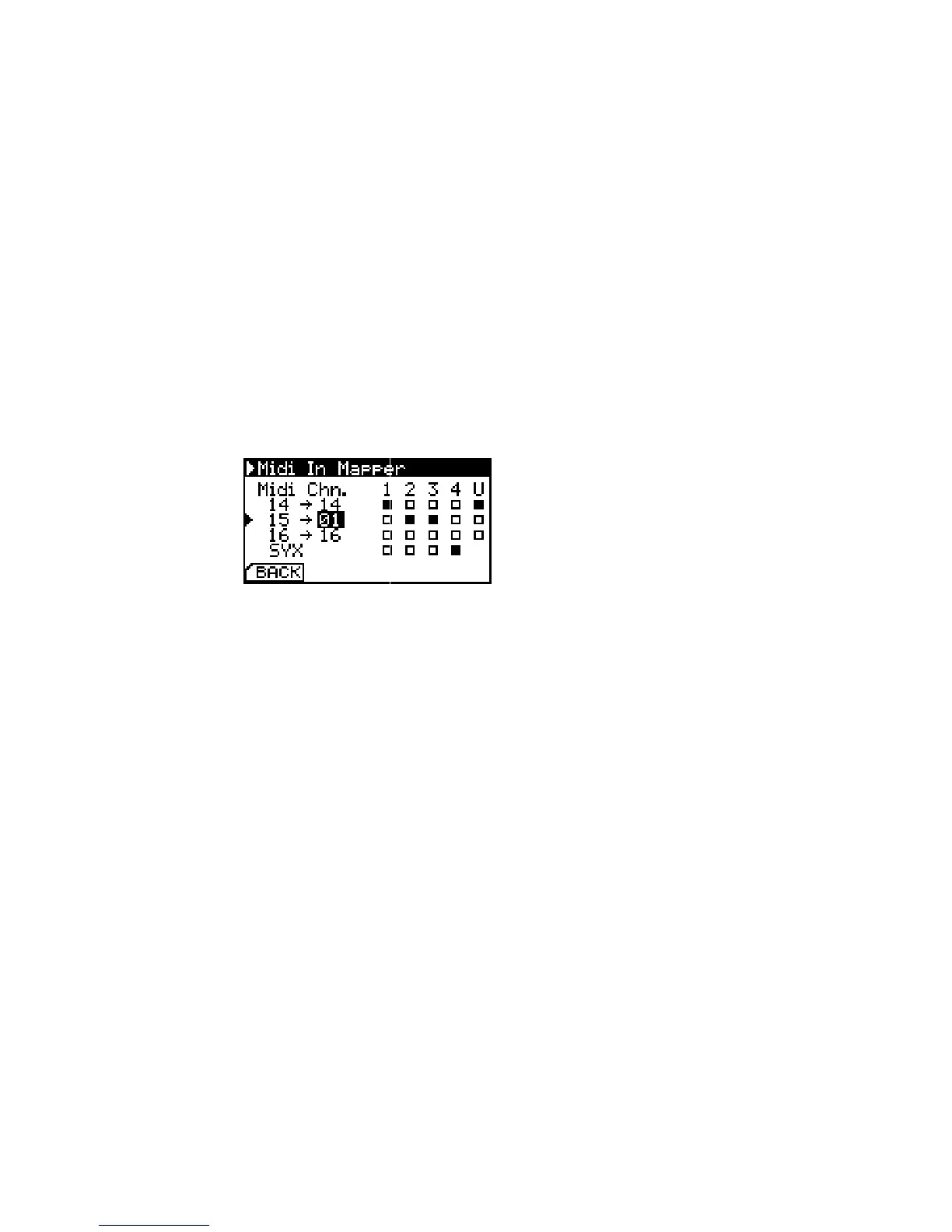
MIDI In Mapper. You can both replace
MIDI Channel numbers and select
output ports.
The MIDI Mapper is organised from the left to the right: All 16
incoming MIDI Channels are available in the leftmost column. In
the column next to it, you can substitute an incoming MIDI Channel
number with another outgoing MIDI Channel number. The matrix
on the right holds items for all physical MIDI Out ports on the back
of the multiclock (1,2,3,4), as well as USB MIDI (U). Just select all
desired outputs that should receive the respective incoming MIDI
channel.
All supported MIDI messages can be found in section 6.1 (p. 20).
MIDI Sysex commands don’t contain a channel number and can
thus only be assigned to an output port.


 To Next Page