Installation, Operation and Parts Manual
EE-6435B .WF
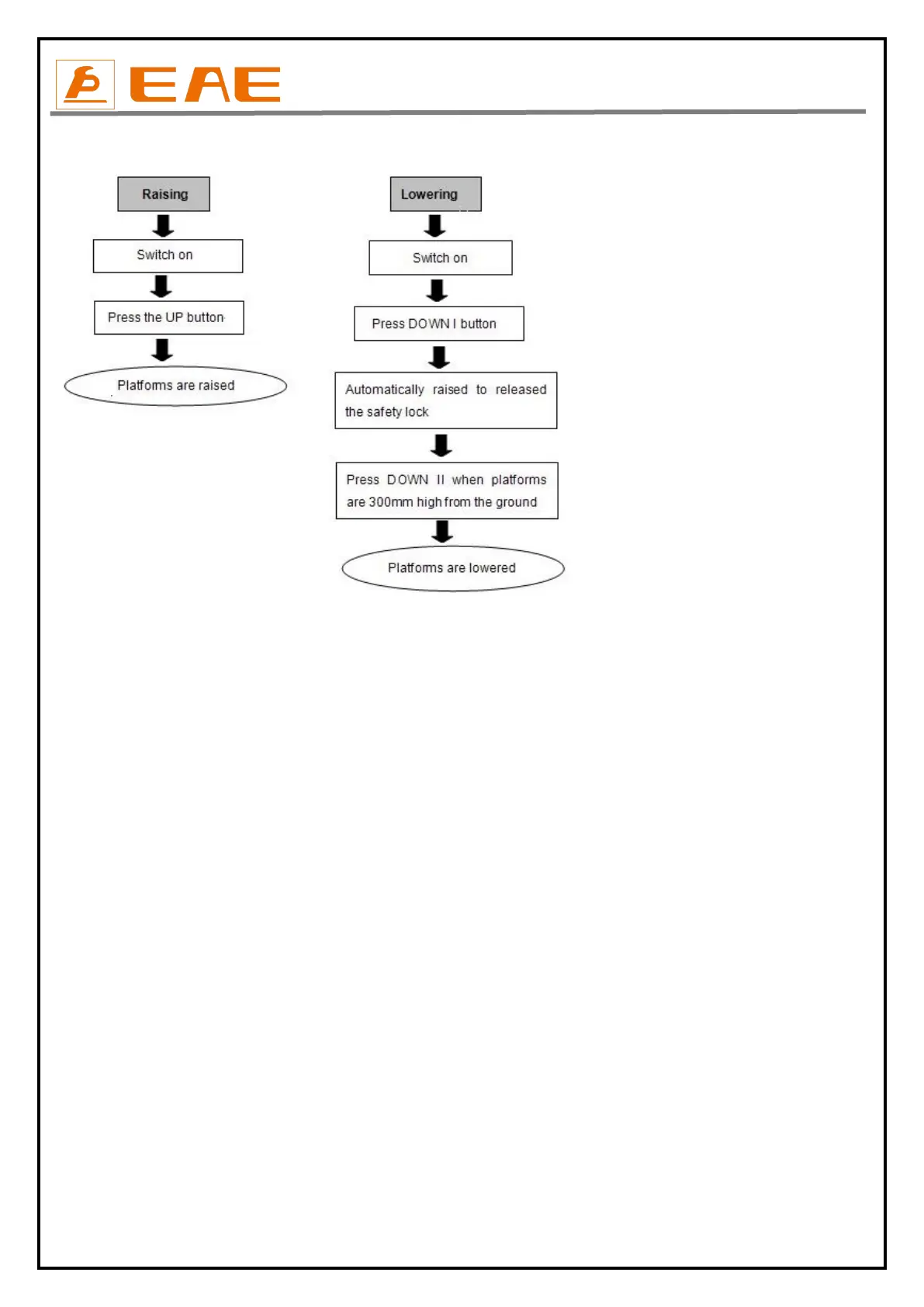
5.3 Flow chart for operation
5.4 Operation instructions
5.4.1 Use the main lifting platform
Turn the selection switch to the state of “LIFT”
Raise the lift
1. Turn on the power switch.
2. Park the vehicle on the platforms to ensure its gravity is positioned midway of the platforms.
3. Press the UP button until platforms rise to the desired height.
4. Before perform any service around or under the vehicle, operators must press the safety lock button to ensure the mechanical safety lock is
fully engaged, turn off the power so as to avoid any wrong operation done by irrelevant personnel and check again the stability of the vehicle.
Lower the lift
1. Switch on. When the power indicating light is on, press the DOWN I.
2. When the platforms stop lowering, press DOWN II and the platform will continue lowering to the lowest position and alarm buzz will be
heard.
3. Drive away the vehicle when platforms have lowered to the lowest position.
5.4.2 Use the Secondary lift
Turn the selection switch to the state of “JACK”
Raise the Secondary lift
1. Place rubber pads under the pick-up points of vehicle. When it is necessary to use the platform extensions, press “UP” button to raise
platforms of the jack a bit over the platforms of main lift and pull out the extensions.
2. Press “UP” button and check again if the rubber pads are directly under the pick-up points of the vehicle, when they are very close to the
vehicle’s chassis.
3. Keep on pressing “UP” button until reaches to the desired height. Full rise of the jack is 450mm over the platform of main lift.


 To Next Page