8 | P a g e
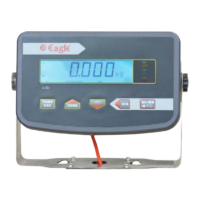
1.5.5 Keys and Key Press Description
1.5.6 Two Keys Pressing Together Functions:
1) Func/Esc + M+/MR - Show the total accumulated weight.
(This will work when the Accumulation mode in ON)
2) Func/Esc + Tare - Show the total accumulated times
(This will work when the Accumulation mode in ON)
3) Func/Esc + Zero - Clear accumulation memory (including weight and
accumulated times) and also to end the accumulation print (if print format
4 is enabled)
Note: -To come out, press ESC key
4) N/G + Tare - This is for unit Conversion (Till you press and hold, it
will show the converted value. At a time, any one conversion is possible
and it works on First come first serve basis)
5) Func/Esc + N/G - Bluetooth name
Note: -To come out, press ESC key
Short press
from home
screen
To enter into
counting
mode
To tare the
weight kept
on the
platform
To toggle
between Net
and Gross if
tare is used
Long Press
from home
screen
To enter into
parameter
settings
To show
the
firmware
version
number
To show the
machine
serial number
(In the 14
segment display it
will show snr)
To show the
month and
year of sale
(In the 14
segment display it
will show sdt)
Short press
when inside
the settings
Long press
during ON
(Count
Down)
To enter into
factory
settings
To show the
month and
year of
production (In
the 14 segment
display it will show
pdt)


 To Next Page