EasyManua.ls Logo

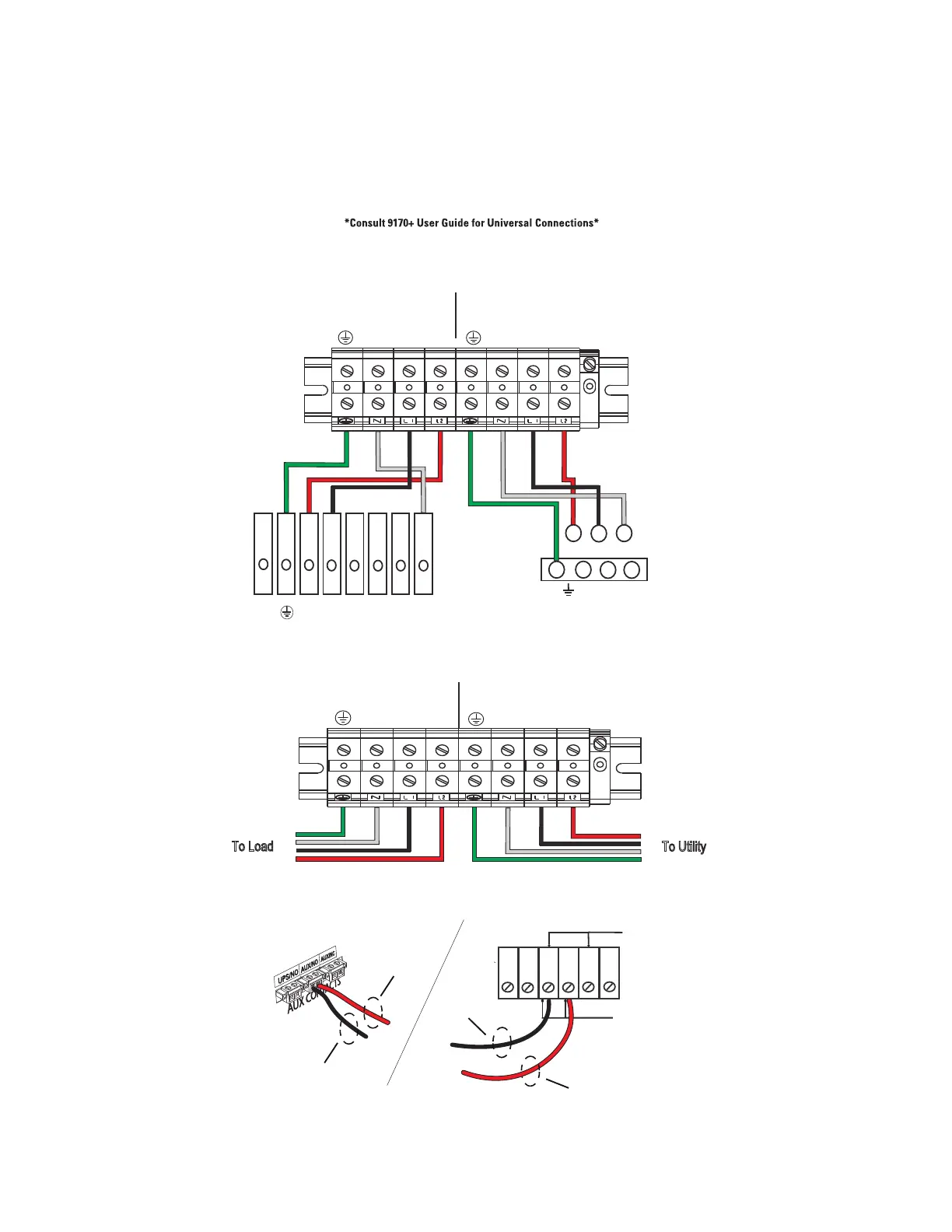
Eaton 9155 - Eaton 9170+ UPS to BPM Connection Diagram

Eaton 9155
28 pages
Print Icon
To Next Page IconTo Next Page
To Previous Page IconTo Previous Page
Loading...
12 User’s Guide P-164000628 P-164000628—Rev 05
33..22 EEaattoonn 99117700++ UUPPSS ttoo BBPPMM CCoonnnneeccttiioonn DDiiaaggrraamm
Figure 12. Eaton 9170+ UPS to BPM Connection Diagram With Signal Inputs
1 2 3 4
5
6
7 8
AC TO
UPS INPUT
AC FROM
UPS OUTPUT
L2 N L1
L2 N L1
1 2 3 4
5
6
7
8
L2
N L1
L2 N L1
AC TO LOADS
CABLES FROM UPS AND AC
INPUT/OUTPUT THROUGH BPM
BOTTOM ACESS PLATE
AC LINE INPUT
To Load
To Utility
+DC
X3
X2
X1
N
-DC
9170+ Output Terminals
3
2
1
9170+ Input Terminals
BPM Signal
Terminals
(Install conduit
over signal wires)
UPS Signal
Terminals
1
2
3
4 5 6
Signal Common
External Bypass
*(short to common when active)
Black Wire
Red Wire
Red Wire
Black Wire
Upper BPM Terminal Block
Lower BPM Terminal Block
Eaton 9170+ UPS to BPM Connection Diagram

Other manuals for Eaton 9155

Related product manuals