16 User’s Guide P-164000628 P-164000628—Rev 05
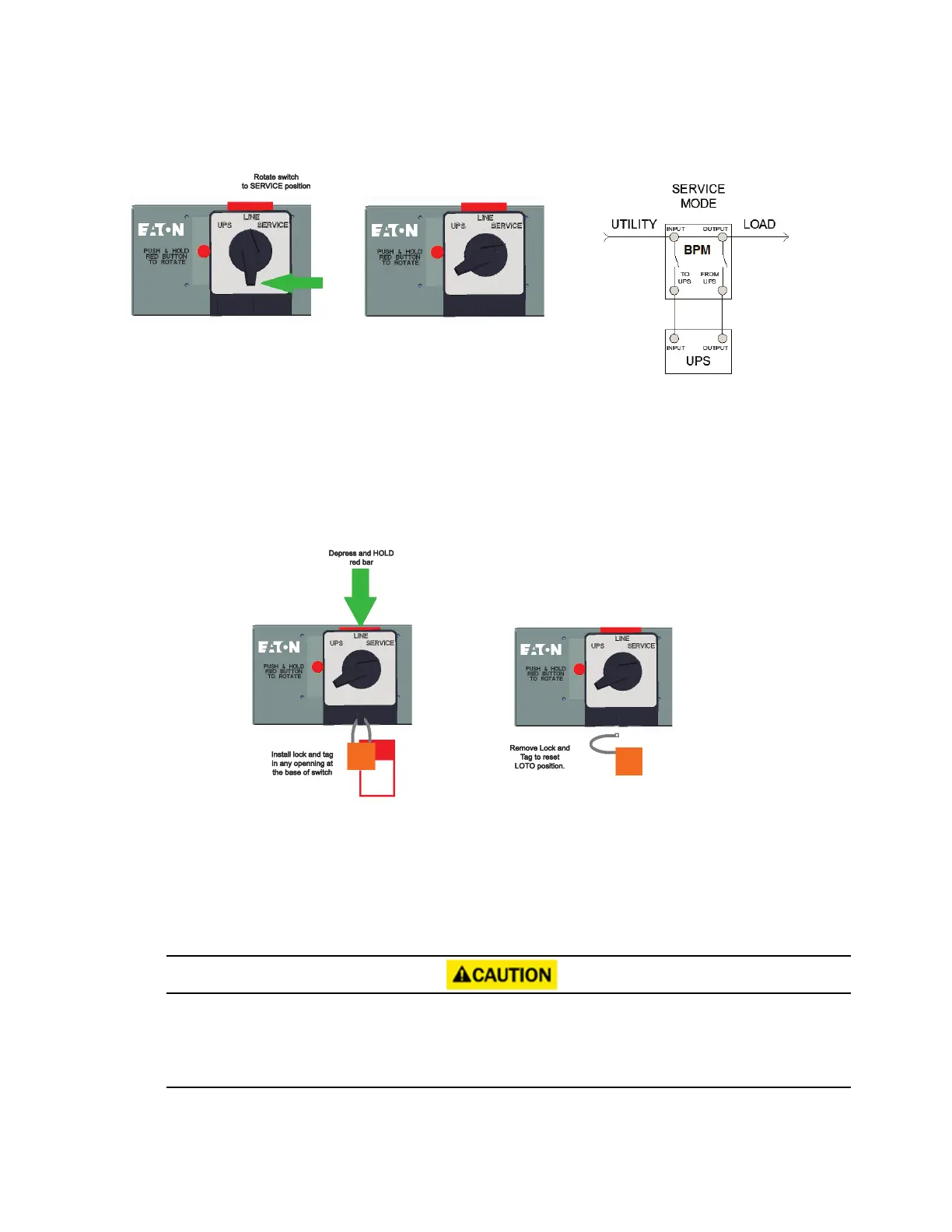
Figure 16. From LINE to SERVICE
44..22 LLoocckk--oouutt//TTaagg--oouutt
The BPM comes with a Lock-out/Tag-out (LOTO) feature to keep the BPM bypass switch locked in SERVICE
mode while qualified service personnel works on the UPS. To use the LOTO feature:
1. Press and hold the red bar (see ).
Figure 17. LOTO Feature
2. Install a lock and tag in any opening at the base of the switch according to LOTO procedures.
3. Remove the lock and tag to reset the LOTO position.
44..33 NNoo BBrreeaakk TTrraannssffeerr ffrroomm SSeerrvviiccee BByyppaassss ttoo UUPPSS MMooddee
After the system has been placed into SERVICE mode, it must be returned to UPS state to resume normal
operation.
It is critical that the following steps are followed to ensure correct and safe operation.
Do not attempt to push the red interlock button or attempt to move the bypass switch handle if the UPS is
operating on battery power.
Refer to the UPS user guide or call the Eaton service help desk for specific BPM to UPS signal functionality.
Lock-out/Tag-out



 To Next Page